IN5312/IN5314 – User’s Manual
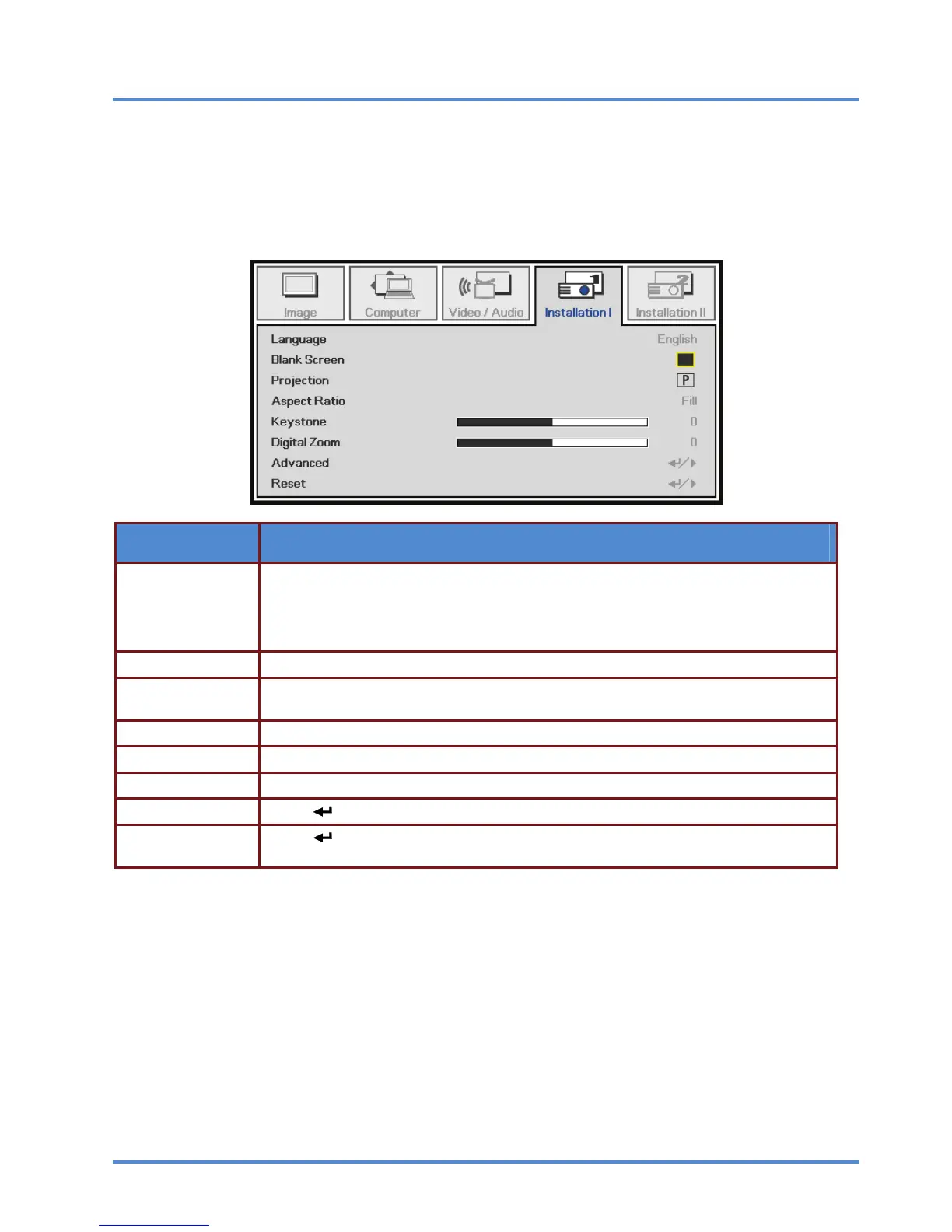
Installation I Menu
Press the MENU button to open the OSD menu. Press the cursor ◄► button to move to the Installa-
tion I menu. Press the cursor ▲▼ button to move up and down in the Installation I menu. Press ◄►
to change setting values.
ITEM DESCRIPTION
Language
Press the cursor ◄► buttons to select a different localized menu.
(Range: English/ Français/ Español/ Deutsch/ Português/ 簡体中文/ 繁體中文/ Itali-
ano/ Svenska/ Nederlands/ Suomi/ Dansk/ Norsk/ Polski/ 한국어/ Türkçe/ Русский/
Bahasa Indonesia/)
Blank Screen Press the cursor ◄► button to select different color to blank the screen.
Projection
Press the cursor ◄► button to choose from four projection methods: Front, Rear,
Ceiling, Rear + Ceiling
Aspect Ratio Press the cursor ◄► button to adjust the video aspect ratio.
Keystone Press the cursor ◄► button to adjust the display keystone.
Digital Zoom Press the cursor ◄► button to adjust the Digital Zoom.
Advanced Press (Enter) / ► to enter the Advanced menu. See Advanced on page 32.
Reset
Press
(Enter) / ► to reset all settings to default values
(expect Language and Security Lock).
– 31 –



 To Next Page