User’s Manual
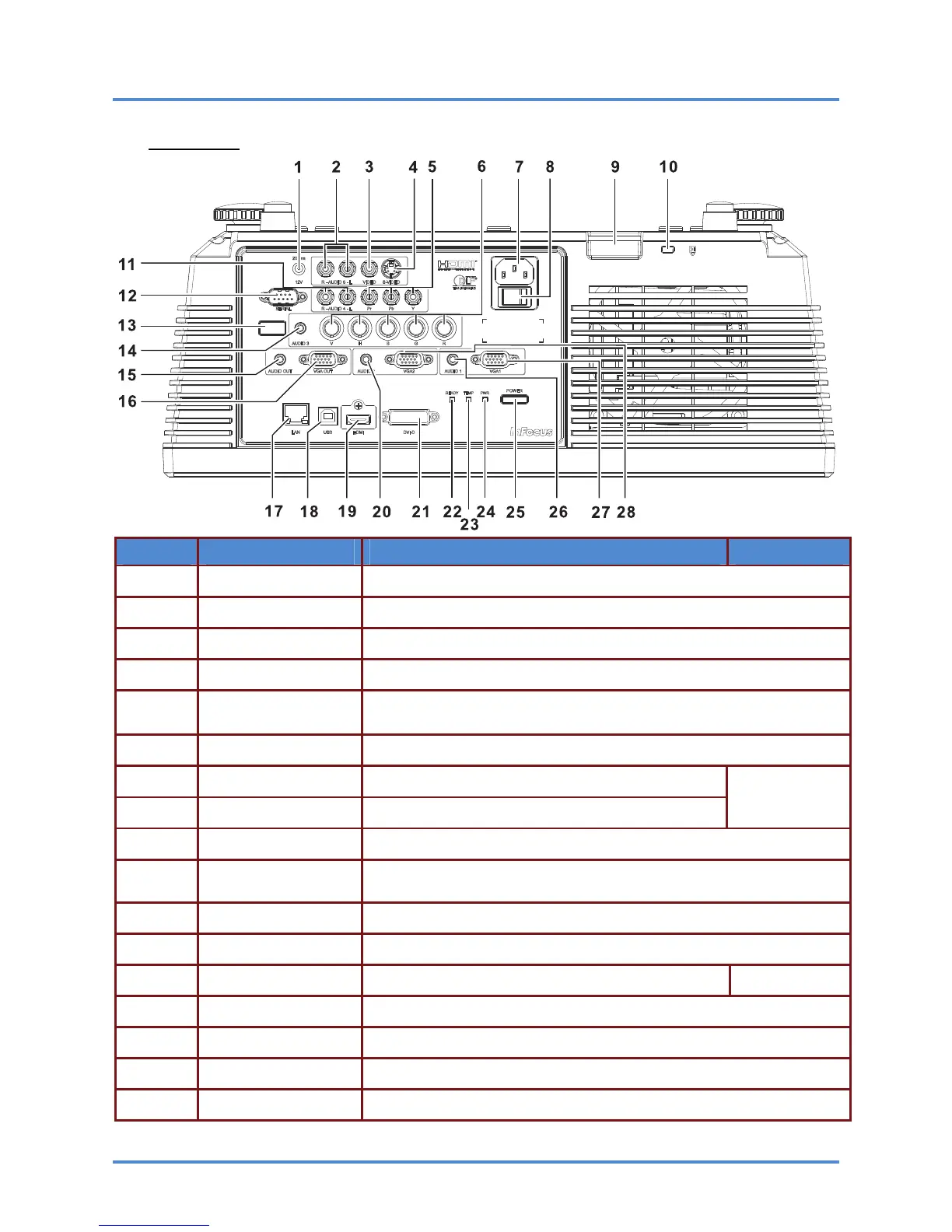
Rear view
ITEM LABEL DESCRIPTION SEE PAGE:
1.
DC 12V TRIGGER Connect a 12V screen trigger (200ma max)
2.
AUDIO 5 (L and R) Connect the AUDIO CABLE from an input device
3.
VIDEO Connect the COMPOSITE CABLE from a video device
4.
S-VIDEO Connect the S-VIDEO CABLE from a video device
5.
YPbPr
Connect the COMPONENT CABLE from a component video enabled
device
6.
BNC Connect the BNC CABLES from a computer or a video enabled device
7.
AC IN Connect the POWER CABLE
8.
Power Switch Connects AC power to the projector
12
9.
Safety Cable Anchor Secure a ceiling mount safety cable to this anchor
10.
Security Lock
Connect a security lock system to the projector and attach to a perma-
nent object
11.
AUDIO 4 (L and R) Connect the AUDIO CABLES from an input device
12.
SERIAL Connect an RS-232 serial port cable for command control
13.
IR receiver Receives the remote control IR signal
7
14.
AUDIO 3 Connect the AUDIO CABLE from an input device
15.
AUDIO OUT Connect an AUDIO CABLE to an external speaker system
16.
VGA OUT Connect the RGB cable to a display (Pass through by VGA1 only)
17.
LAN Connect a LAN CABLE for networking purposes
– 4 –



 To Next Page