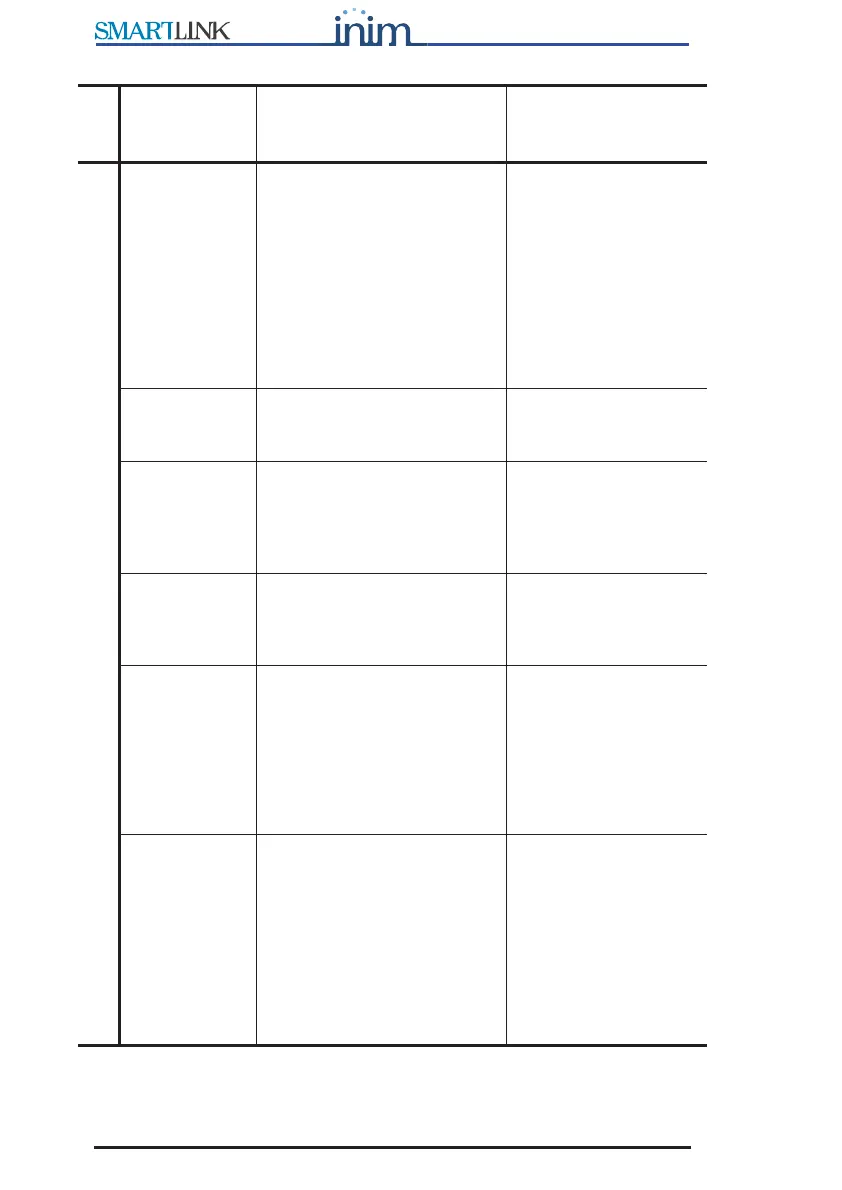
20 Programming the SmartLink-GP
Programming manual
Dialler parameters
Call all
Contact ID
numbers
If selected, the device will
call alternately the two or
more numbers associated
with an event (to transmit
Contact ID reports) until all
numbers successfully receive
the communication. If not
selected, the device will call
until one number only
successfully receives the
communication.
Call all voice
numbers
Same as Call all Contact ID
numbers, for voice message
calls.
Confirm with * If enabled, the SmartLink will
consider the voice call
successful when the recipient
presses “*” on the telephone
keypad.
Bypass voice
check
If enabled, the SmartLink will
start the voice message 5
seconds after dialing the
respective contact number.
Call attempts The maximum number of call
attempts the SmartLink-GP
will make when operating as
a dialer. If a call is
unsuccessful (i.e.
unanswered) the SmartLink-
GP will retry for the set
number of call attempts.
From 1 to 10.
Replay
message
Indicates the number of
times voice messages must
be played during a call. If, for
example, a call includes
messages 2 and 4 and the
Replay message parameter is
set at 5, messages 2 and 4
will be played five times
before the Smartlink-GP ends
the call.
From 1 to 10.
Group
Parameter Description Note



 To Next Page