FUNCTIONAL OVERVIEW
page6
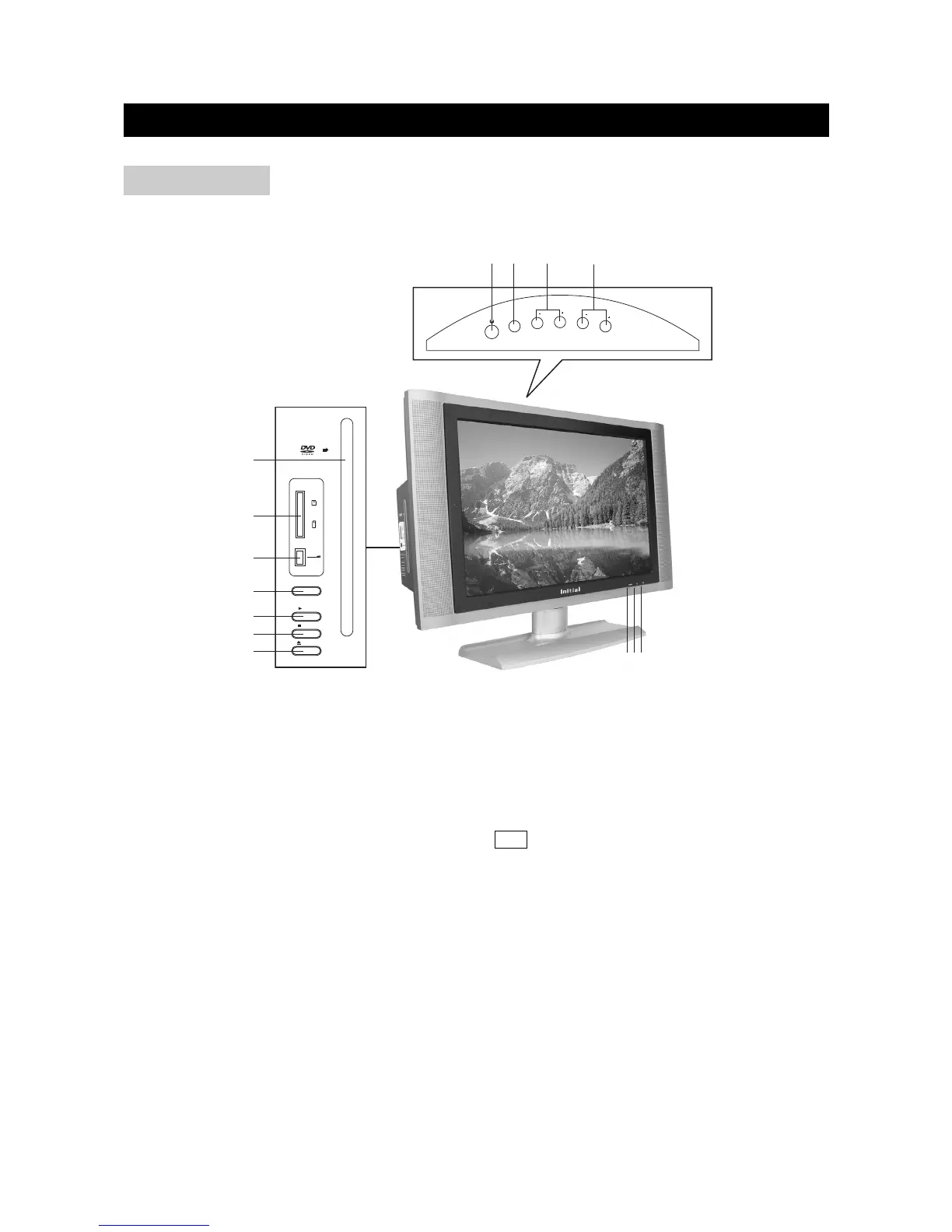
FRONT VIEW
1) REMOTE SENSOR
2) POWER ON INDICATOR
3) STANDBY INDICATOR
4) POWER BUTTON: Use to turn the unit on and off.
5) TV/DVD/AUX/PC: Use to select the AV signal source between: TV, AV,S-Video,
DVD/USB/CARD, YPbPr,VGA, DVI and use the OK button to confirm.
6) CH+/-: To skip to the previous/next channel.
7) VOLUME+/-: Use to adjust the volume.
8) DISC SLOT: Insert a DVD or CD disc to play under DVD status. In other status, insert a disc to
change to DVD status.
9) MULTI MEDIA CARD/SD/MEMORY STICK CARD SLOT
10) USB INJECT
11) DVD/CARD/USB: In DVD status, when there are USB and MMC/SD/MEMORY STICK card
being played, use to shift among DVD, USB and CARD.
12) PLAY BUTTON: Use to begin the DVD playback; in other mode, press it to change to DVD
mode.
13) STOP: Use to stop the DVD playback.
14) EJECT BUTTON: Use to eject the disc being played in the disc slot.



 To Next Page