2‐4‐3 PRINTINGPLATEN’SMOVEMENTINZDIRECTION
Main Parts Included
1. Step Motor: It generate the rotation of leading screw at the backside of the printer.
2. Leading Screw: It leads the movement of printing platen’s movement in Z-axis. It is connected to the
reducer at the backside of the printer.
3. Reducers: Two reducers are installed beneath the front and end of printing platen’s holder. The one at the
front is connected to the motor; the one at the back is connected to the leading screw. They are
connected with a shaft and couplings.
4. Pneumatic Supports and Shafts: They hold the printing platen and make printing platen’s movement in
Z-axis possible and stable. There are two pneumatic supports and two shafts at each end.
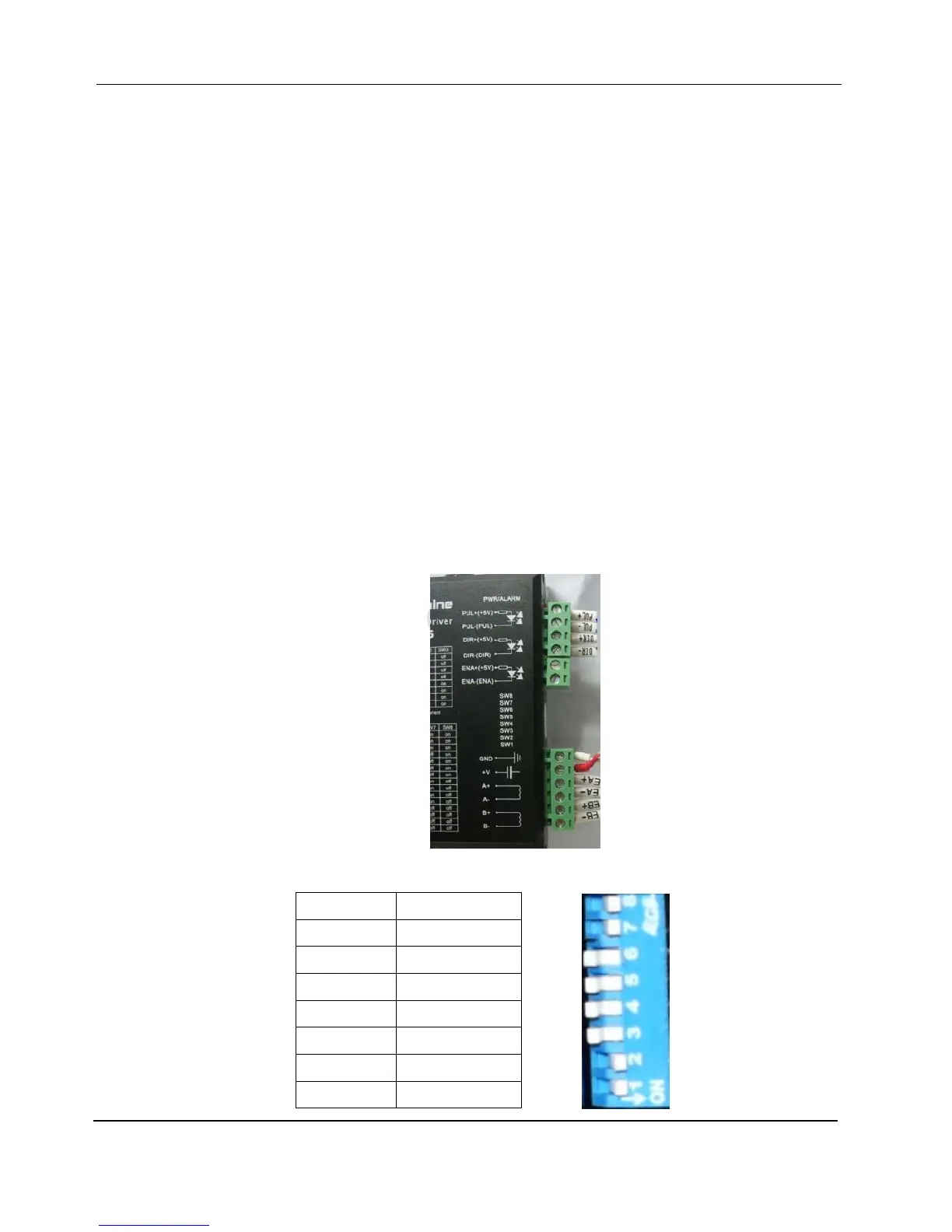
5. Step Motor Driver: It sits in the front electric cabinet. It controls and drives the step motor for printing
platen’s movement in Z-axis.
1) Two connectors are plugged on the step motor driver. The signal cables (PUL+, PUL-, DIR+ and
DIR-) go to the main board, encoder and high voltage cables (EB+, EB-, EA+, EA-, +5V and GND)
come from the step motor.
2) Dial Switch:
SW8 ON
SW7 ON
SW6 OFF
SW5 OFF
SW4 OFF
SW3 OFF
SW2 ON
SW1 ON


 To Next Page