4-4 SETTING NEGATIVE PRESSURE VALUE
Users should be very clear about the negative pressure value of their printers. Before printing, proper
negative pressure value should be set on the software Negative Pressure Control for the system to control it.
Mainly there are two steps to get an accurate negative pressure value:
- Calculate: get a range of the value through a formula;
- Alignment: get the accurate value by tests;
Calculate Negative Pressure Value Range
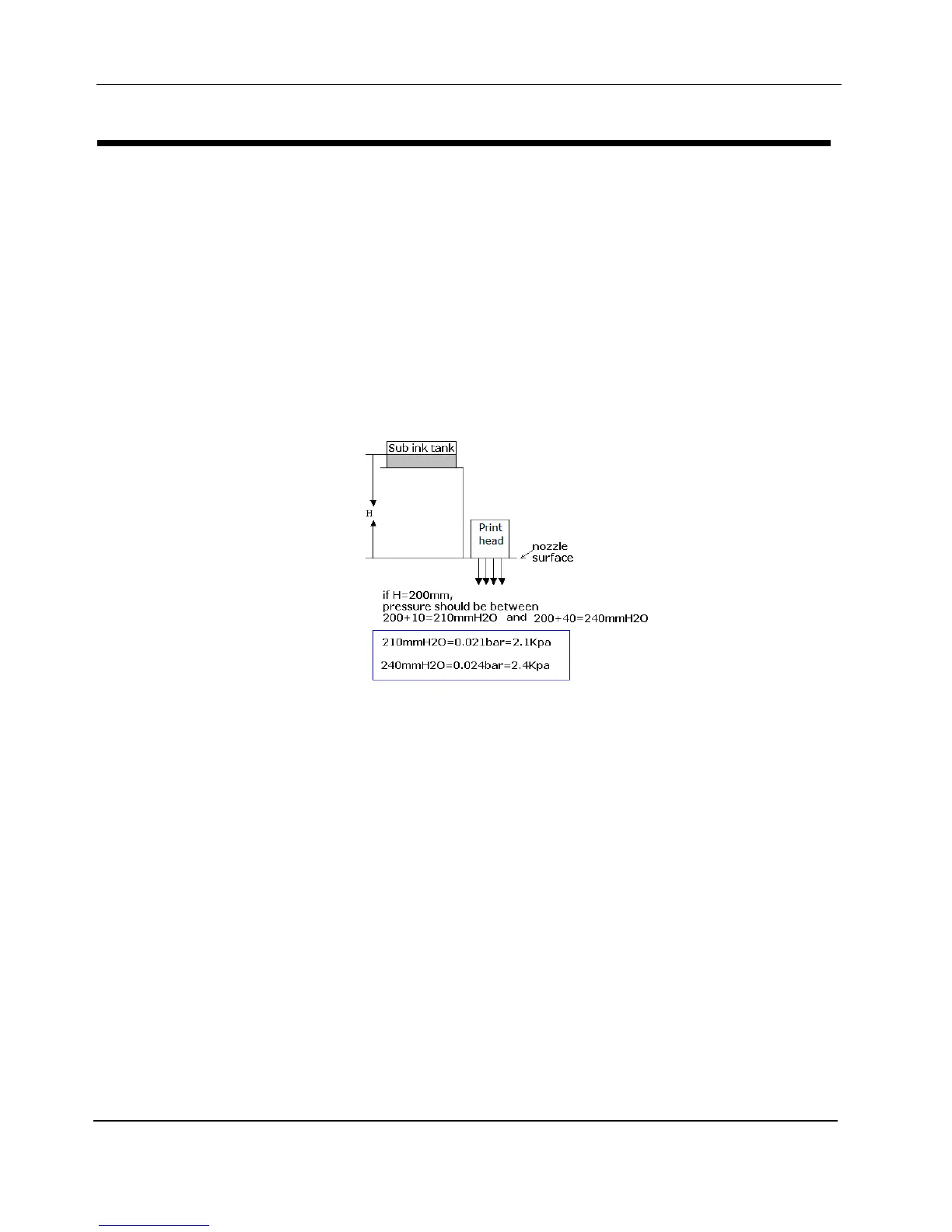
The negative pressure value is decided by the distance between sub-ink-tank and print heads;
please calculate the theoretical negative value according to the following diagram
Alignment
1. Input any value in the range got according to the method above;
2. Press buttons on Panel Board to purge ink from one print head, either head 1 or head 2.
3. Observe the nozzles and check if nozzles spray normally.
4. Wipe the print head with a piece of Cleanroom wiper (in one direction only).
5. Check the nozzle plate.
If there is bleeding (small drop of ink) over the nozzle, reduce 0.1Kpa of the pressure (as the value
is negative, reduce means to increase the ABSOLUTE value). If there is no bleeding, increase
0.1kpa of the pressure, then repeat step 2 to step 5 until you get the threshold pressure value (in
which the bleeding is almost unobservable).


 To Next Page