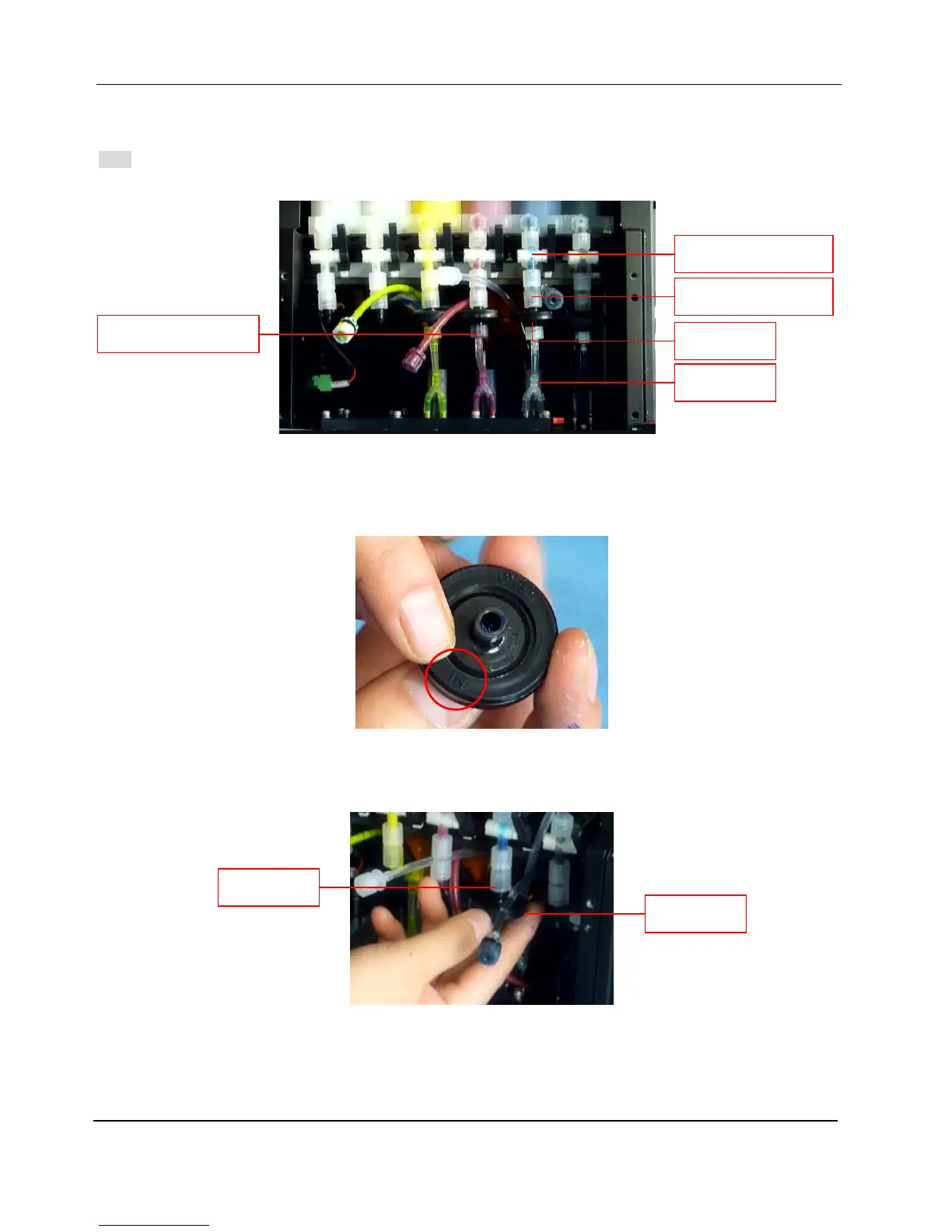
7-8 CONNECT PRINT HEADS TO THE INK SYSTEM
Note: The following procedures take water-based print heads as example; the installation procedures of installing
print heads on UV system are exactly the same, except that the ink tubes and connectors should be for UV ink.
1. Connect a disc filter to the outlet of manual 3-way valve.
- Please differentiate disc filter’s ink inlet and outlet. Connect the ink inlet to the luer lock at the ink
outlet of manual 3-way valve. The ink inlet side is marked as “IN”; please see the image below:
- The luer lock assembly at the ink outlet of manual 3-way valve constitutes of two luer locks. Please
insert the inlet of disc filter to the luer lock at the bottom; then rotate the luer lock anti-clockwise and
tighten it.
2. Screw a luer adapter (Φ4) on the ink outlet of disc filter.
3. Check the distance between disc filter’s ink outlet and print head’s front ink inlets.
Disc Filter
Luer Lock
Luer Lock Fittings
Disc Filter
Manual 3-way Valve
Print Head
Male Luer Connector



 To Next Page