6-7 SETTING PLATEN HEIGHT FOR PRINTING
The distance between print head (nozzles) and media should be proper. The printing quality will not be good if the
distance is too big. While if too small, carriage could have crash with the media. According to our long time
experience, 1.7mm is a proper distance for printing.
Here’s the procedure of setting platen’s height for printing with options on PCS:
1. Switch to Fixture Mode, in which the auto measurement of Z-axis height is enabled.
2. Move the carriage to the printing platen.
3. Keep clicking the Up arrow button on PCS or pressing the Up arrow button next to the LCD control panel until
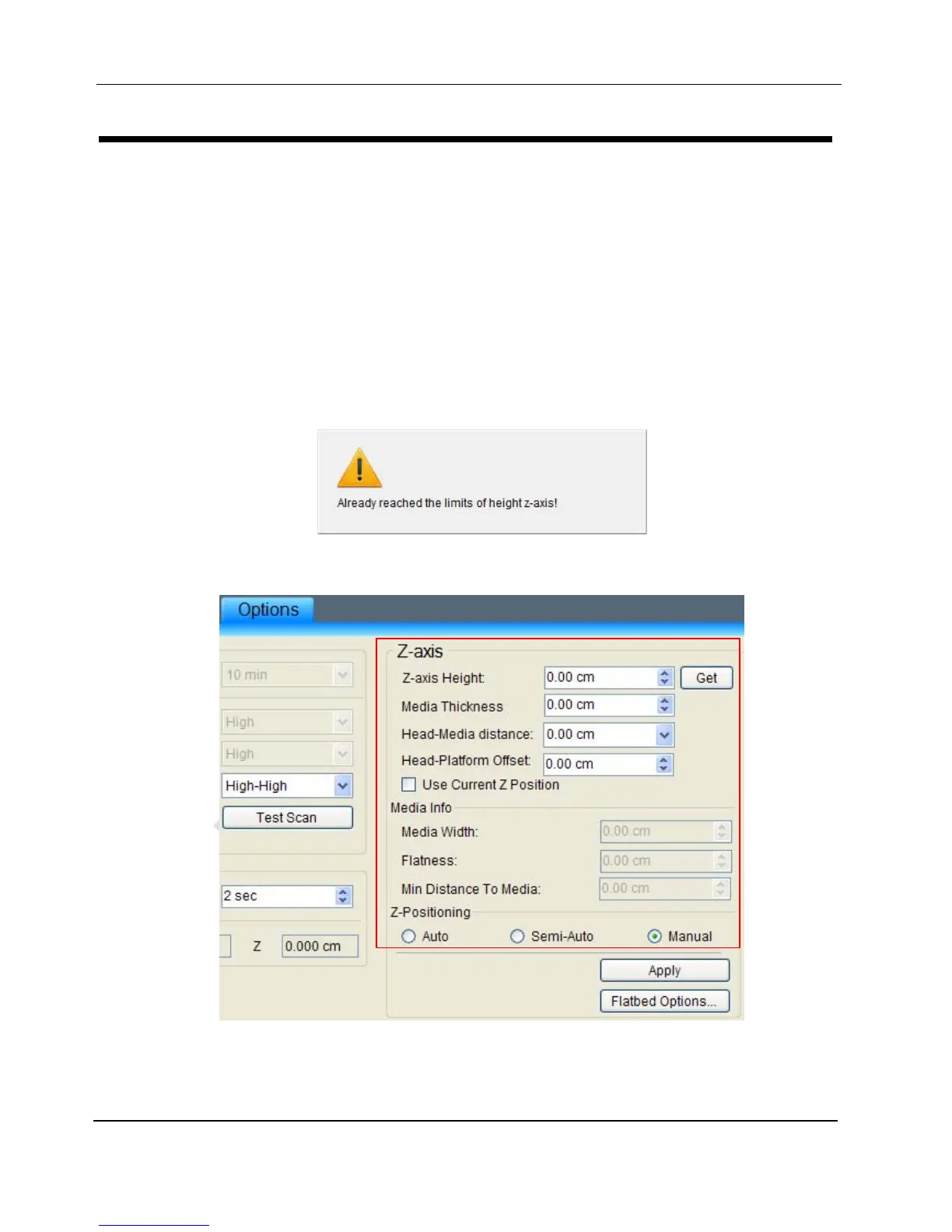
the platen stops moving. A warning message will pop up on PCS:
4. Go to the Z-axis setting pane in Options tab and set parameters
a. Click the button Get to the right of Z-axis Height to get current position of platen; and set the current
platen’s height as Z-axis Height. The following warning message will pop up, please click button Yes.


 To Next Page