CHAPTER 5 PRINTER CONTROL INTERFACES
The printer can be controlled with two interfaces: the Printer Control Software (PCS) and the LCD control panel.
With PCS, users can set printing settings, printer parameters and control printer remotely; while the LCD control
panel allows user to do basic printer settings and control the printer closely.
5-1 PRINTER CONTROL SOFTWARE
With Printer Control, you can check printer's real time status, set printer parameters and control the printing
process.
1. General Introduction
Remotely control the printer through USB connection, switching printer’s online/offline status, clean
print head, move print head and media.
Monitor and control the printing process. Send print jobs to the printer and pause/resume/abort job
during printing.
Set printhead parameters, align the printer, and modify printing settings.
Setup user permissions. Normal user cannot modify advanced settings, for safety consideration.
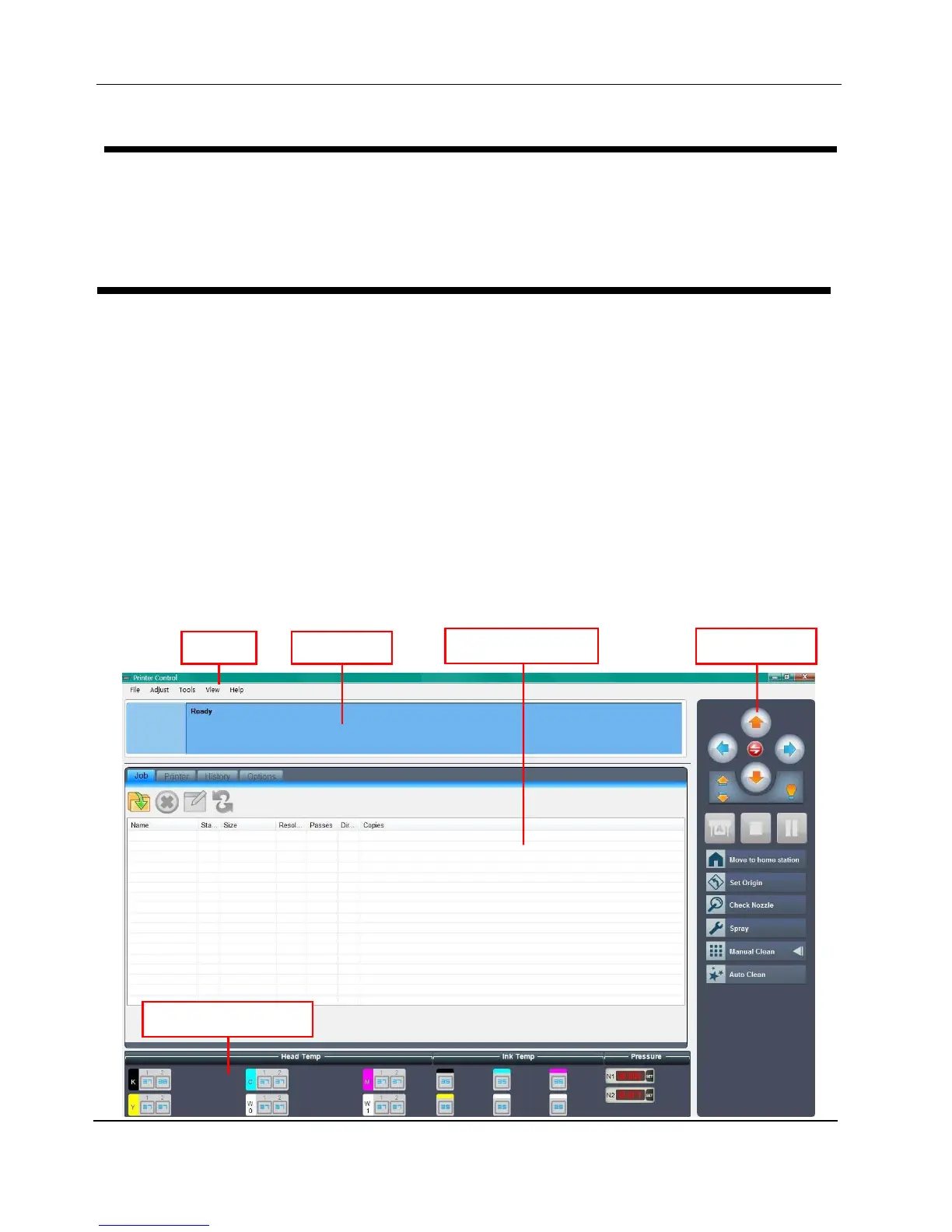
2. Main Interface
Peripheral Status Panel
Tool Ba


 To Next Page