23
Connecting Your Components
—Continued
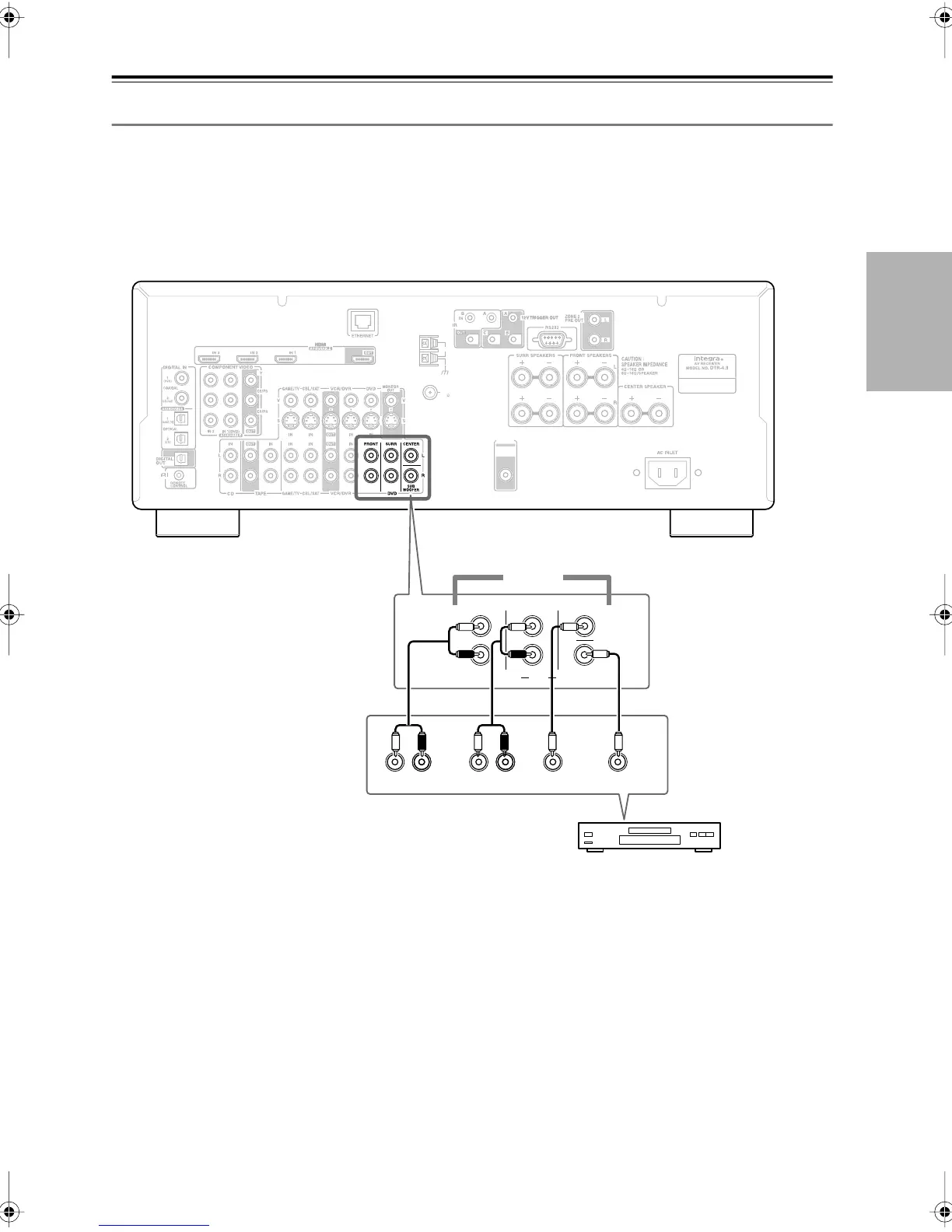
Hooking Up the Multichannel Input
If your DVD player supports multichannel audio formats such as DVD-Audio and SACD, and it has a multichannel
analog audio output, you can connect it to the AV receiver’s multichannel input.
Use a multichannel analog audio cable, or several normal audio cables, to connect the AV receiver’s DVD IN FRONT
L/R, CENTER, SURR L/R, and SUBWOOFER jacks to the 5.1-channel analog audio output on your DVD player.
To select the multichannel input, see “Basic AV Receiver Operation” on page 43. To adjust the subwoofer sensitivity for
the multichannel input, see “Using the Audio Adjust Settings” on page 57 or see “Hardware Setup” on page 63.
ANTENNA
FM
AM
75
PRE OUT
SUB
WOOFER
FRONT CENTER
SUB
WOOFER
SURR
DVD
R
FRONT
LLR
SURROUND
CENTER SUB
WOOFER
R
L
5.1 ch
DVD player
DTR-4.9En.book Page 23 Tuesday, April 15, 2008 5:13 PM



 To Next Page