78
Controlling Other Components
—Continued
P
Fast Forward [ ] button
Press and hold to fast forward.
Q
Stop [ ] button
Stops playback and displays a menu.
R
Play Mode button
Selects play modes on components with selectable
play modes.
Works as a Resume button when used with a DS-A2
RI Dock.
S
Random button*
Used with the shuffle function.
*Buttons marked with an asterisk (*) are not supported
by 3rd generation iPod models.
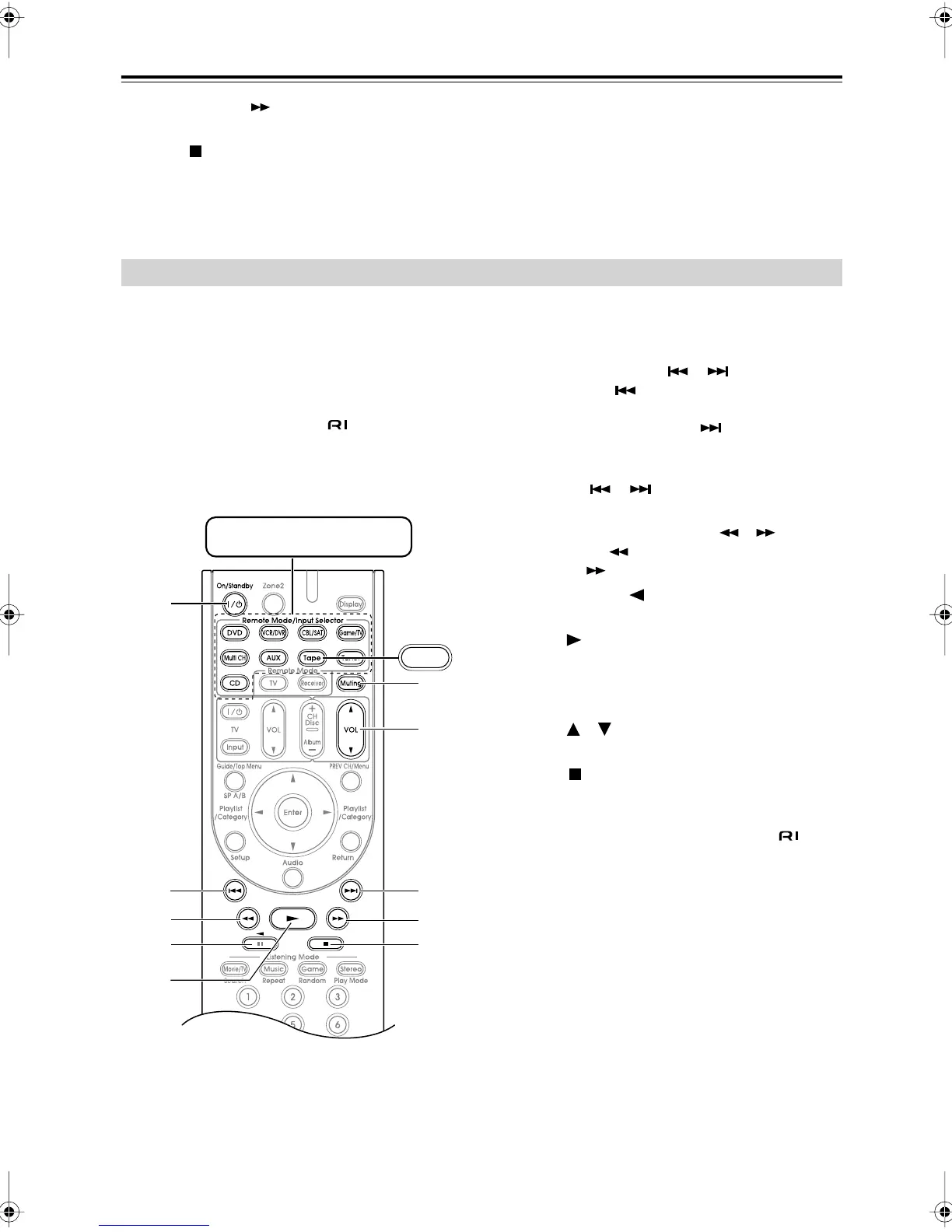
By pressing the Remote Mode button that’s been pro-
grammed with the remote control code for your cassette
recorder, you can control your cassette recorder with the
following buttons.
The [Tape] Remote Mode button is preprogrammed with
the remote control code for controlling an Onkyo cas-
sette recorder when used with an connection.
For details on entering a remote control code for a differ-
ent component, see page 71.
On twin cassette decks, only Deck B can be controlled.
A
On/Standby button
Turns the cassette recorder on or off.
B
Previous and Next [ ]/[ ] buttons
The Previous [ ] button selects the previous
track. During playback it selects the beginning of
the current track. The Next [ ] button selects the
next track.
Depending on how they were recorded, the Previous
and Next [ ]/[ ] buttons may not work prop-
erly with some cassette tapes.
C
Rewind and Fast Forward [ ]/[ ] buttons
The Rewind [ ] button starts rewind. The Fast
Forward [ ] button starts fast forward.
D
Reverse Play [ ] button
Starts reverse playback.
E
Play [ ] button
Starts playback.
F
Muting button (44)
Mutes or unmutes the AV receiver.
G
VOL [ ]/[ ] button (43)
Adjusts the volume of the AV receiver.
H
Stop [ ] button
Stops playback.
Note:
• An Onkyo cassette recorder connected via can
also be controlled in Receiver mode.
Controlling a Cassette Recorder
3
2
A
2
F
G
5
3
H4
Tape
Press the appropriate Remote
Mode button first
* With some components, certain buttons may not
work as expected, and some may not work at all.
DTR-4.9En.book Page 78 Tuesday, April 15, 2008 5:13 PM



 To Next Page