28
Connecting the AV receiver—Continued
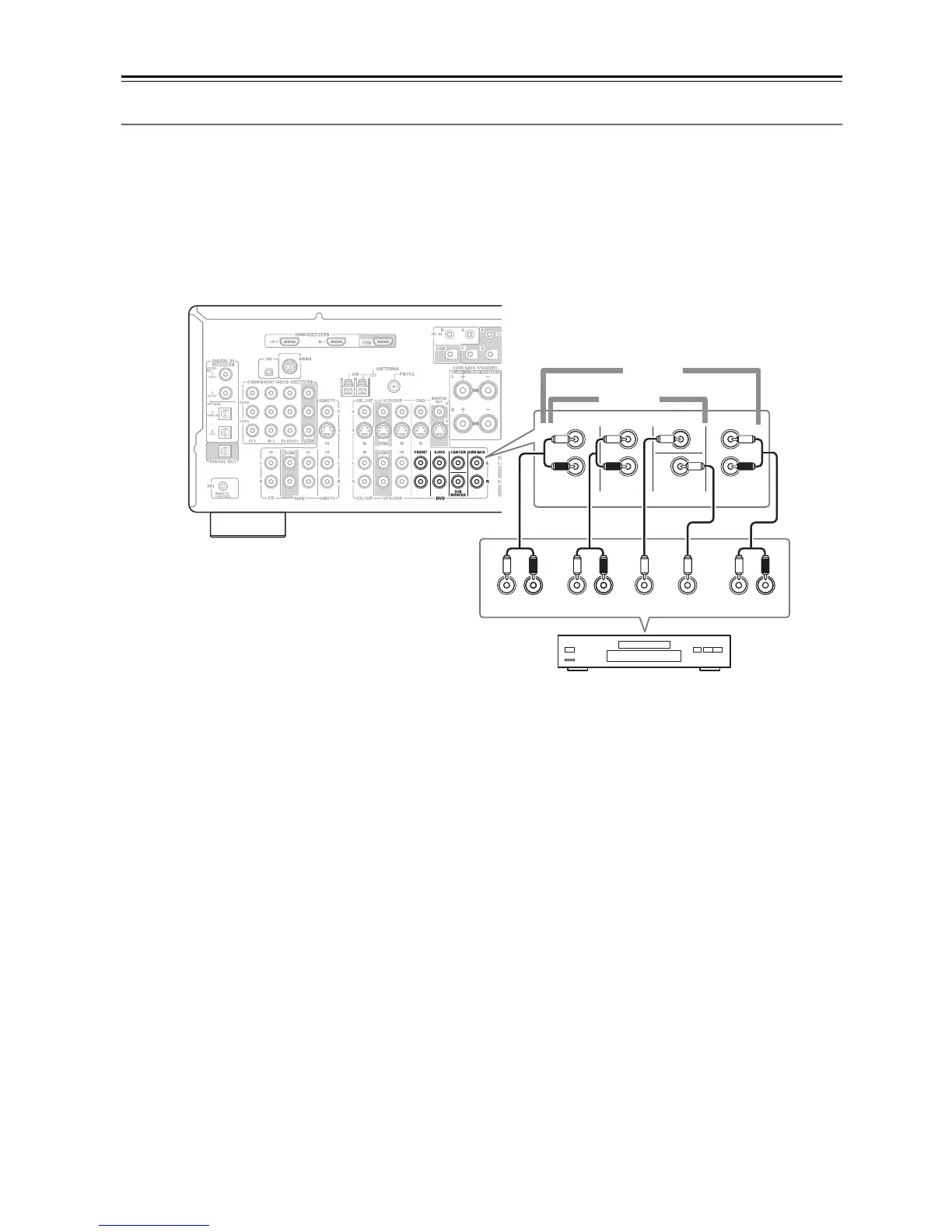
Hooking Up the Multichannel DVD Input
If your DVD player supports multichannel audio formats such as DVD-Audio or SACD, and it has a multichannel
analog audio output, you can connect it to the AV receiver’s multichannel DVD input.
Use a multichannel analog audio cable, or several normal audio cables, to connect the AV receiver’s DVD IN FRONT
L/R, CENTER, SURR L/R, SURR BACK L/R, and SUBWOOFER jacks to the 7.1-channel analog audio output on
your DVD player. If your DVD player has a 5.1-channel analog audio output, don’t connect anything to the AV
receiver’s SURR BACK L/R jacks.
R
FRONT
LLR
SURROUND
CENTER SUB
WOOFER
FRONT
SURR
DVD
SUB
WOOFER
CENTER
R
L
R
L
LR
SURR
BACK
SURR BACK
5.1 ch
7.1 ch
DVD player



 To Next Page