53
First Time Setup—Continued
You must specify the AM frequency step used in your
area. Note that when this setting is changed, all radio
presets are deleted.
Note:
• This procedure can also be performed on the AV
receiver by using its [Setup] button, arrow buttons, and
[Enter] button.
AM Frequency Step Setup
(Australian model)
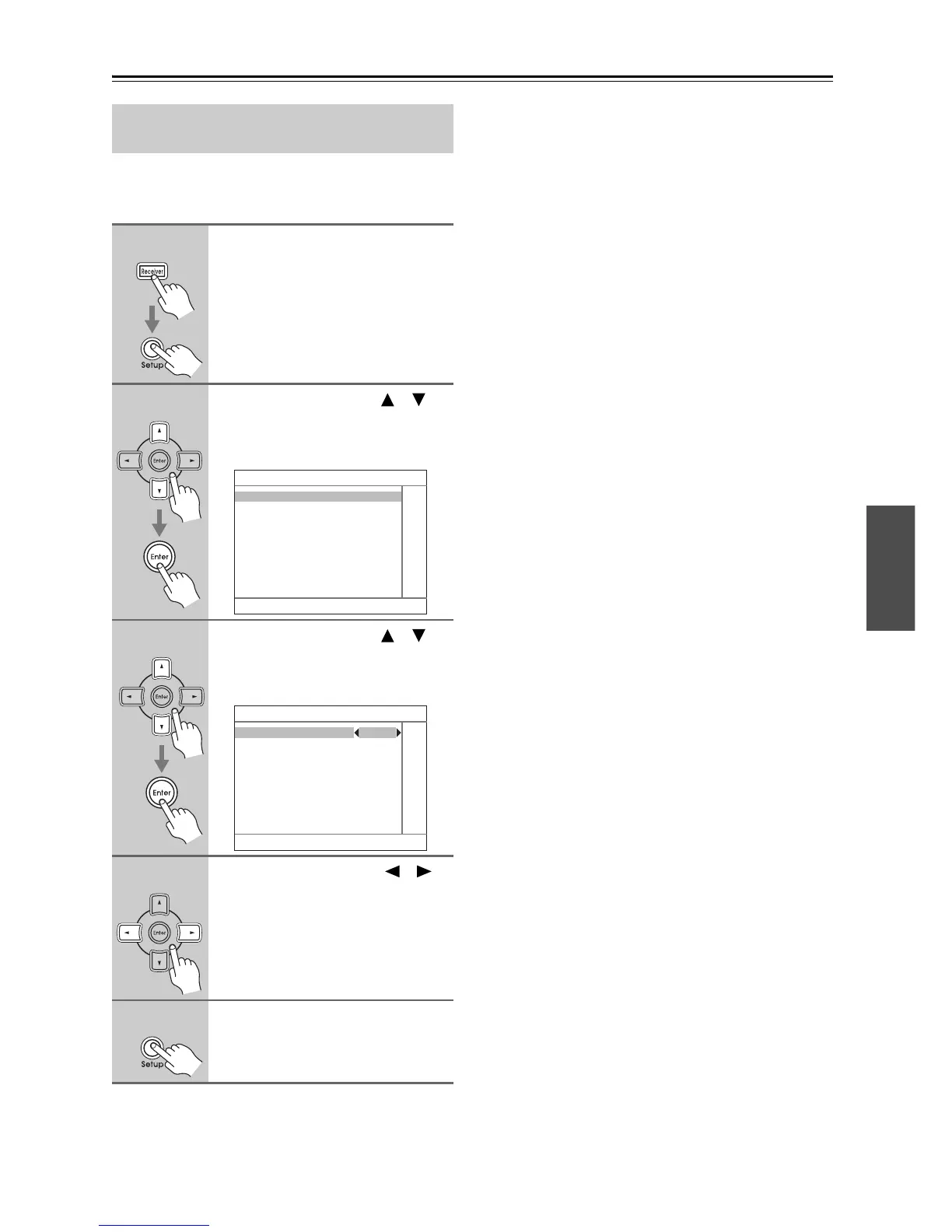
1
Press the [Receiver] button, fol-
lowed by the [Setup] button.
The main menu appears onscreen.
2
Use the Up and Down [ ]/[ ]
buttons to select “7. Hardware
Setup,” and then press [Enter].
The Hardware Setup menu appears.
3
Use the Up and Down [ ]/[ ]
buttons to select “3. Tuner,” and
then press [Enter].
The Tuner menu appears.
4
Use the Left and Right [ ]/[ ]
buttons to select:
10 kHz: Select if 10 kHz steps are
used in your area.
9kHz: Select if 9 kHz steps are used
in your area.
5
Press the [Setup] button.
The Setup menu closes.
7. Hardware Setup
1. Remote Control
2. Zone2
3. Tuner
4. Analog Multich
5. HDMI
7–3. Tuner
AM Frequency Step 9 kHz



 To Next Page