84
Zone 2
With the Zone 2 function, you can enjoy one input
source in the main room and a different source in another
room.
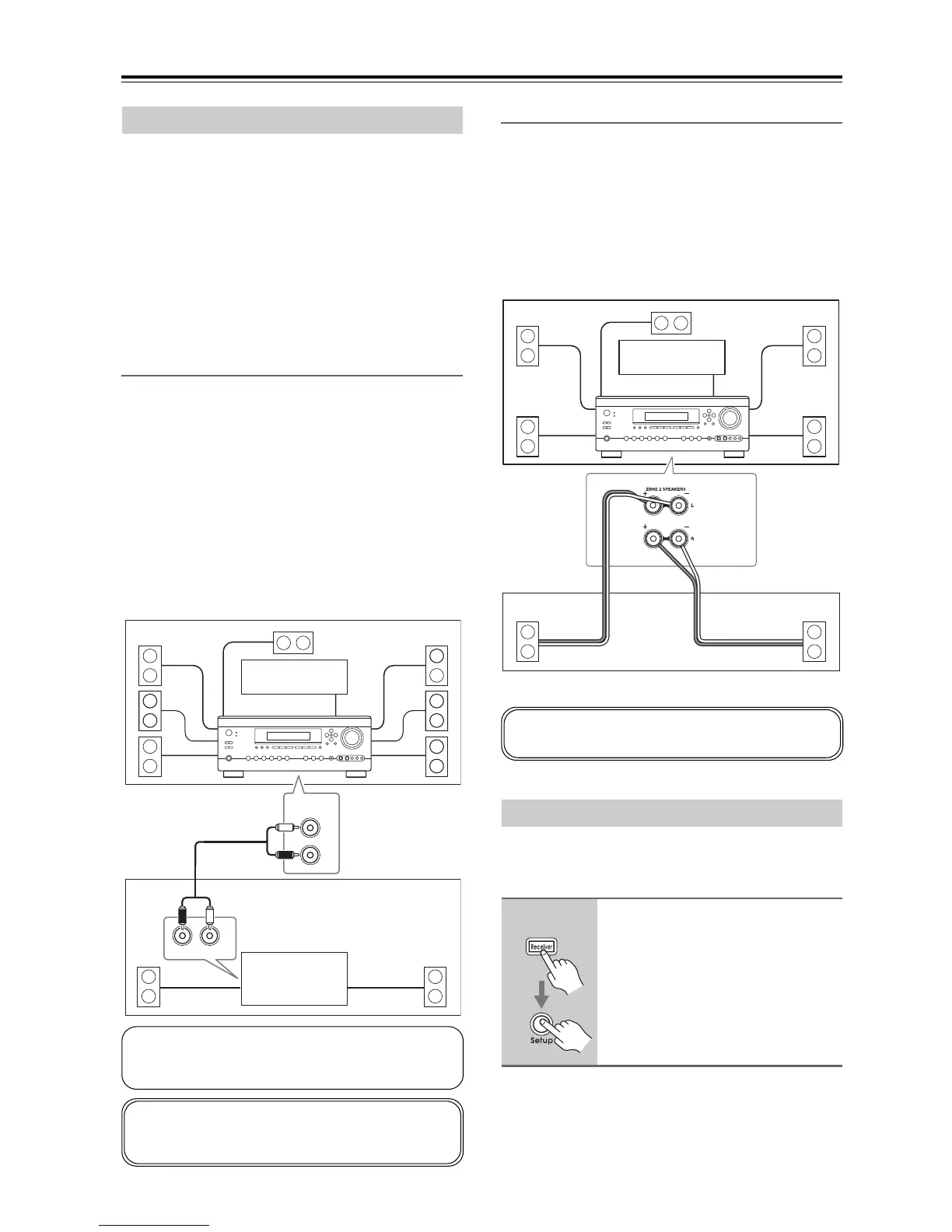
There are two ways to hook up your Zone 2 speakers:
1) Use another amp (receiver, integrated amp, or power
amp) in Zone 2 and connect your Zone 2 speakers to it.
2) Connect your Zone 2 speakers to this AV receiver.
Note:
For speaker connections and related cautions, see
page 20.
Using Another Amp in Zone 2
With this hookup, you can enjoy 7.1-channel playback in
the main room and a different stereo source in Zone 2. If
you use a receiver or integrated amp in Zone 2, the
volume for Zone 2 is adjusted on that unit. If you use a
power amp with no volume control in Zone 2, the vol-
ume for Zone 2 is adjusted on this AV receiver.
Hookup
• Use an RCA audio cable to connect the AV receiver’s
ZONE 2 PRE OUT L/R jacks to an analog audio input
on the amp in Zone 2.
• Connect the Zone 2 speakers to the speaker terminals
on the amp in Zone 2.
Using Only Speakers in Zone 2
With this connection method, you can use 5.1 surround
sound in the main room and play a different AV source
in Zone 2. The volume for Zone 2 is set on the AV
receiver.
Hookup
• Connect your Zone 2 speakers to the AV receiver’s
ZONE 2 SPEAKERS terminals.
To use Zone 2, you must make this setting. It enables the
speakers connected to the ZONE 2 SPEAKERS termi-
nals so that they produce sound when Zone 2 is used.
Connecting Zone 2
IN
R
L
ZONE 2
PRE OUT
R
L
Main room
Zone 2
TV
Receiver/
integrated amp,
or power amp
AV receiver
If you’re using a receiver or integrated amp in Zone 2,
you don’t need to make any settings to use this hookup.
Proceed to “Using Zone 2” on page 86.
If you’re using a power amp with no volume control
in Zone 2, you must set the Zone 2 Out setting to Vari-
able (see page 85).
Setting the Powered Zone 2
1
Press the [Receiver] button fol-
lowed by the [Setup] button.
The main menu appears onscreen.
RL
Main room
TV
Zone 2
AV receiver
You must set the “Powered Zone 2” setting to “Act”
(Activated) in order to use this hookup (see below).



 To Next Page