87
Zone 2—Continued
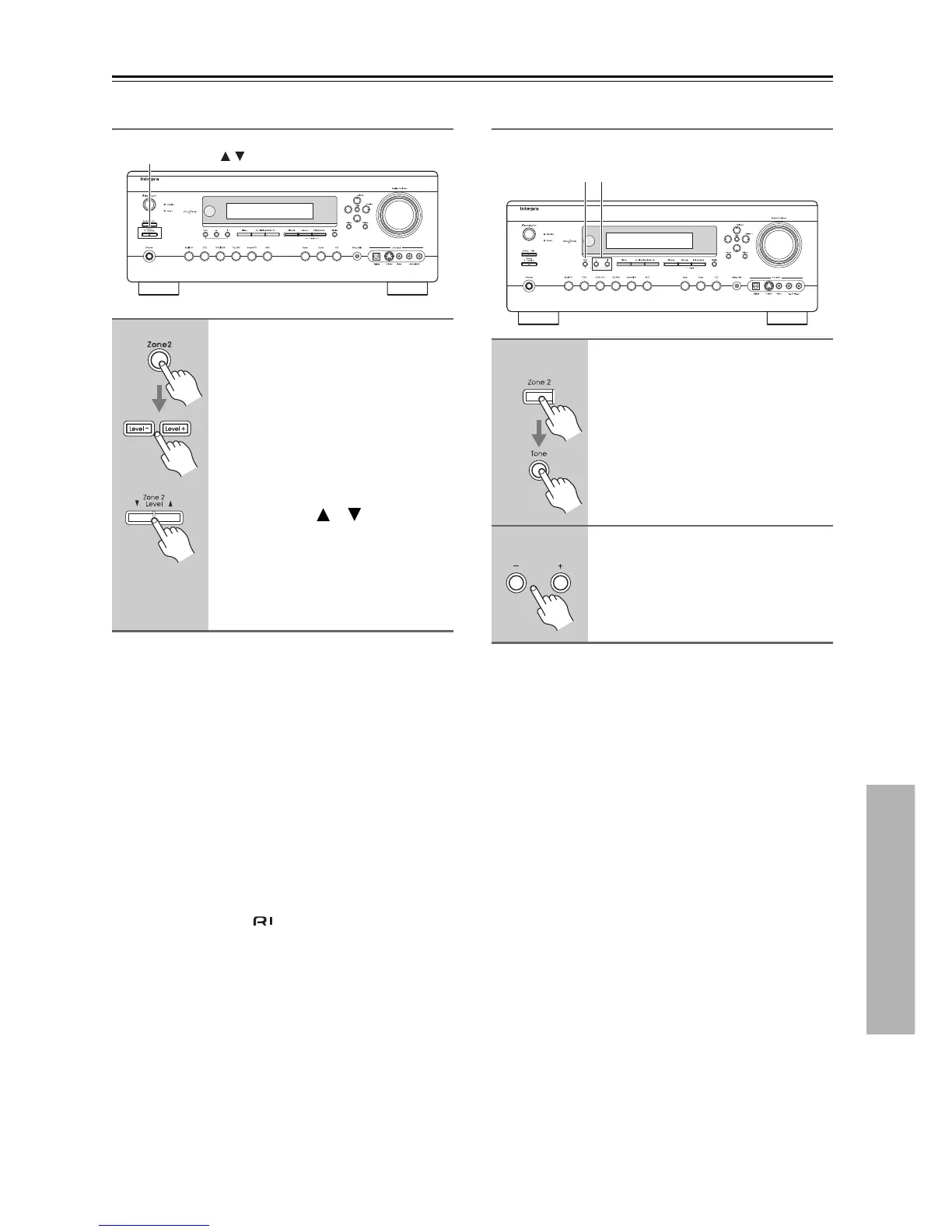
Adjusting the Volume for Zone 2
To Mute Zone 2:
Press the remote controller’s [Zone 2] button, followed
by the [Muting] button. To unmute Zone 2, press the
remote controller’s [Zone 2] button again, followed by
the [Muting] button, or adjust the volume for Zone 2.
Notes:
• Only analog input sources are output by the ZONE 2
PRE OUT and ZONE 2 SPEAKERS terminals. Digi-
tal input sources are not output. If no sound is heard
when an input source is selected, check if it’s con-
nected to an analog input.
• While Zone 2 is being used, listening modes that need
surround back speakers (i.e., Dolby Digital EX and
DTS-ES) are unavailable.
• While Zone 2 is on, functions will not work.
• You can’t select different radio stations for Zone 2 and
the main room. For example, if you have an FM sta-
tion for the main room, that station will also be used in
Zone 2.
Adjusting the Tone and Balance for Zone 2
You can adjust the bass, treble, and balance for Zone 2.
■ Bass
You can boost or cut low-frequency sounds output by the
front speakers from –10 dB to +10 dB in 2 dB steps.
■ Treble
You can boost or cut high-frequency sounds output by
the front speakers from –10 dB to +10 dB in 2 dB steps.
■ Balance
You can adjust the balance of the left and right speakers
in Zone 2 in 2 dB steps, +10 dB to the right and +10 dB
to the left.
The balance cannot be adjusted when the Powered Zone
2 setting is set to Not Act (page 84) or the Zone 2 Out
setting is set to Fixed (page 85).
Remote controller
AV receiver
On the remote controller, press
the [Zone 2] button, and then use
the [Level–] and [Level+] buttons.
On the AV receiver, use the
Zone 2 Level [ ]/[ ] buttons.
If your Zone 2 speakers are connected
to a receiver or integrated amp in Zone
2, use its volume control to adjust the
volume.
Zone 2 Level ,
1
Press the [Zone 2] button, and
then press the [Tone] button
repeatedly to select Bass, Treble,
or Balance.
2
Use the Tone [+] and [–] buttons
to adjust.
1 2



 To Next Page