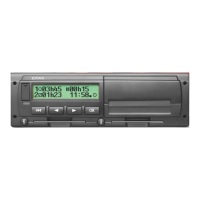
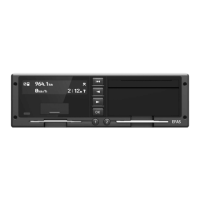
The EFAS-4.0 digital tachograph, manufactured by intellic GmbH, is a sophisticated device designed to log various aspects of vehicle operation and driver activity, ensuring compliance with European Commission regulations. This user guide provides comprehensive instructions for drivers, company representatives, controlling bodies, and workshop personnel on its proper use and maintenance.
Function Description:
The primary function of the EFAS-4.0 is to automatically record work periods, driving times, rest periods, and availability periods for both the driver and co-driver. It also logs vehicle speed and distance covered. These recorded protocols serve as official proof for controlling bodies such as the police. The device adheres to technical specifications outlined in EC Regulation No. 1360/2002 (July 13, 2002), the 7th adaptation of Council Regulation (EEC) No. 3821/85, and EC Regulation No. 1266/2009 (December 16, 2009).
The EFAS-4.0 is designed to prevent falsification, disabling, or deletion of recordings from the digital tachograph and tachograph cards. Any modifications to the tachograph or its electronic signals/data links, especially with intent to deceive, are punishable by law. It automatically detects and logs any disconnection of the vehicle's battery from the electrical system without a workshop card inserted, registering it as an interruption.
Important Technical Specifications:
The device features an alphanumeric display for clear information readout. It includes dedicated card slots for the driver and co-driver, ensuring proper identification and data logging in team mode. Control keys (forward, backward, OK, backspace) facilitate menu navigation and selection. A red warning light indicates various operating modes, including functional checks, system errors, warnings, and incorrect entries. An integrated printer module allows for immediate printouts of stored data.
The EFAS-4.0 records all logs and entries in Coordinated Universal Time (UTC), a standardized world time without daylight saving. Printouts can be generated in either UTC or local time, though only UTC printouts comply with legal requirements. The device supports multiple languages, which can be automatically set based on the inserted tachograph card or manually selected. Display brightness and contrast are adjustable, as are acoustic signals for key clicks, notifications, and warnings. The unit of distance can be set to kilometers or miles, with speed display automatically adjusting accordingly.
Usage Features:
-
Driver and Co-Driver Operations:
- Before Starting: Drivers must insert their card into the left-hand slot (chip side up). The device displays the driver's name, last card withdrawal date, and time. It prompts to complete activities, allowing manual entry of past activities if needed. The country where the working day begins must be selected. In team mode, the co-driver inserts their card into the right-hand slot.
- Automatic Settings: The tachograph automatically switches to driving time for the driver and availability for the co-driver when the vehicle starts. When the vehicle stops, it automatically switches to work period for the driver. Brief stops (less than 2 minutes) do not trigger an activity change. When the ignition is off, the EFAS can automatically switch to a programmed driver activity.
- Display Settings: Drivers can cycle through various display screens using control keys, including speed and odometer, current work periods and activities, driving times for each driver, speed and trip meter, and UTC time.
- Manual Entries: If activities were not recorded automatically (e.g., during a card withdrawal), drivers can manually enter them via a guided dialog.
- Events/Faults: The device displays warnings for events or faults with an acoustic signal and flashing light. These must be acknowledged with the OK button.
- Ferry/Train Crossing: A specific mode can be activated for ferry or train crossings, which automatically deactivates when the vehicle starts moving again.
- "OUT" Mode: For trips excluded from EC regulations, the "Digital tachograph not required" (OUT) mode can be activated and deactivated.
- Speed Monitoring: In addition to legal speed monitoring, a programmable speed limit can be set, triggering an advance warning if exceeded. This can be adjusted via the menu or directly when the vehicle is moving.
- Remote Data Transmission (Optional): If an RDD® device is connected, driver card data and mass storage data can be transferred remotely. The device displays the status of these transfers.
-
Company Representative Operations:
- Company Registration/Deregistration: Inserting a company card automatically registers the company if no other is registered. This activates a company lock, preventing other companies from accessing driver data. Companies can also be manually registered/deregistered.
- Automatic Activity Setting: Company representatives can define the automatic activity setting for drivers and co-drivers after ignition ON/OFF.
- Data Download: Stored data can be downloaded using an external device. The company must be registered with the tachograph to download data for its drivers.
-
Controlling Body Operations:
- Data Display/Download: Inserting a control card allows full access to display, print, or download all data from the EFAS and driver cards, regardless of company locks.
Maintenance Features:
-
Workshop Operations:
- PIN Entry: Workshop personnel insert a workshop card and enter a PIN (4-8 characters, including digits, letters, and special characters) to enter CALIBRATION mode. The PIN entry process includes character group selection and confirmation.
- Test Run: Test runs can be performed with a workshop card inserted.
- Calibration Mode Warnings: In CALIBRATION mode, some EFAS warnings are suppressed but briefly displayed. A service manual provides details on faults ("SrvIDs") and their solutions.
- Regular Inspection: The EFAS must undergo a regular inspection by an authorized workshop at least every 24 months. Additional inspections are required after repairs, changes in tire circumference, revolution ratio, vehicle registration number, or if the UTC time deviates by more than 20 minutes.
-
General Settings:
- Printouts: Data can be printed in UTC or local time. The device indicates when the printer runs out of paper and allows for continued printing after a new roll is inserted.
- Display: Language, brightness (day/night mode), and contrast can be adjusted.
- Acoustic Signals: Key click, notification, and warning tones can be configured.
- Time and Date: Time can be corrected (limited to 1 minute every seven days without a workshop card), time zone set, daylight saving activated/deactivated, and date/time formats changed. Full time and date changes are only possible in CALIBRATION mode with a workshop card.
- Company Lock: Information on the current company lock can be displayed.
- Device Data: Software version, production date, and serial number of the EFAS can be displayed.
The EFAS-4.0 also provides various messages and warnings, some accompanied by audible beeps, to alert users to conditions such as card ejection refusal, driving time limits, printer issues, data errors, security breaches, and internal faults. Pictograms are used to quickly convey the nature of events ("!") and faults ("x"), with ">>" specifically indicating speeding events.

 Need help?
 General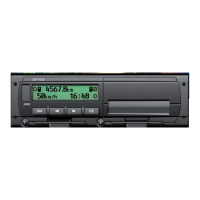

 To Next Page