English
18
3. Press OK again to store the correction or press to cancel the correction.
For setting other menu sub-items, choose the respective sub-item and proceed accordingly.
10.5 Company Lock
This menu is used to display information on the current company lock.
1. Select OK ĺ Settings ĺ Company Lock ĺ Info. The information about the current company
lock is displayed.
2. Use control keys andto access the required line.
3. Press to return to the menu.
Also, with a company card inserted, the company lock can be activated or deactivated (see section 6).
10.6 Automatic Setting of Activity after Ignition ON/OFF
In the digital tachograph mode COMPANY, the activity for the driver and co-driver can be selected which
is set automatically after the ignition is turned on/off (see section 6).
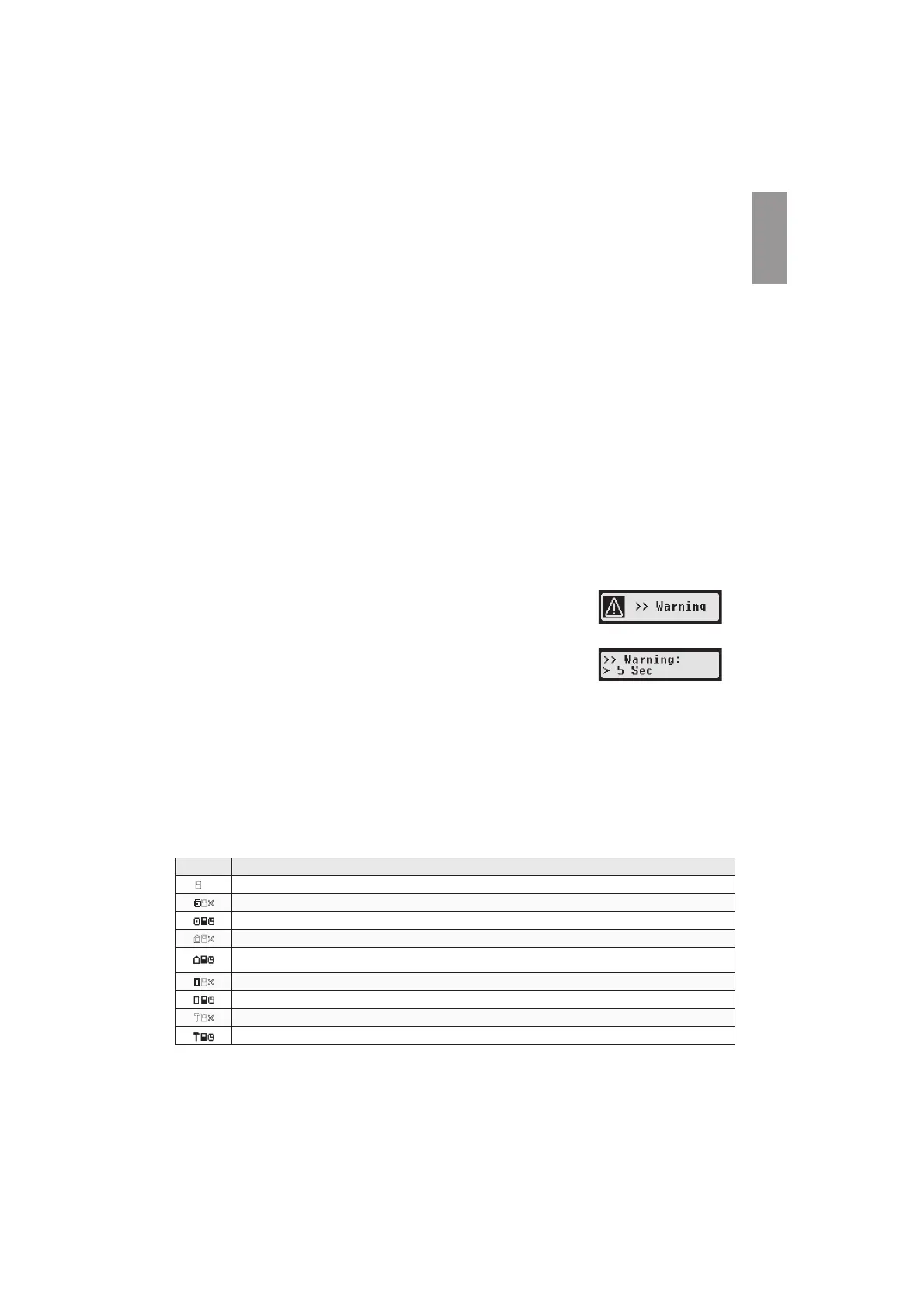
10.7 Speeding warning (>>Warning)
When the maximum speed (programmed by the workshop) is exceeded for 1 minute or longer, the digital
tachograph stores this event in the mass memory and on the driver card in accordance with EU regula-
tions. If the function “>>Warning” is activated, an advance warning will be displayed when the maximum
permissible speed is exceeded for a certain time.
When the advance warning is displayed, a long beep is performed and the red
warning lamp flashes temporarily. The advance warning time can only be set
when the vehicle is stationary.
1. Select OK ĺ settings ĺ >>Warning. The current setting is dis-
played.
2. Use the control keys and to choose a time between 5 and 55 seconds. When displaying a
warning to reduce speed, this warning will remain on the display for this time, before an entry is
stored in the digital tachograph and stored on the driver card. Alternatively select “OFF“, if you don’t
want to receive advance warnings.
3. Press OK to adopt your entry
10.8 Displaying Card Information
This function is used to view the card type or card status or the name of the card holder of the cards that
are inserted in the card slots. If the card is defective or expired, the status of the card is displayed as
follows:
Symbol Card status
---
No card in card slot
Data error on driver card
Driver card - start of validity period not yet reached or expiry date exceeded
Data error on company card
Company card - start of validity period not yet reached or expiry date exceeded
Data error on control card
Control card - start of validity period not yet reached or expiry date exceeded
Data error on workshop card
Workshop card - start of validity period not yet reached or expiry date exceeded


 To Next Page
 Loading...