8‐PortGigabitWeb‐SmartSwitch
35|Page
7.3 DHCPSnooping
TheaddressesassignedtoDHCPclientsonunsecureportscanbecarefullycontrolledusingthedynamic
bindingsregisteredwithDHCPSnooping.DHCPSnoopingallowstheIntellinetswitchtoprotectanetwork
fromrogueDHCPserversorotherdeviceswhichsendport‐relatedinformationtoaDHCPserver.This
informationcanbeusefulintrackinganIPaddressbacktoaphysicalport.
CommandUsage
NetworktrafficmaybedisruptedwhenmaliciousDHCPmessagesarereceivedfromanoutside
source.DHCPSnoopingisusedtofilterDHCPmessagesreceivedonanon‐secureinterfacefrom
outsidethenetworkorfirewall.
WhenDHCPSnoopingisenabled,DHCPmessagesenteringanuntrustedinterfacearefilteredbased
upondynamicentrieslearnedviaDHCPsnooping.
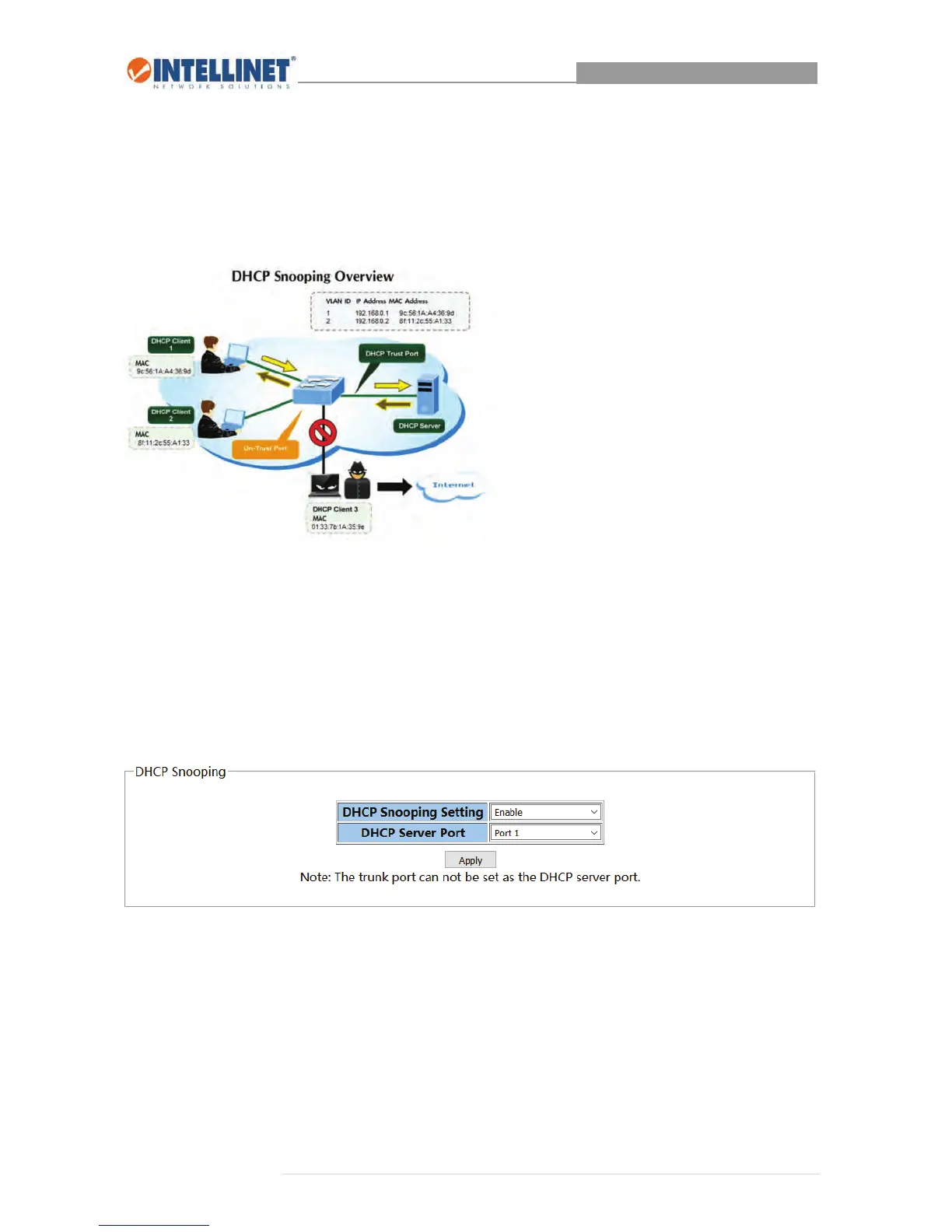
ActivatingDHCPSnoopingontheIntellinet8‐PortGigabitWeb‐SmartSwitchissimple:SetDHCPSnooping
to‘Enable’,specifytheporttowhichtheDHCPserver(i.e.,therouter)isconnectedto,andthenclick
‘Apply’toactivatethesettings.



 To Next Page