Chapter 1— Getting Started
6 3400, 3440, and 3600 Bar Code Label Printer User’s Manual
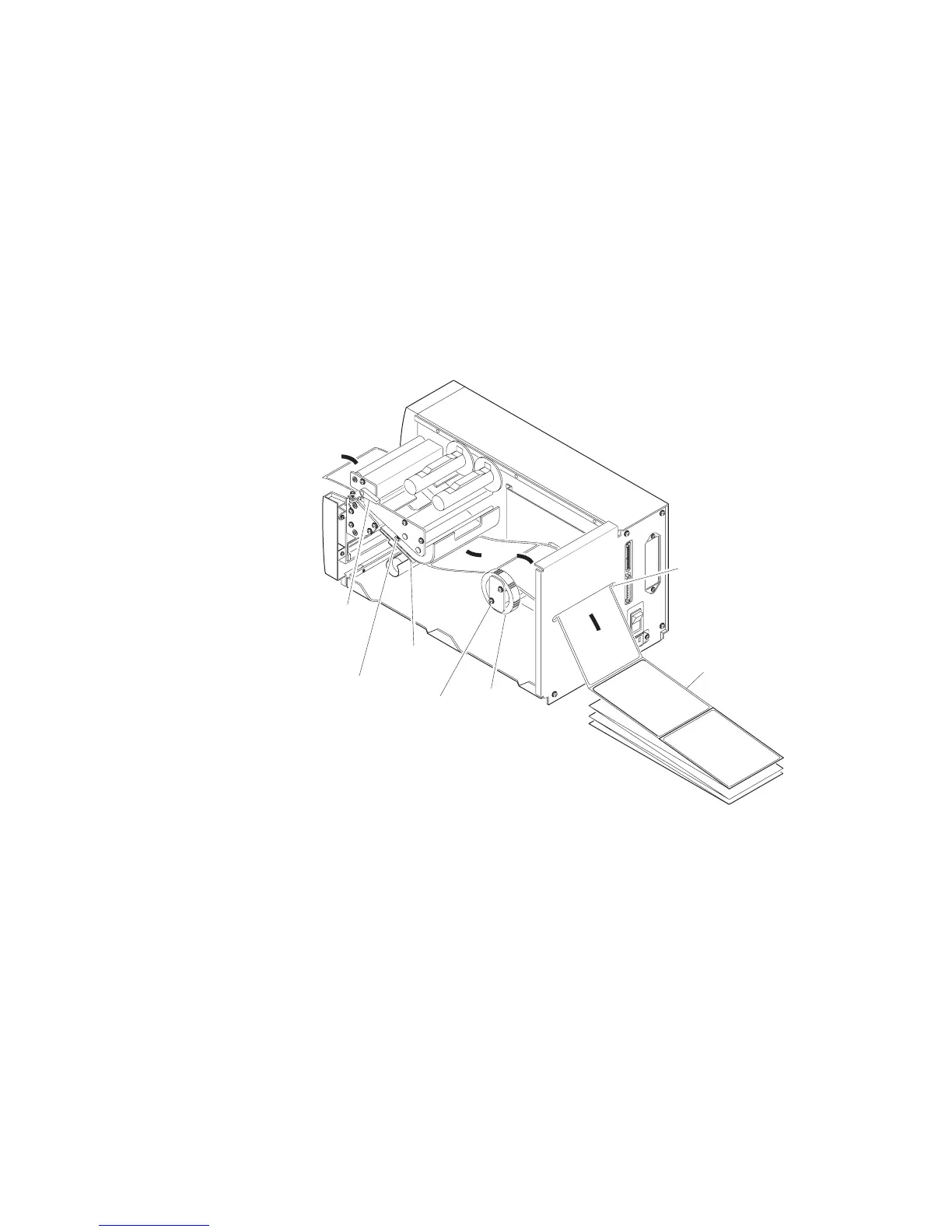
To load media for fanfold printing
1 Open the printer.
2 Disengage the printhead by rotating the head lift lever clockwise until it
releases.
3 Move the supply roll retainer by turning it counterclockwise and sliding
it to the outer end of the supply post.
4 Place the fanfold media slightly lower than the slot in the printer back
cover. Line the (box of) fanfold media up with the label path through
the printer. Insert media through the slot at the rear of the printer and
thread it over the supply roll post.
3XXXU.006
Media access
slot
Fanfold
media
1 2 3 4 5 6 7 8 1 2 3 4 5 6 7 8
O
I
➤
➤
➤
➤
➤
Lower
media guide
Head lift
lever
Supply
roll
post
Edge
guide
Supply
roll
retainer
5 To allow easy access to the media path, pull down on the lower media
guide. Make sure that the edge guide is slid all the way to the outer edge
of the edge guide plate.
6 Insert the fanfold media through the printer mechanism as shown in the
illustration on the next page. The front edge of the media should pass
over the tear bar and through the label dispense opening in the media
cover. The fanfold media should pass over the supply roll post.

















 To Next Page