28
Interpreting The Forward Horizontal
Display
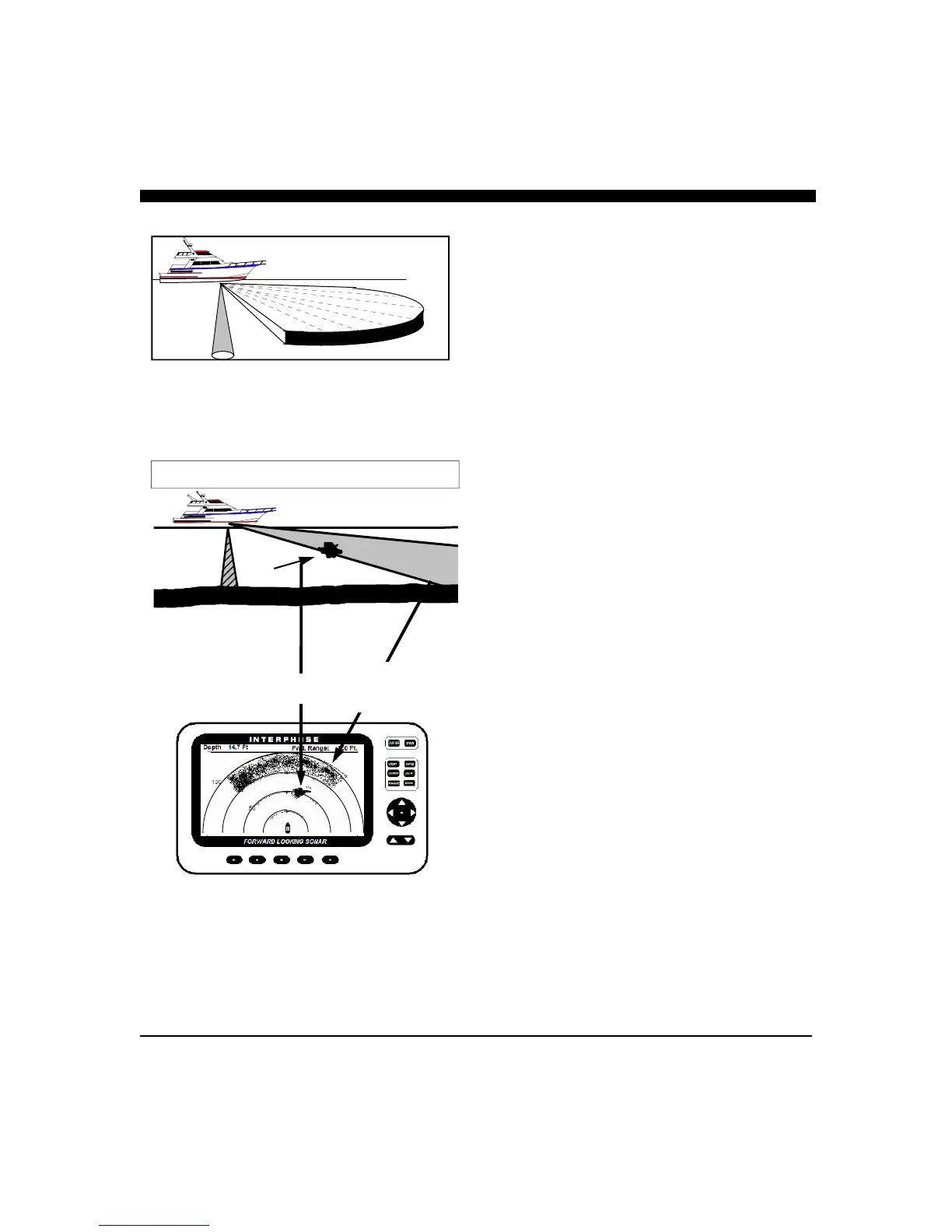
In the Horizontal display, the iScan 180 scans from left to
right across the boats bow. The forward scanning elements in
the transducer are positioned so that the plane of the
horizontal scan is angled downward approximately 10
degrees from the water’s surface (see sketch at left). This
downward angle is designed to help reduce the effects of
surface noise clutter when the water is choppy and to view
the bottom foward of the boat.
As the acoustic sound beam is projected away from the boat,
the cross-sectional diameter of the beam increases. At a
range of approximately 5 times the depth of the water the
sound beam will begin intersecting the bottom and some of
the sound energy that intersects the bottom will be reflected
back and will appear on the dislay as bottom echos.
It is important to understand that when the iScan 180 is in the
Horizontal display mode, in shallow water - it will typically
show the bottom on the forward display. This display
information can be used to help understand the structure of
the bottom ahead of the boat, but the bottom echos can also
mask or be confused as fish targets.
The center picture and resulting screen display shows a boat
in 14.7 feet of water. The iScan 180’s forward range is set to
100 Ft. Notice that the bottom is just starting to show at
about 75 forward.. A school of fish or bait is shown about 50
feet to the right and forward of the ship’s bow.
On the following page, two bottom situations are shown
along with the resulting iScan 180 Display.
Noise and Sensitivity Adjustments
The iScan 180 features an AUTO gain feature where it
continuously adjusts the gain to achieve the optimum picture
quality. The gain can also be adjusted manually to allow for
a reduction in gain to minimize the effect of screen noise, or
to increase the gain to show weaker targets.
In the forward scanning modes, the gain setting is especially
important as too little gain will cause a loss of target detection
and too much gain will cause an increase in screen noise. In
the AUTO mode, the iScan 180 increases the forward gain
until there is a certain density of targets on the display. In
most situations the AUTO gain mode works well, but manual
adjustments will often be required to get the optimum picture
- especially when looking far ahead in shallow water.
Plane of Forward Scan is Angled 10 Degrees
Downward From Surface. Forward beam will reach
bottom at approx. 5 times depth
Bait
100 ft Forward Range, Water Depth of 14.7 Ft
Bottom
Echos
Bait Ball



 To Next Page