10
2 – VIN Scan In Vehicle Testing
IB Pulse
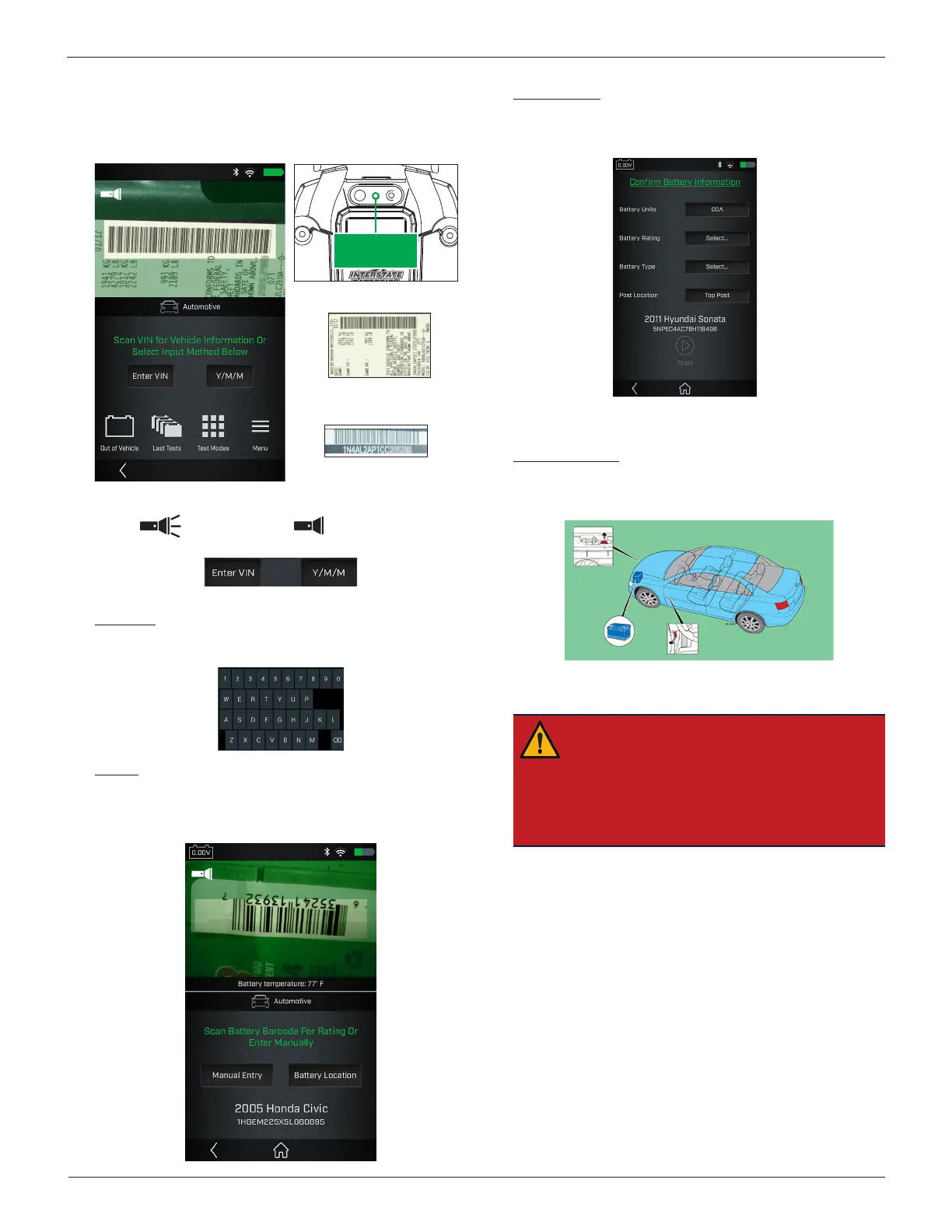
6. Scan VIN or QR code. Use the
camera view window to align
the
scanner on the back of the tool with the vehicle's VIN
barcode, usually located in the right corner of the vehicle's
front windshield or on the driver’s side door frame.
Barcode
Scanner
Driver's Door Frame
Windshield
Select the ashlight icon if more light is required.
Flashlight On Flashlight Off
Enter VIN: VIN scan is always preferred. If necessary, use the
displayed keypad to manually enter the VIN. Select Next >
to continue.
Y/M/M: Select to manually enter year, make, and model data.
7. Scan the battery. Aligning the battery barcode within the
camera view window and scan the battery barcode. The bat-
tery temperature is measured at the same time.
Manual Entry: If a battery barcode is not in the tester
database, not scannable, or the battery data is not available,
select Manual Entry to enter the Battery Units, Rating, Type,
and Post Location.
Refer to the Appendix in back of this manual for specic
battery parameter information.
Battery Location: Select Battery Location to display the
battery location in the vehicle based on vehicle year, make,
and model determined by the scanned VIN or information
entered manually.
8. Connect the IB Pulse clamps to the battery posts and select
Start.
IMPORTANT: If the entered VIN is a start-stop
vehicle and the IB Pulse has been paired to a
IB
Pulse XP
module, connect the
IB Pulse XP
to the
battery.
The
IB Pulse XP
module is paired to the IB Pulse
using a Bluetooth connection. See Chapter 2 -
VIN Scan In Vehicle Testing.
9. If prompted, capture the battery temperature.



 To Next Page