6
1 – Introduction
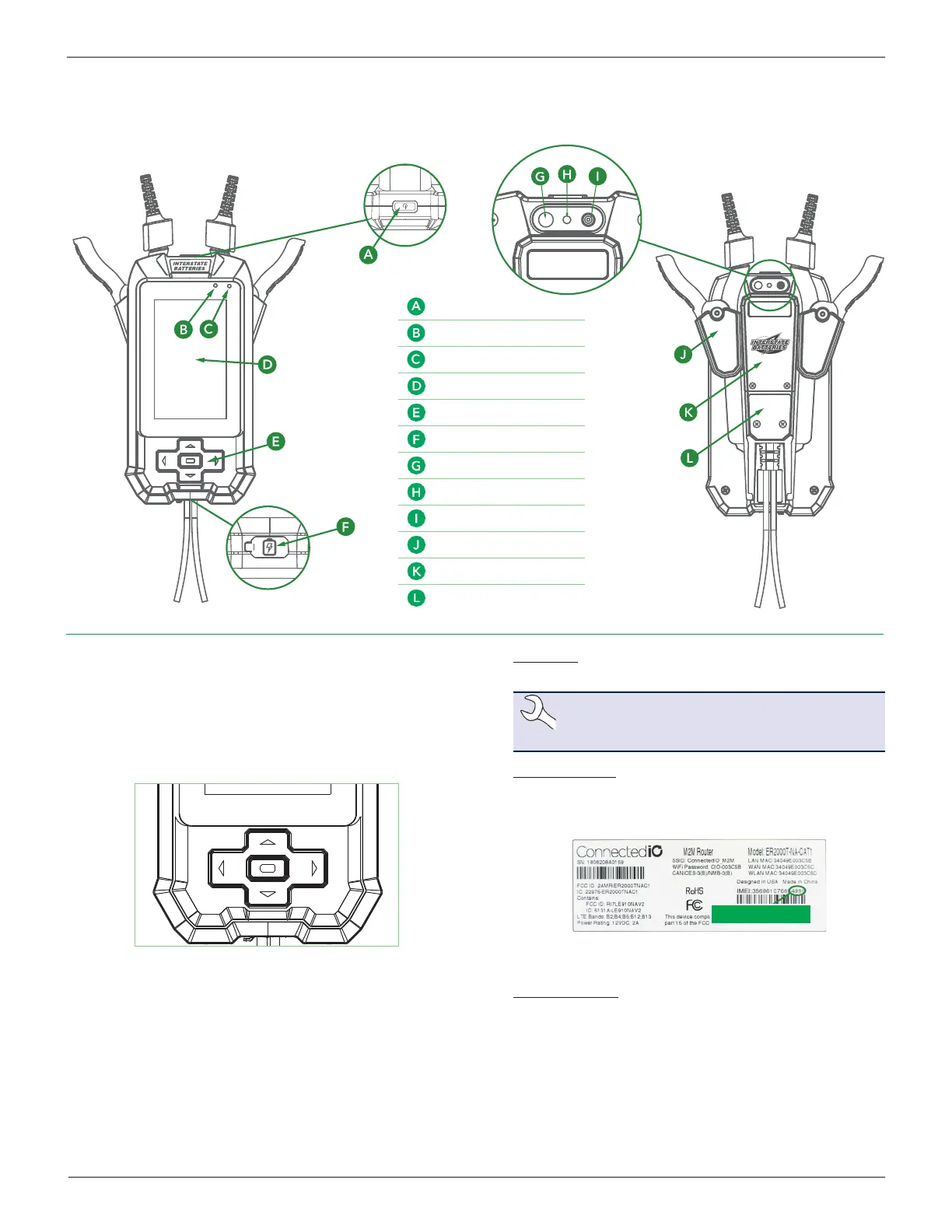
IB Pulse
IB Pulse
Front Back
Navigation
The IB Pulse features a touch screen for accessing various function
s
and options.
The arrow buttons ( ) at the bottom of the tool can also
be used for highlighting and selecting.
Press ■ to enter a selection.
Initial IB Pulse Power Up
1. Press the I/O Power button on the top of the tester to power
it up.
2. Select Next
>
to begin the setup process.
3. Date Time: Select the correct time zone, date, and time and
select Next >.
NOTE: Time zone, date, and time must be cor-
rectly set in order for the IB Pulse to connect to
the WI-FI Hub.
4. Connect To Hub: When only one HUB is detected, the tool
automatically detects and congures to the HUB. If more
than one HUB is available, identify the last 4 digits of the HUB
IMEI (on the back label) and select from the displayed list.
Last Four Digits
Once connected, the tester automatically searches for any
software updates.
5. Software Update: Installs any available updates.
Power Button
Light Sensor
Charging Indicator
Touchpanel Display
Keypad
Auxiliary Charge Port
Scan Light
Barcode Scanner
Temperature Sensor
Clamp Holster
Battery Compartment
Cable Connection



 To Next Page