9
2 – VIN Scan In Vehicle TestingIB Pulse
Use the IB Pulse
TM
to perform a battery test with two simple
scans.
Scanning the vehicle VIN and battery barcodes pre-populates
vehicle information and the battery information into the tester,
providing the information needed to run an accurate battery
test. Scanning the VIN or selecting the year, make, and model
also provides:
• Battery Location Diagrams for nding the battery location
within the vehicle.
• Electronics Reset Instructions to access vehicle electronics
reset instructions for most major vehicle brands.
• Recommended Batteries to match and recommend batter-
ies by part number
By default, the IB Pulse is congurated to test in-vehicle
automotive batteries using test parameters determined by
vehicle VIN or the year, make, and model of the vehicle being
tested. A System Test is also available.
Select
<
at any time during the test to return to the previous
screen or to return to the Main Menu.
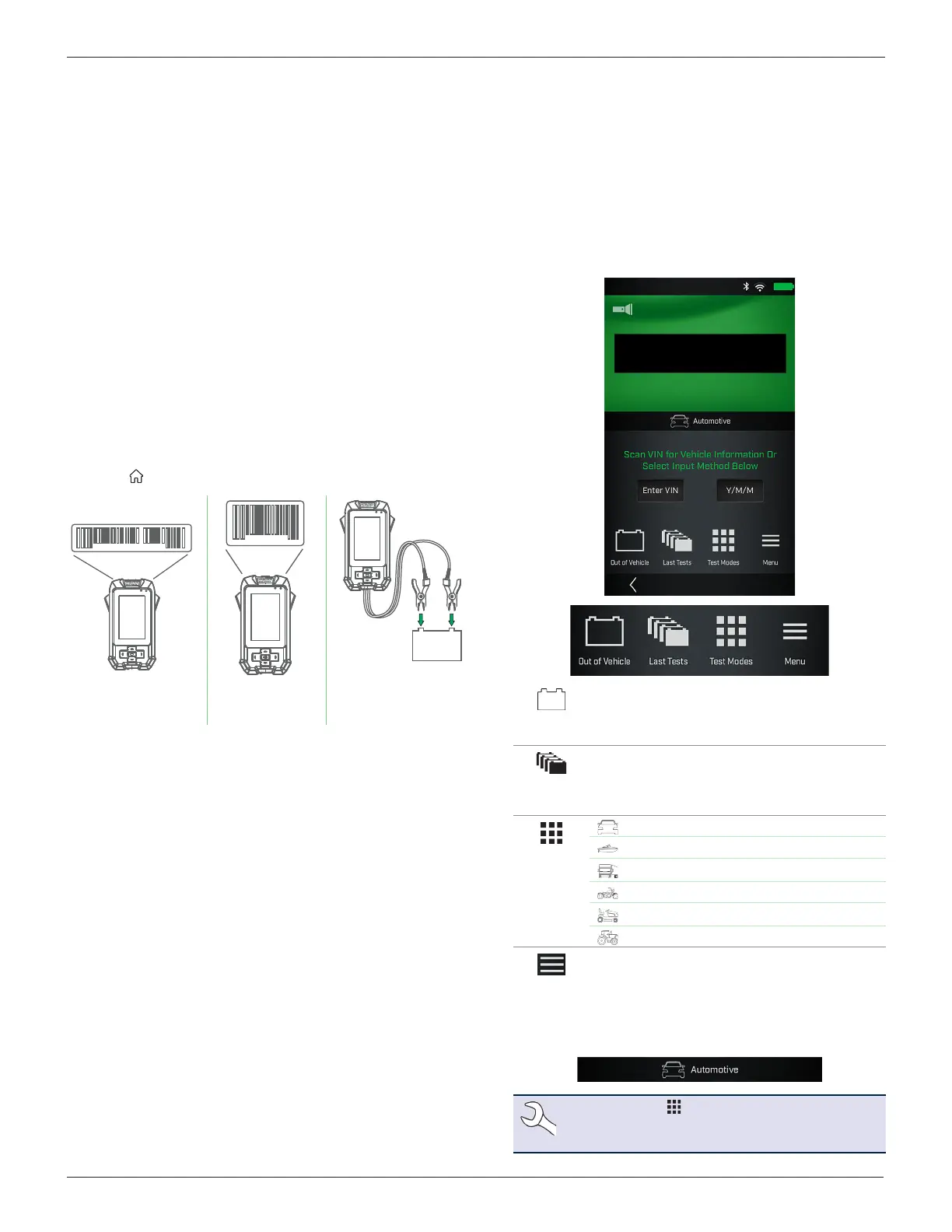
1VW76C56AHQ123548
8811477121 31
Step 1:
Scan VIN
Step 2:
Scan Battery
Barcode
Step 3:
Connect clamps
to the battery
Inspecting the Battery
Visually inspect the battery before testing for the following:
• Cracked, buckled, or leaking case. If you see any of these
defects, replace the battery.
• Corroded, loose, or damaged cables and connections. Re-
pair or replace them as needed.
• Corrosion on the battery terminals, and dirt or acid on the
case top. Clean the case and terminals using a wire brush
and a mixture of water and baking soda.
• Low electrolyte level. If the electrolyte level is too low, add
distilled water to ll to ½" above the top of the plates and
fully charge the battery. Do not overll!
• Corroded or loose battery tray and hold-down xture. Tight-
en or replace as needed.
Battery Test
1. Power on the IB Pulse tester.
2. If the function is enabled, select a User from the displayed list.
3. If the function is enabled, enter the Job Number and select
Next
>
.
4. The main test screen is displayed.
Out of
Vehicle
For testing batteries not electrically connected
to a vehicle. This test bypasses VIN entry.
See Chapter 4 - Out Of Vehicle Test.
Last Test
Most recent test result history. Select a
displayed result for specic details. Select Full
Test History to access test totals searchable
by vehicle, user, or test results.
Test
Modes
Automotive (only option with IB Pulse XP)
Marine
Group 31
Powersports
Lawn & Garden
Commercial 4D/8D
Menu
Access tester settings, defaults and
Promotion information.
See Chapter 5 - Menu.
5. The active Test Mode is displayed below the VIN scan win-
dow. Tap Test Modes to change it.
NOTE: Select to change the Test Mode. VIN
is not used for Marine, Powersports, Lawn &
Garden, and Commercial 4D/8D applications.
2 – VIN Scan In Vehicle Testing



 To Next Page