13 TILT
Invacare® Solara®3G/Spree 3G Wheelchair 110 Part No 1154295
13.2 Adjusting Hublock Cables
1. Lift up on the hublock lever to test the hublock.
2. Perform one of the following:
A. Loosen the cable locking nut that secures the cable adjusting
nut in place.
B. Turn cable adjusting nut one of two ways:
• To Tighten - Turn the cable adjusting nut clockwise. DO
NOT overtighten the cable adjusting nut (FIGURE1).
• To Loosen - Turn the cable adjusting nut
counterclockwise (FIGURE1).
C. While holding the cable adjusting nut in place, tighten the cable
locking nut against the cable adjusting nut.
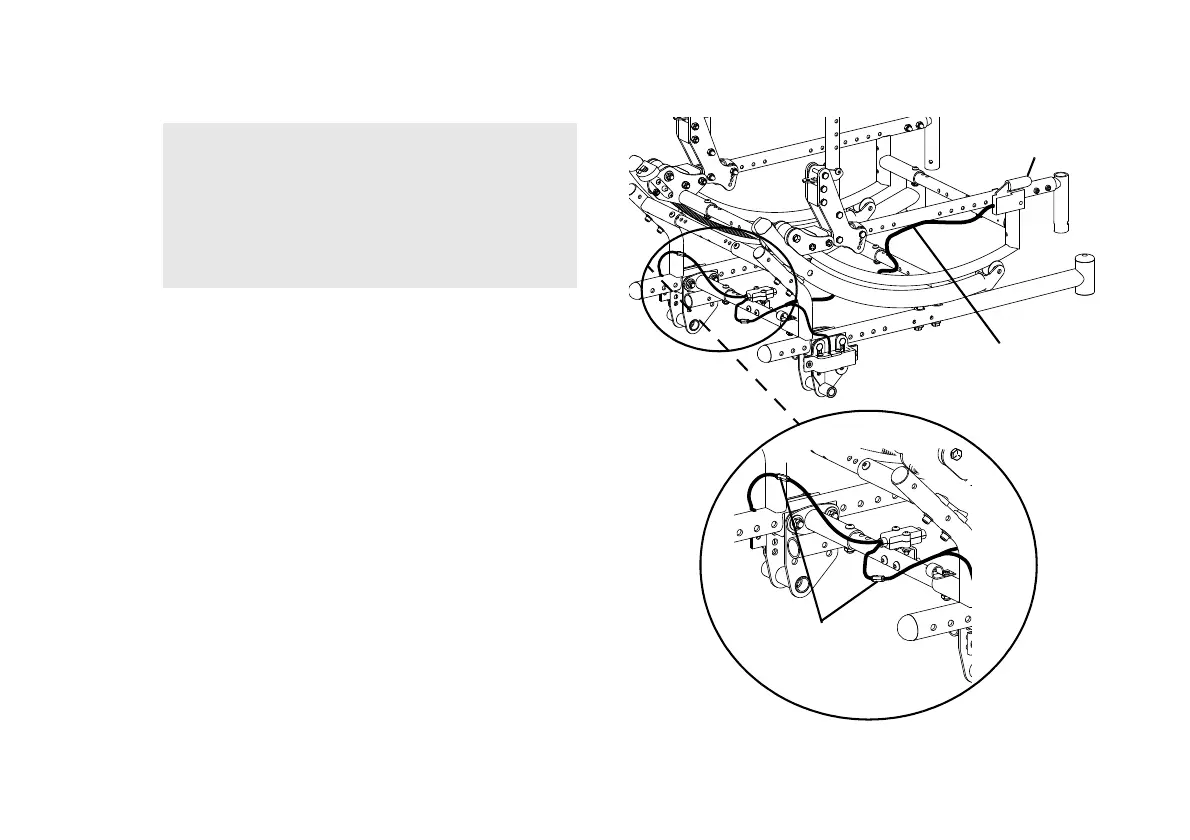
FIGURE2 Adjusting Hublock Cables
WARNING
DO NOT adjust the hublock cables while the
cables are coiled up. The adjustment will be too
tight when the cable is straightened and the tilt
mechanism will not lock and hold its position,
possibly causing injury.
If the cable is too loose, the hublock will not work.
Hublock Lever
Hublock Cable
Cable Adjusting
Nut
DETAIL “A”





 To Next Page