Service
7.
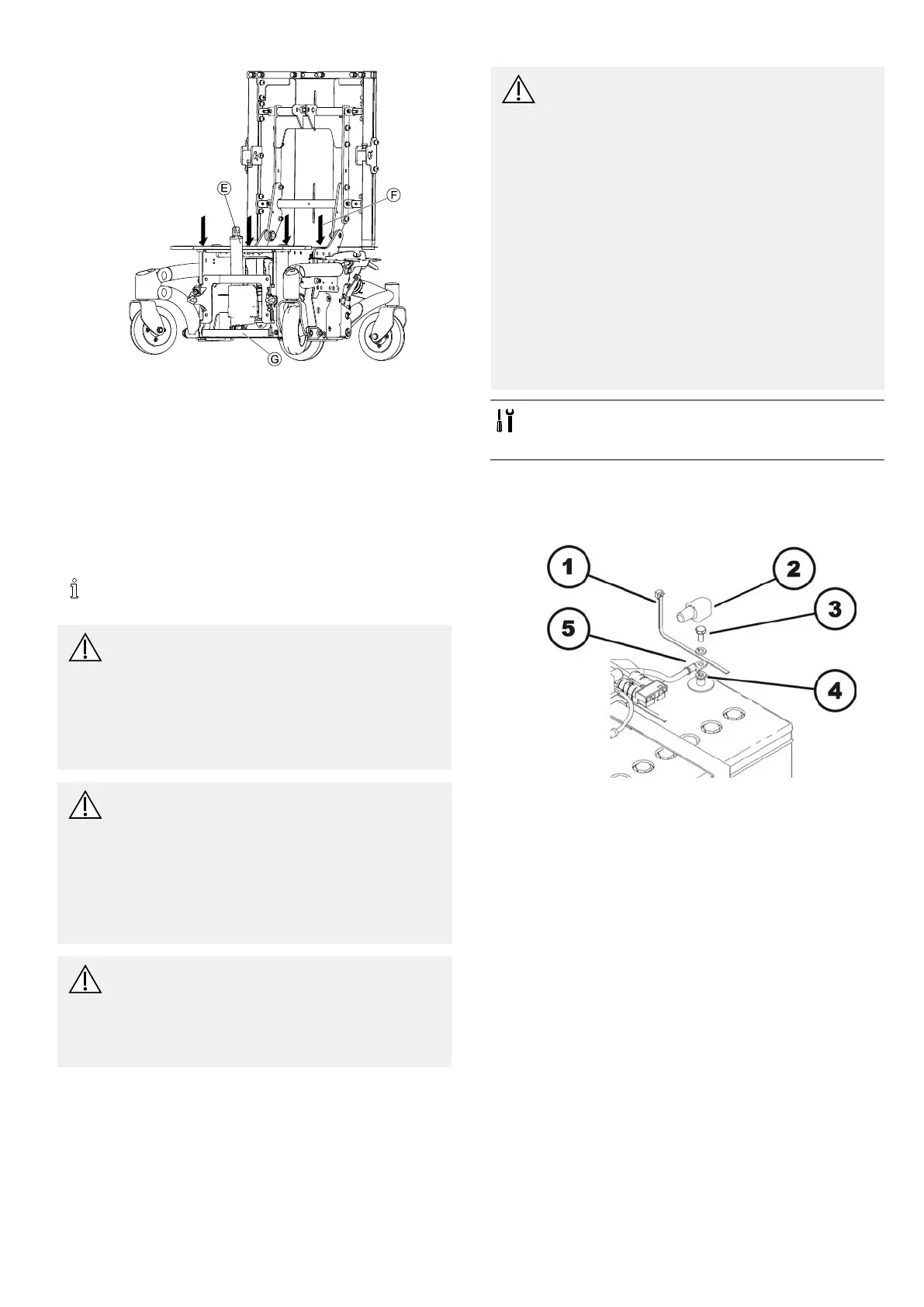
RemoveactuatorE.
8.RemovefourscrewsontopplateF.
9.Removetopplate.
10.Removebatterycaps.
11.PulloutbatterytrayG.
12.Placewoodenblockunderbatteryrail.
13.Loosenbatterybelts.
14.Removebatteries.
15.Installpartsinreverseorder.
6.7.9Replacingbatteries/replacingbatterycables
Toreplacefuse,batterycablewithfuseattachedto
itmustbereplaced.
CAUTION!
Riskofinjuryanddamagetopropertyifbatteries
arehandledincorrectly
–Theinstallationofnewbatteriesmayonlybe
performedbyauthorizedtechnicians.
–Payattentiontowarningnotesonbatteries.
–Onlyusebatterytypedenedintechnical
specications.
CAUTION!
Riskofreandburnsifbatteryterminalsare
shorted
–Takespecialcarethatthebatteryterminalsare
NOTshortedwithatoolormetalliccomponents
ofwheelchair.
–Makesurethatbatteryterminalcapsaretted
tobatteryterminalsatalltimesifyouarenot
workingonthem.
CAUTION!
Riskofcrushing
Thebatteriesareveryheavy.Riskofinjuryto
yourhands.
–Takeintoaccounttheheavyweightofbatteries.
–Handlebatteriescarefully.
CAUTION!
Riskofchemicalburns.Riskofinjurybyleaking
acid.
–Wearacid-resistantprotectivegloveswhen
handlingbatteries.
–Wearprotectivegoggleswhenhandling
batteries.
Howtodealwithabatteryacidleak
–Removeclothesthathavebeensoiledorsoaked
withacidimmediately.
–Immediatelywashaffectedareaofskinthat
hascomeintocontactwithbatteryacidwith
lotsofwater.
Aftercontactwitheyes
–Immediatelyrinseeyesunderrunningwater
forseveralminutes.Consultaneyedoctor
immediatelyafterwards.
•11mmsocketwrench
•Sidecuttingpliers
•Cableties
Removingbatteries/batterycables
1.Removebatteries,asdescribedin6.7.5Makingbatteries
accessible,page32.
Positiveterminal(+)
1.Removecableties(1)withsidecuttingpliers.
2.Liftbatteryterminalcap(2)offandmoveitupcable
andoutofway.
3.Loosenbatteryterminalscrew(3).
4.Removebatteryterminalscrewtogetherwithboth
washersandcablelug(5)frombatteryterminal(4).
Negativeterminal(-)
1.Repeatstepsofprocedureonnegativeterminalof
battery.
2.Replacebatteriesand/orbatterycables.
Installingbatteries/batterycables
1.Installpartsinreverseorder.Connectnegativeterminal
rst,thenpositiveterminal.
2.Makesurebatteryboxsocketsandplugsarecorrectly
installed.Apolaritydiagramislocatedinthebattery
boxshroud.
3.Carefullyrepositionbatteryterminalcapsandsecure
themawithcabletietopreventthemfrompossibly
slippingoutofplace.
1532486-L35










 To Next Page