Service
•5/6“Allenkey
•5/32“Allenkey
•Phillipsscrewdriversize2
•Flatscrewdriver
•1/4“wrench
•5/16“wrench
•Torquewrench0-20Nm(orsimilar)
•Obliquepliers
•Cableties
•M8washer
•Twolongwoodenblocks,min.14x14x30cm
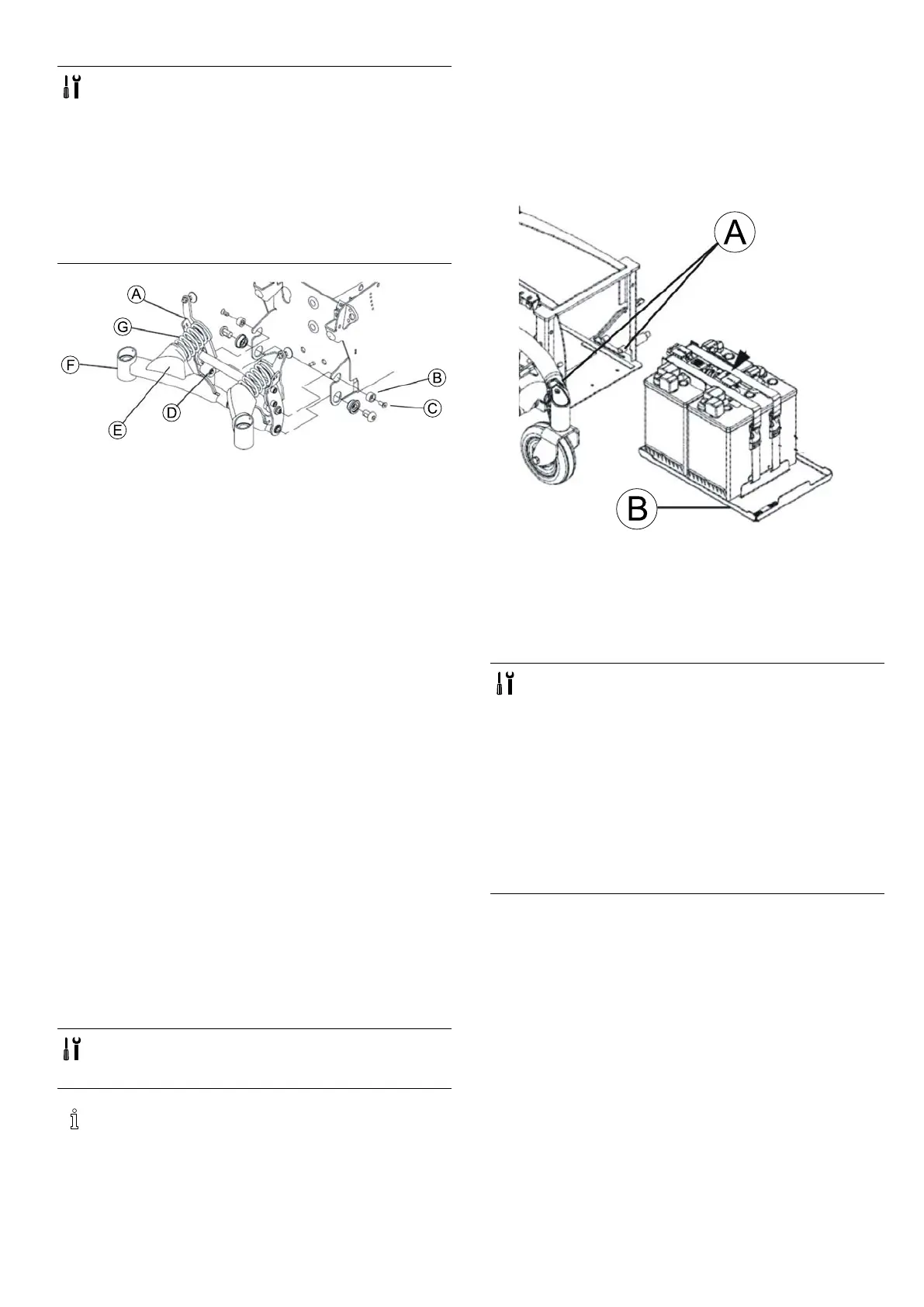
1.PutspringsGintopositionbetweensuspensionarm
FandstopA.
2.Makesurerearspringsarecompressed:
•Blockmethod
–Raisesuspensionarmsandreplacewoodenblocks
underneaththemuntilspringsarecompressed.
•Clampmethod
–Pressspringstogetherwithjoiner'sclampor
similarsuitableclampuntilnylonspacerBcan
bettedintorecessesprovidedinsuspensionF.
–FittwoscrewsCincludingspacerB.
–Tightenscrewsto8.5Nm.
3.InstalltwostoppersD.
4.Fitwasherandnutstosecurestoppers.
5.Tightennutsto8.5Nm.
6.Removewoodenblocksorjoiner'sclampscarefullyso
thatspringsarereleased.
7.Reinsertallnecessaryplugsandxcableswithcableties
aspreviously.Seealso6.7.16Cablerouting,page38.
8.Installrearshroudasdescribedin6.6.2Removingrear
shroud,page30.
9.Liftmobilitydeviceoffwoodenblocks.
10.Checkallmobilitydevicefunctions.
11.Ifnecessary,carryoutadjustmentstosettingscrewon
stabilitylocksystemasdescribedinAdjustingsetting
screw,page16.
12.Fitbothprotectivecapsofthestabilitylocksystem.
Theyareheldusingascreworacabletiedependingon
mobilitydevice’sdateofmanufacture.
6.3.6Replacingbatterytray
•Phillipsscrewdriversize2
•5/8“Allenkey
•5/32“Allenkey
TDXSP2Low-Riderdoesnothaveabatterytray.
Removebatteriesmanually.
Removingbatterytray
1.Makebatteriesaccessibleasdescribedin6.7.5Making
batteriesaccessible,page32.
2.Removebatteriesasdescribedinchapter6.7.6Replacing
batteries,page33/6.7.9Replacingbatteries/replacing
batterycables,page35/6.7.8Replacingbatteries
(Poweredsimpletilt20°),page34.
3.
RemovetwostopboltsA.
4.PullbatterytrayBoutofbatterybox.
Installingbatterytray
1.Installpartsinreverseorder.
6.3.7Replacingbatterybox
•5/6“Allenkey
•5/32“Allenkey
•Phillipsscrewdriversize2
•Flatscrewdriver
•1/4“wrench
•5/16“wrench
•Torquewrench0-20Nm(orsimilar)
•Torquewrench5-25Nm(orsimilar)
•Torquewrench20-80Nm(orsimilar)
•Obliquepliers
•Cableties
•M8washer
•Twolongwoodenblocks,min.14x14x30cm
Removingbatterybox
1.Removeseatincludingseatsupportasdescribedin
“Seating”andinModuliteservicemanual.
2.Removeshroudsasdescribedin6.6Shrouds,page30.
3.Removebatteriesasdescribedin6.7.5Makingbatteries
accessible,page32and6.7.6Replacingbatteries,page
33/6.7.9Replacingbatteries/replacingbatterycables,
page35.
4.Removebatterysupportasdescribed6.3.6Replacing
batterytray,page19.
5.Removeheadlightsandrearlightsdependingonversion
(includingholder)asdescribedin6.8Lightingunit,page
38.
6.Removepowermoduleasdescribedin6.7.1Replacing
powermodule,page31.Seecorrespondingservice
manual:
-ForLinX,seeLiNXservicemanual.
-ForDX2,seerevision11ofTDXSP2servicemanual.
1532486-L19






 To Next Page