
 Need help?
Do you have a question about the Ipcam IP Camera and is the answer not in the manual?
User must strictly follow the manual for camera usage.
Guidelines for camera installation environment, temperature, and humidity.
Instructions for safely transporting and carrying the camera package.
Guidelines for maintaining and protecting the camera.
Lists all items included in the camera package.
Lists the key features of the IPCAM.
Details advanced functionalities of the IPCAM.
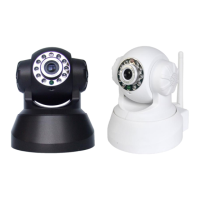
Identifies and explains the components visible on the front of the camera.
Details the various ports and connectors on the camera.
Specifies the hardware and software needed on a PC to use the camera.
Step-by-step guide for connecting and setting up the camera hardware.
Instructions for installing the necessary software for the camera.
Introduction to the IP Camera Tool for managing cameras.
Steps for logging into the camera via the IP Camera Tool or browser.
Explains the view and functions available for a visitor user.
Details the controls and functions available for an operator user.
Outlines the advanced settings and management options for administrators.
General guide on how to get started using the camera after setup.
Instructions for configuring the IP camera's wireless network connection.
Guide on accessing the internet via a router using ADSL.
How to access the camera directly from the internet using a static IP.
Guide on using Dynamic DNS for remote access to the camera.
Procedure to reset forgotten administrator username and password.
How to check and configure IP address and subnet mask for network access.
Troubleshooting network configuration issues for camera access.
Resolving issues with video display due to ActiveX controller problems.
Factors affecting image frame rate and potential solutions.
Steps to register for a DDNS hostname for remote access.
Troubleshooting the "Fail to connect to the device" prompt when using multiple cameras.
Reasons and solutions for not being able to access the IPCAM over the internet.
 General
| Connectivity | Wi-Fi, Ethernet |
|---|---|
| Features | Motion Detection |
| Night Vision | Yes |
| Night Vision Range | Up to 30m |
| Power Supply | DC 5V |
| Operating Temperature | -10°C to 50°C |
| Storage | MicroSD Card (up to 128GB) |
| Two-Way Audio | Yes |
| Weather Resistance | IP66 |

 To Next Page