IPCAM User Manual
22 / 67
3.3 For Visitor
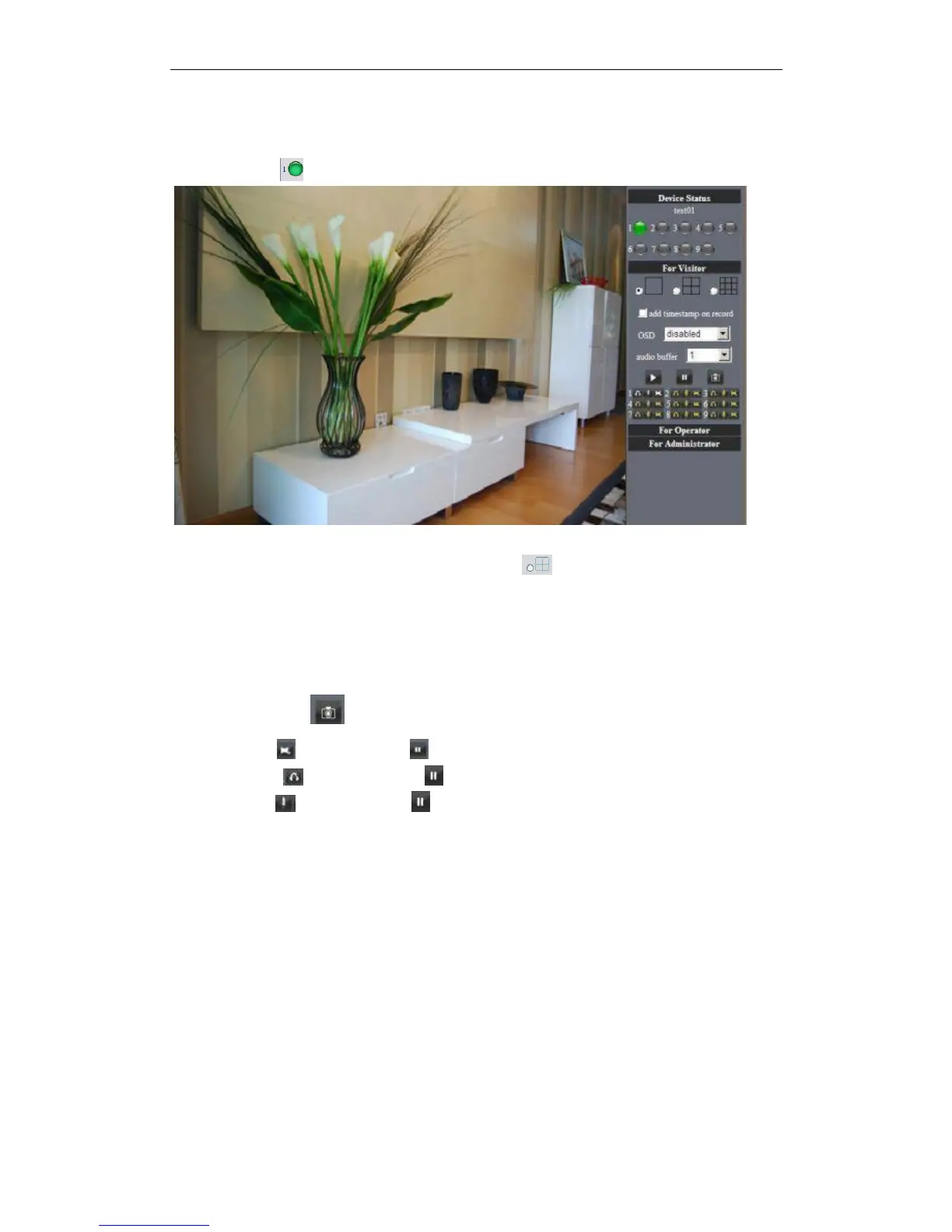
For example: if is bright ,the first route is on Detection(Motion Detection).
Figure 3.5
If you want to detect 4 views , need to click this ico .The first you should add more
deivce.see details in 3.5.1 Multi-Device Settings.
OSD: Display date and time on the video. You can disable the OSD function or choice
other color.
(OSD:on-screen display)
Snapshot: Click ico to snap the picture.
REC: Click ico into REC mode, is stop.
Audio:Click ico into Audio mode, can listen the voice in monitoring range..
Talk:Click ico into Talk mode, Visitor can talk with whom is in the monitoring
range.
Note:
the record file name is: device Alias_ Current time.Avi
For example: IPCAM_20081211134442.Avi
It means the device alias is IPCAM and its record‟s end time is : At 13:44:42 on
December 11, 2008.When use motion detection and checked Send Mail on Alarm.
The name of the picture received in mailbox is like this: device id(Alias)_ Current
time.jpg
For example: 00606E576A02(IPCAM)_m20081216212745.jpg
It means the device ID is 00606E576A02, the device alias is IPCAM and its picture‟s time
is : At 21:27:45 on December 16, 2008


 To Next Page