IPCAM User Manual
45 / 67
4.2 Setting Wi-Fi of IP Camera
1) To use the wireless functions of the IP Camera,a wireless router like linksys is
required.
2) Enter the wireless router setup page(you may see the wireless router user
manual).To Find out the SSID, Channel(less than 10), Security
Way(NONE,WEP),Authentication Type,encryption.
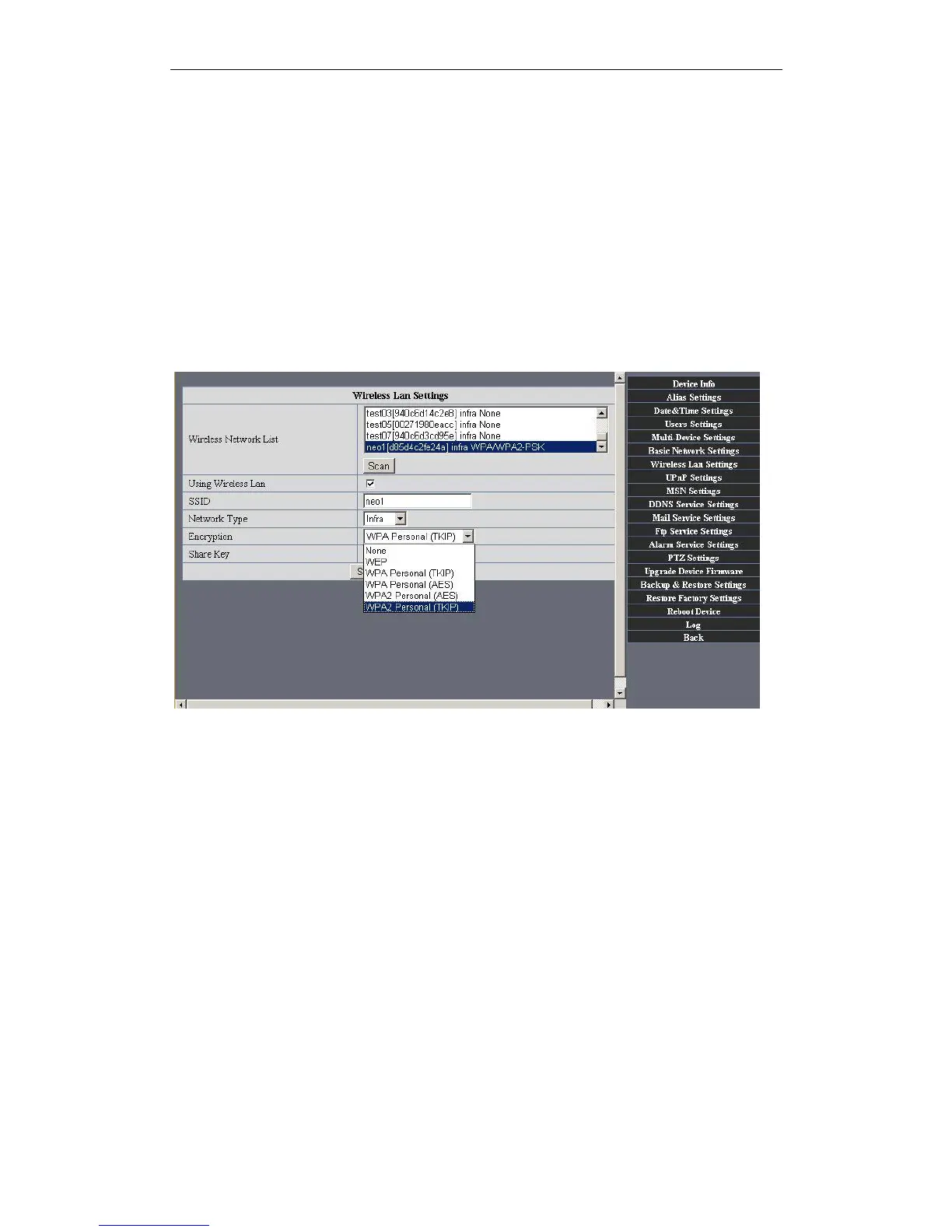
3) Enter Wireless LAN Settings to input contents gotten from the wireless router then
click Submit to reboot the device.
NOTE: This product only supports WEP encryption.
Figure7.5
4) Wait at least 30 seconds to unplug the ethernet cable, then unplug the power supply.
5) Plug the power supply making sure that the ethernet is not connected
6) After around 30 seconds, if the LED blinks ,it indicates it is working in wifi mode
7) Camera login.(details:3.2)
4.3 Using a router to access the Internet
Using a router to access the Internet by shared ADSL If a router is set for dial-up Internet
access,it is not required to set ADSL dial-up account and password on the IP Camera.


 To Next Page