The site should be away from radio transmitting equipment, arc-welding devices, copy
machines, and other electrical equipment capable of generating high levels of electrical
interference. The system should be protected from flooding and heavy machinery as well
as excessive dust and vibration.
4.2.2 Verify Equipment On-Site
Once the equipment installation site has been identified and a dedicated AC outlet, protective earth
ground, lighting and ventilation are available, verify that all equipment and tools required are on-
site and the equipment has not been damaged during shipment. Assure there is no shipping
damage. Check that the type and quantity of Modules and terminals received are correct. Also,
assure optional equipment and Power Line Surge Protector are on-site. The individual Modules
and terminals need not be unpacked at this time.
If any equipment appears damaged or missing, notify appropriate personnel to correct the situation.
4.3 MODULE MOUNTING HARDWARE INSTALLATION
4.3.1 Desk mount Holder Installation
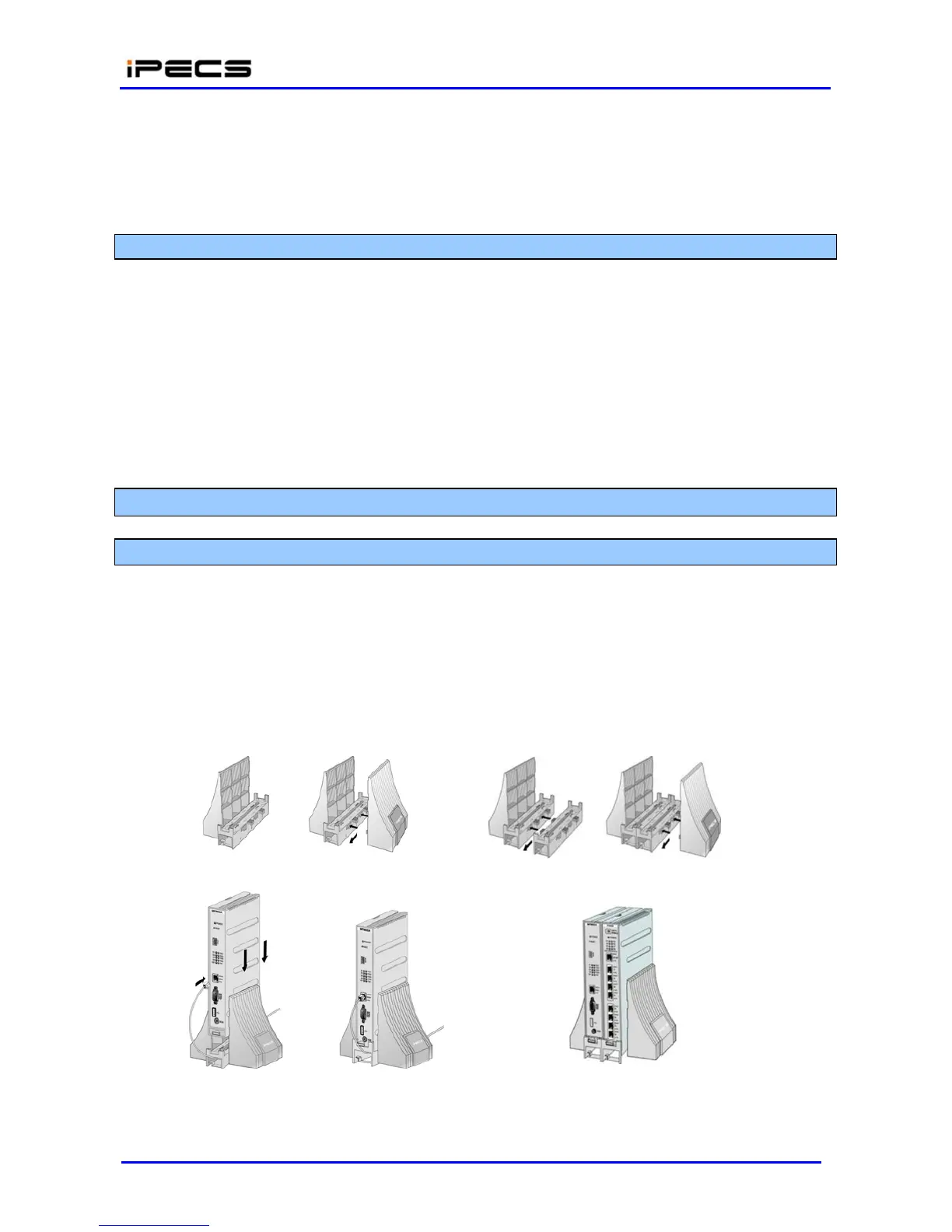
To assemble the Desk Mount Holder, refer to the instructions below and Figure 4.3.1-1. Note a
Desk Holder Extender is required for each Module.
Place key-hole slots on the side of the Extender over the keys on the side of the bookend.
Slide the Extender and bookend in opposite directions to the locked position.
Repeat for additional Extenders and the other bookend.
Then, insert the Module(s) from top position.
Figure 4.3.1-1 Mounting Module in Desk Mount
Holder



 To Next Page