ISLA Instruments S2400 User Manual
– 44 –
Edit Step Parameters
In this mode the recorded parameters can be changed for any pattern event. The changed
parameters can be previewed by pressing the pad. If the pattern is running, the changed
parameters will be played when that event is played in the pattern.
Scroll the cursor to the step to edit and press Enter. The parameters can be edited in either a
graphical or numeric view. Press F2 to switch between views.
Graphical View
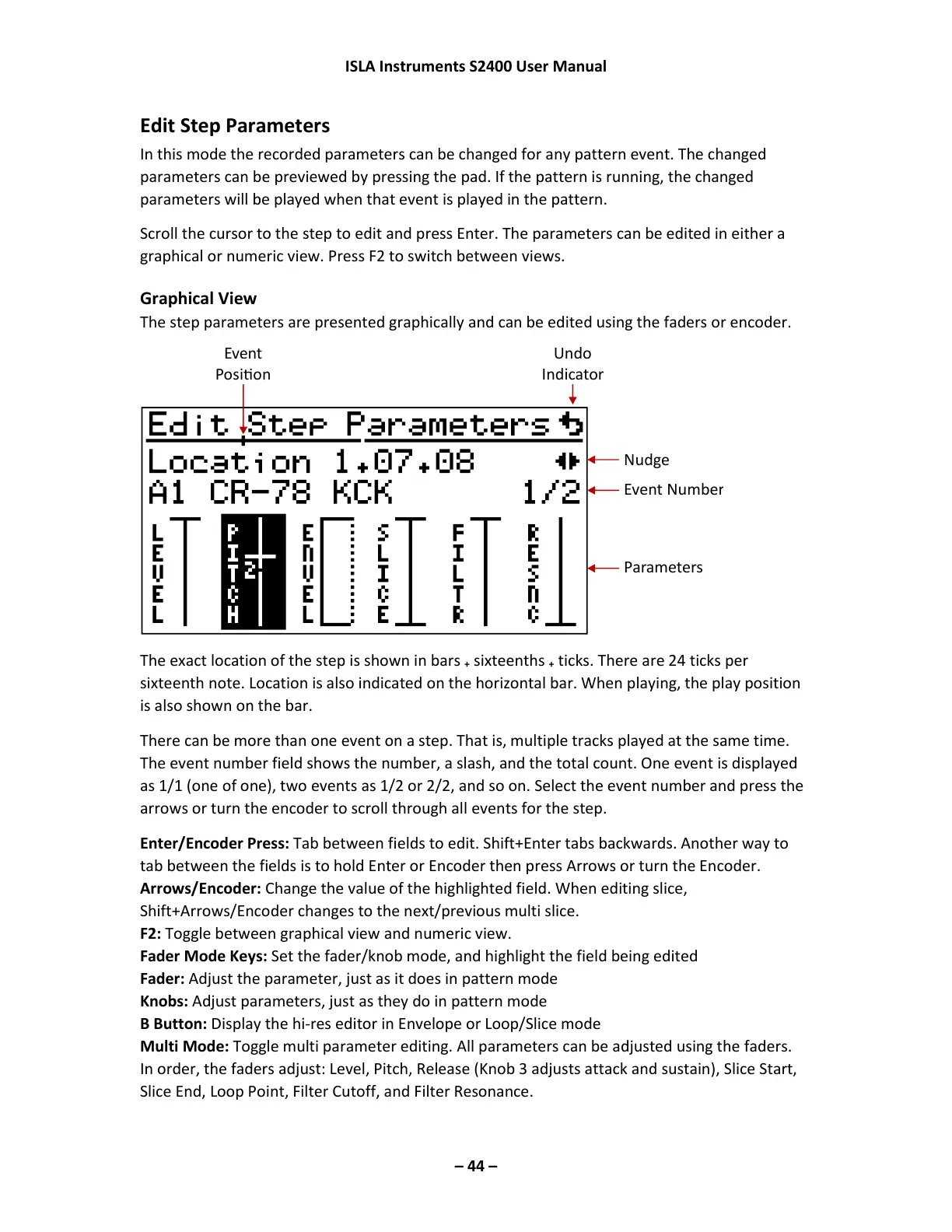
The step parameters are presented graphically and can be edited using the faders or encoder.
The exact location of the step is shown in bars
+
sixteenths
+
ticks. There are 24 ticks per
sixteenth note. Location is also indicated on the horizontal bar. When playing, the play position
is also shown on the bar.
There can be more than one event on a step. That is, multiple tracks played at the same time.
The event number field shows the number, a slash, and the total count. One event is displayed
as 1/1 (one of one), two events as 1/2 or 2/2, and so on. Select the event number and press the
arrows or turn the encoder to scroll through all events for the step.
Enter/Encoder Press: Tab between fields to edit. Shift+Enter tabs backwards. Another way to
tab between the fields is to hold Enter or Encoder then press Arrows or turn the Encoder.
Arrows/Encoder: Change the value of the highlighted field. When editing slice,
Shift+Arrows/Encoder changes to the next/previous multi slice.
F2: Toggle between graphical view and numeric view.
Fader Mode Keys: Set the fader/knob mode, and highlight the field being edited
Fader: Adjust the parameter, just as it does in pattern mode
Knobs: Adjust parameters, just as they do in pattern mode
B Button: Display the hi-res editor in Envelope or Loop/Slice mode
Multi Mode: Toggle multi parameter editing. All parameters can be adjusted using the faders.
In order, the faders adjust: Level, Pitch, Release (Knob 3 adjusts attack and sustain), Slice Start,
Slice End, Loop Point, Filter Cutoff, and Filter Resonance.



 To Next Page