18
The set up functions (batching, regulation,
automatically the instrument (filters)
for the operation set modifying optimally the
parameters related to the function chosen.
To enable one of four types operation press the key
while the function is highlighted,
to confirm the changes press the key.
Filters
settings for different S.rate (sensor menu, not user modifiable):
Batching Regulation Flow measure
MFSLN MFFLN MFSLN MFFLN MFSLN MFFLN
10Hz 0 0 10 0 20 0
20Hz 0 0 5 0 10 0
50Hz 0 0 2 0 4 0
80Hz 0 0 1.3 0 2.5 0
150Hz 0 0 0.7 0 1.3 0
See the functions description section for more details regarding
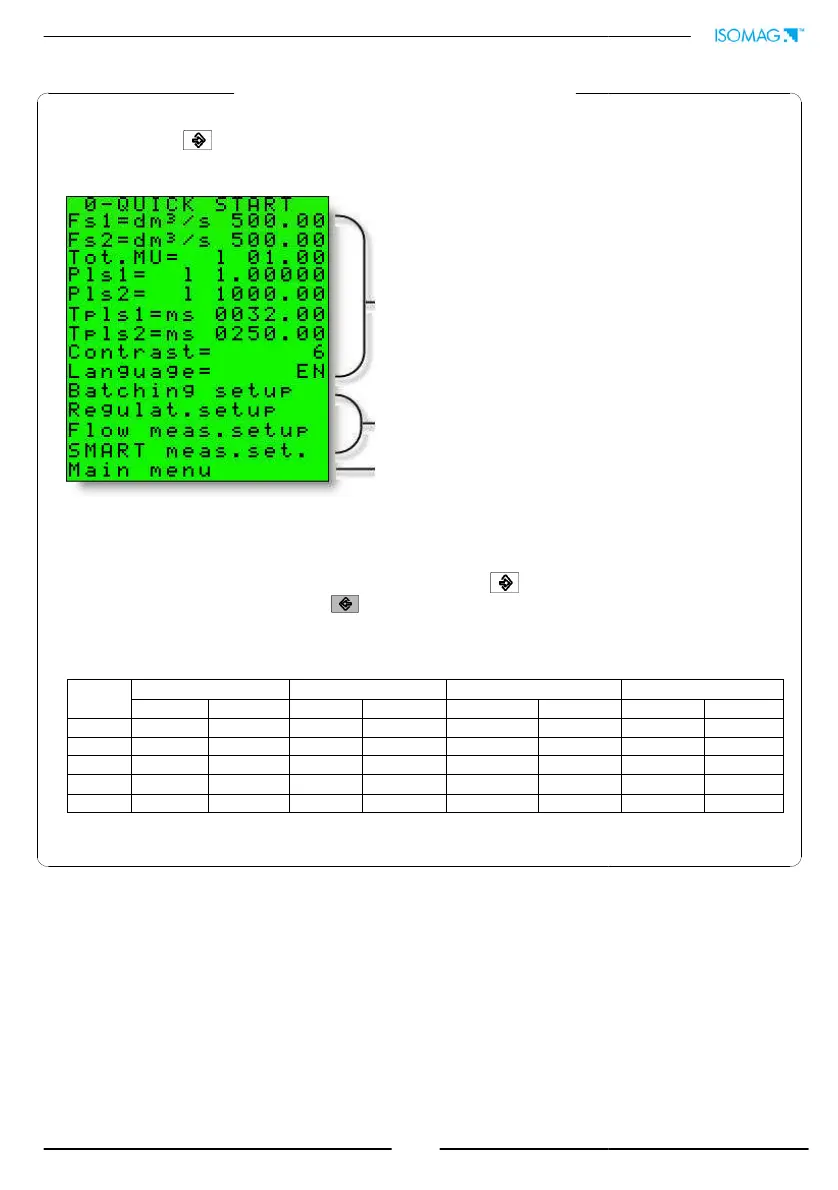
QUICK START MENU
The user has immediate access to the Quick Start menu when the converter is powered up
by pressing the
key. If access to the quick start menu does not occur, then it has been
disabled through the function 8.4
See function menu section
Automatic parameters optimization (see below)
configure
for the operation set modifying optimally the
while the function is highlighted,
settings for different S.rate (sensor menu, not user modifiable):
SMART measure
MFSLN MFFLN
100 10
50 5
20 2
12.5 1.25
6.7 0.67
.
The user has immediate access to the Quick Start menu when the converter is powered up
key. If access to the quick start menu does not occur, then it has been
Automatic parameters optimization (see below)


 To Next Page