20
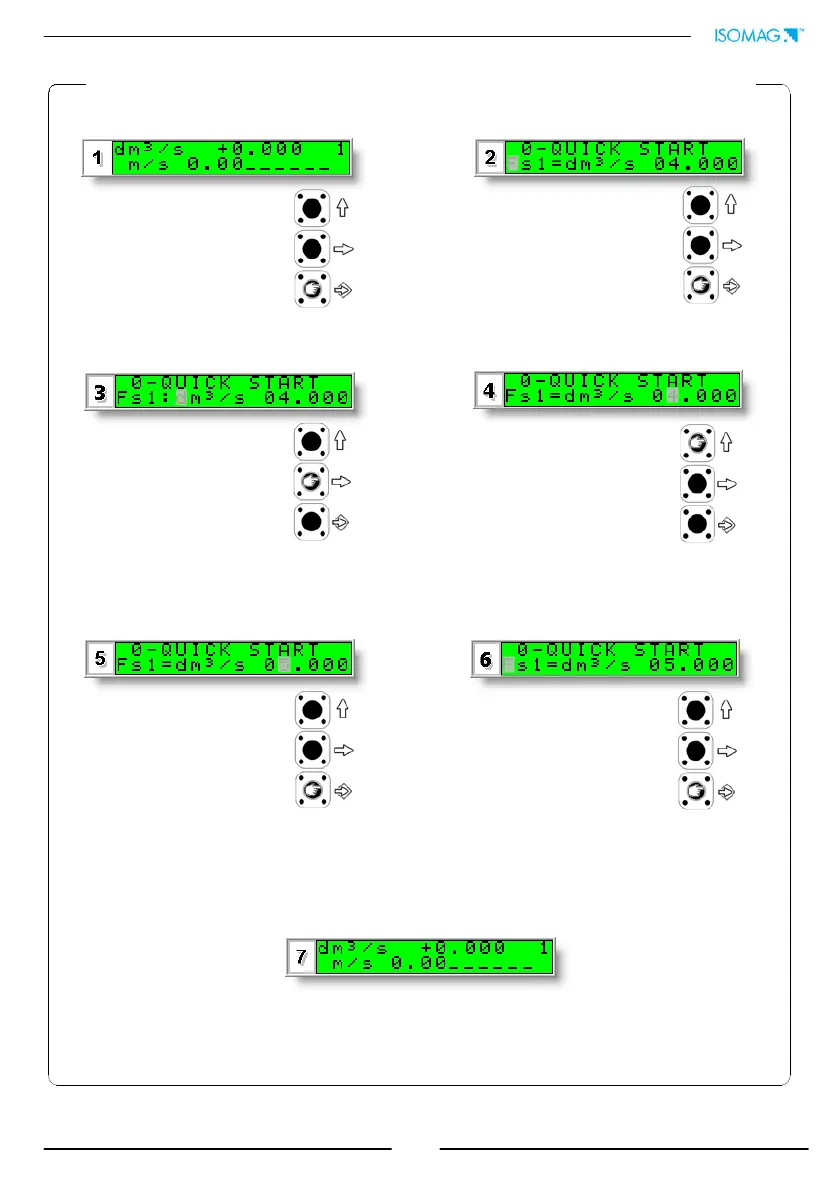
EXAMPLE: “Quick start menu” function modification. Full scale value 1
(Fs1) from 4dm³/s to 5dm³/s.
Access the function “Fs1” by
pressing the button indicated for less
than 1 second
Push the key repeatedly and rapidly
to move the cursor to the value to
modify
Confirm the new value with a
short press of the key (less
than 1 second)
Long push to leave the quick
start menu and return to the
initial visualization page
To increase the value press
the upper key for short
periods of less than 1 second,
to reduce the value press the
upper key for more than 1
second repeatedly
Enter in the “Quick start menu”
The keypad button to be pressed at
each step is indicated by the icon
symbol place on one of the three
keys of the keypad (here lower key)


 To Next Page