23
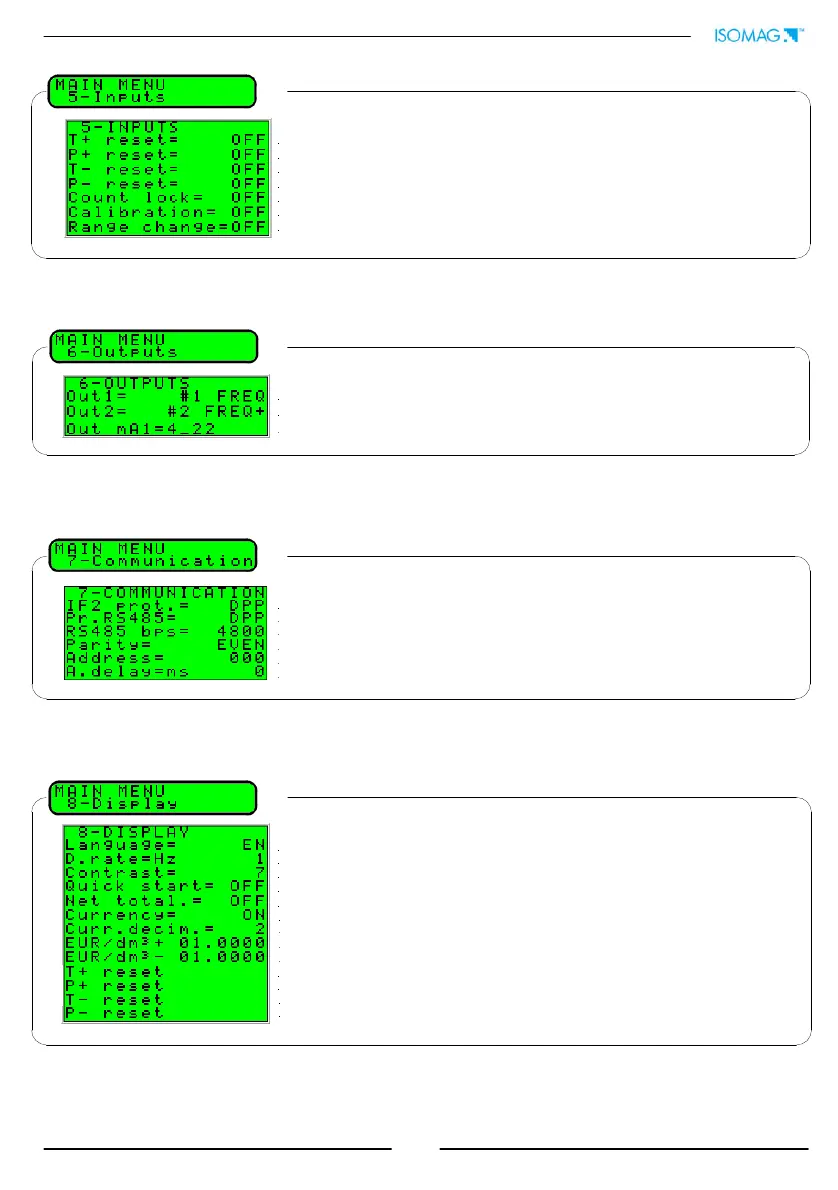
6.1* Output 1 functions
6.2* Output 2 functions
6.3* Choice of function the range of current output n.1
8.1 Choice of the language: EN= English, IT=Italian, FR= French, ES= Spanish, DE=German
8.2 Display updating frequency: 1-2-5-10 Hz
8.3 Display contrast
8.4 Quick start menu visualization
8.10* Total direct (positive) flow totalizer reset
8.11* Partial direct (positive) flow totalizer reset
8.5 Enable the page of net totalizer
8.8* Value of conversion/currency for direct totalizer
8.12* Total reverse (negative) flow totalizer reset
8.13* Partial reverse (negative) flow totalizer reset
8.7 Choice of the numbers of decimals for the visualization currency value: From 0 to 3
8.6 Visualizes the values of the partial totalizer in the unit of selected currency
8.9* Value of conversion/currency for reverse totalizer
5.1* Total direct (positive) flow totalizers reset enable
5.2* Partial direct (positive) flow totalizers reset enable
5.3* Total reverse (negative) flow totalizers reset enable
5.4* Partial reverse (negative) flow totalizers reset enable
5.5 Totalise counting lock command (see input on/off operation section)
5.6* Autozero calibration external command
5.7 Range change external command (see function 3.5)
7.1 Choice of the communication protocol for the IF2 device
7.2 Choice of the communication protocol for the RS485 port
7.3 Speed of the RS485 output (possible choice: 4800, 9600, 19200, 38400 bps)
7.4 RS485 parity
7.5 Address value of the converter (range 0 - 255)
7.6 Instrument answer delay


 To Next Page