Pancode VoIP/Pantel VoIP Access Control Door Phones
Installation and Programming Manual
4.1 Installing the Video Camera (Optional)
4.1.1 Installing the analog Video Camera
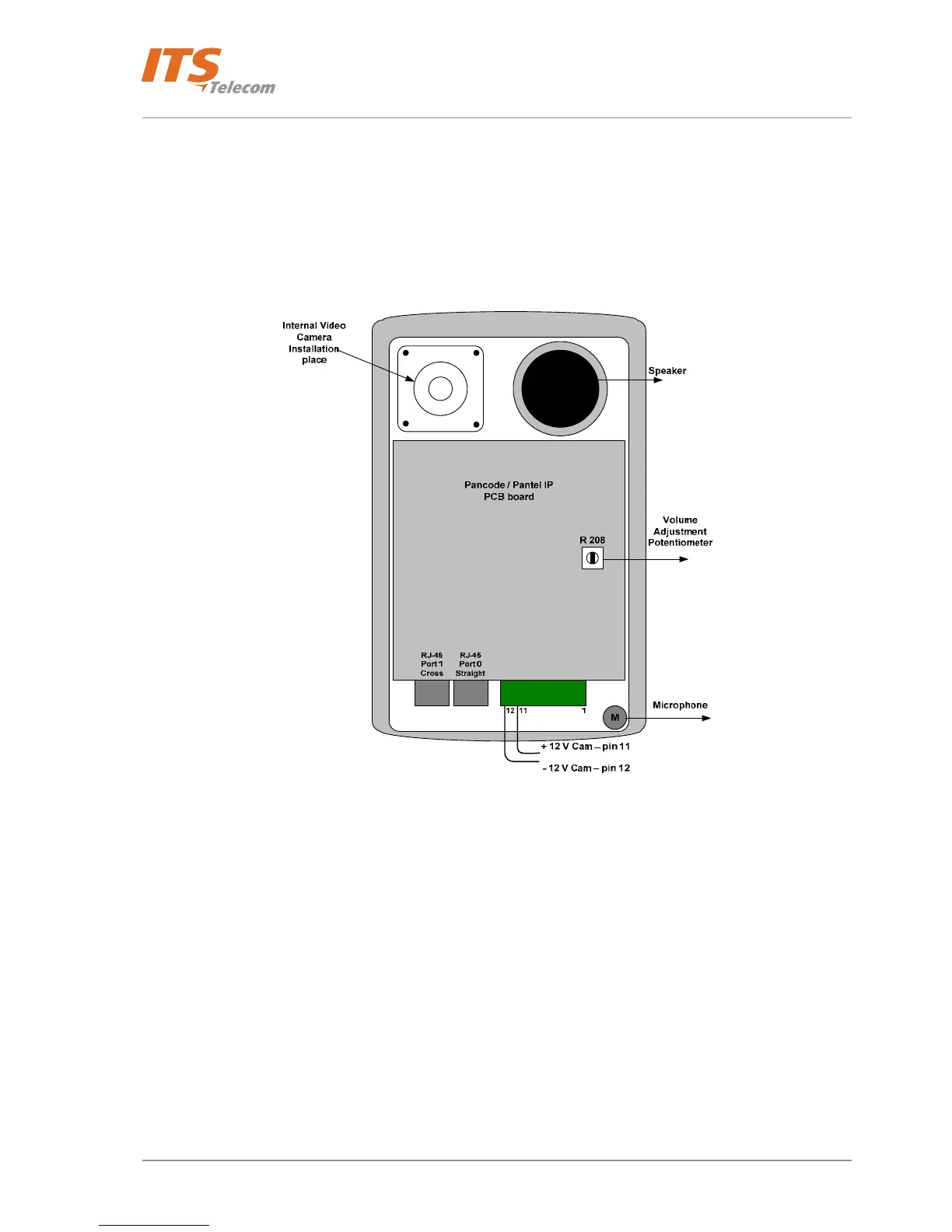
The Pantel VoIP/Pancode VoIP unit can be installed with an internal or external analog video camera. The video
camera 12V DC power is supplied via the 11(+) and 12(-) pins located on the Main PCB Connector (see Figure
4-5). In addition to the external video camera can be powered with the own external power supply.
Figure 4-5 Pantel Pancode IP rear view
The internal video camera can be physically installed on the internal video camera installation place (see Figure
4-5).
The default internal video camera video output socket is the BNC-Female type. The BNC (Bayonet Neill
Concelman) connector is a very common type of
RF connector used for terminating coaxial cable. BNC-Female
video output has to be connected with the customer’s video monitor or USB adapter (See Note below) by using
the coaxial cable installed on the customer’s site. The recommended coaxial cable length has to be no more then
20 m.
14



 To Next Page