PanCam/Pantel/Pancode
Installation and Programming Manual
11
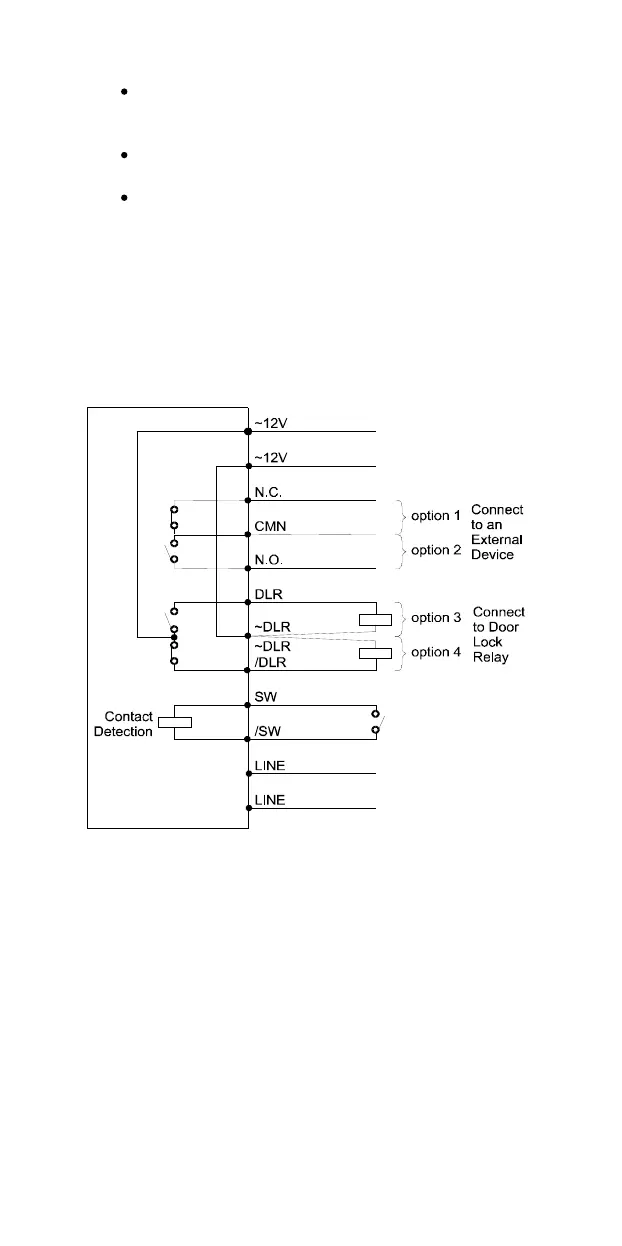
Option
2:
For use with an external device, which
requires the Pancode to be set up as “Normally
Open”
Option 3:
For use with powered
-
unlocked
-
state lock
relay (most common)
Option 4:
For use with powered
-
locked
-
state lock
relay
(
recommended for safety purposes in
an
emergency
situation
)
The following schematic diagram shows the wiring plan for
these four options.
PanCam/Pantel/Pancode
Circuit (PCB Side)
Figure 2
-
7. PanCam/Pantel/Pancode Wiring Schematics
2.4
V
olume Control
The volume of the PanCam/Pantel/Pancode speaker can be
adjusted using the volume controller located on the unit’s back
panel.
After installing the unit, test the volume. In case it is too
low/high, remove the unit from the mounting bracket a
nd
adjust the volume using a small screwdriver.



 To Next Page