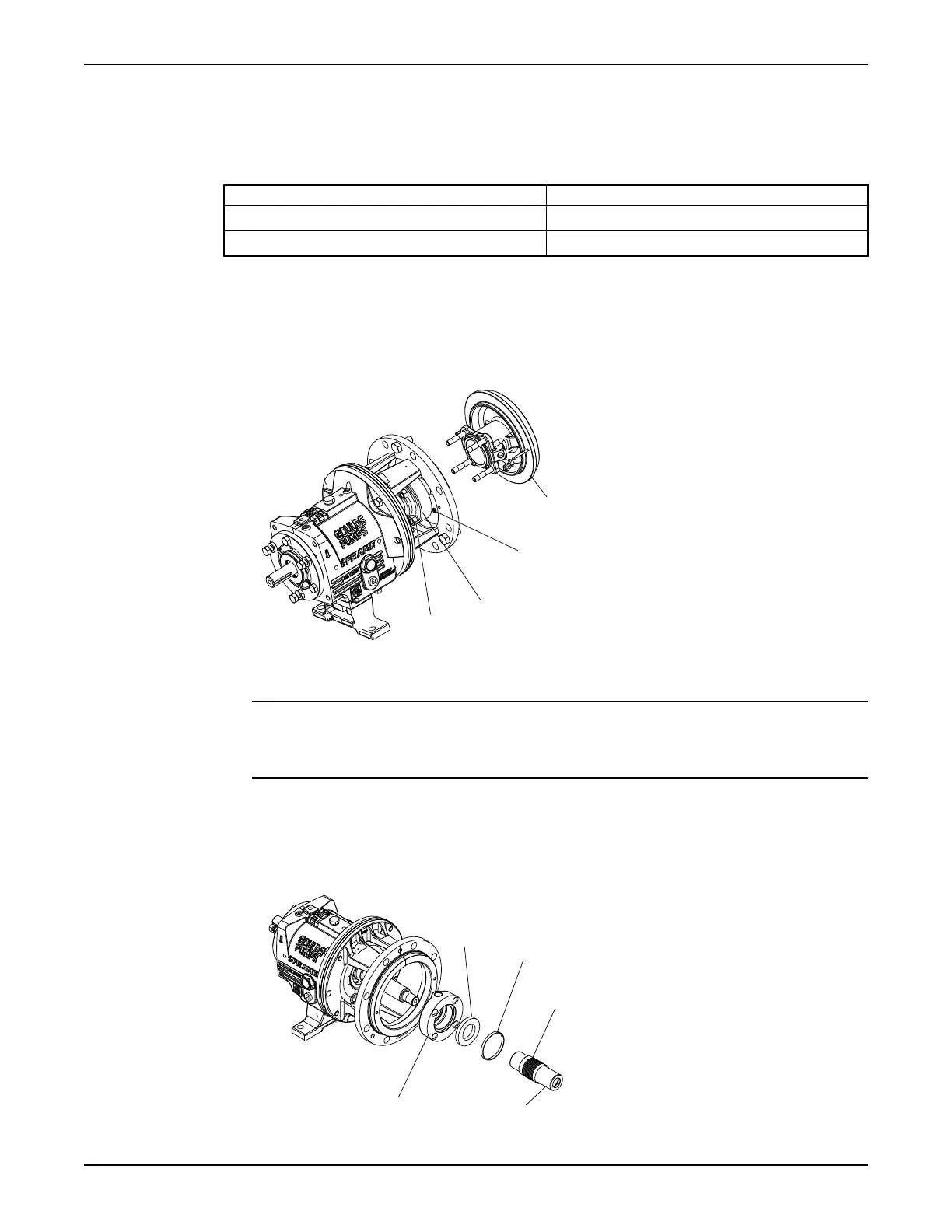
Seal-chamber cover removal
Seal-chamber removal procedures
Choose from one of these procedures to remove the seal-chamber cover.
Table 10: Procedures for seal-chamber cover removal by model
Model Procedure
3196, CV 3196, HT 3196, LF 3196, 3796 Remove the seal-chamber cover.
NM 3196, 3198 Remove the seal-chamber cover and/or backplate.
Remove the seal-chamber cover (3196, CV 3196, HT 3196, LF 3196, 3796)
1. Remove the gland stud nuts (355).
2. Remove the seal-chamber stud nuts (370H).
3. Remove the seal chamber (184).
4. Remove the shaft sleeve (126) if it is used.
The mechanical seal is attached to the sleeve.
NOTICE: Be careful with the stationary portion of the mechanical seal that is either clamped
between the backplate and the gland or seated in the seal-chamber bore. Failure to do so may result in
equipment damage.
5. Remove the rotary portion of the seal from the sleeve by loosening the setscrews and sliding it off the
sleeve.
Refer to the mechanical-seal instructions for more information.
6. Remove the gland (250), the stationary portion of the seal, and the O-ring (360Q).
Maintenance
Model 3196 i-FRAME Installation, Operation, and Maintenance Manual 73





 To Next Page