51
Route planner
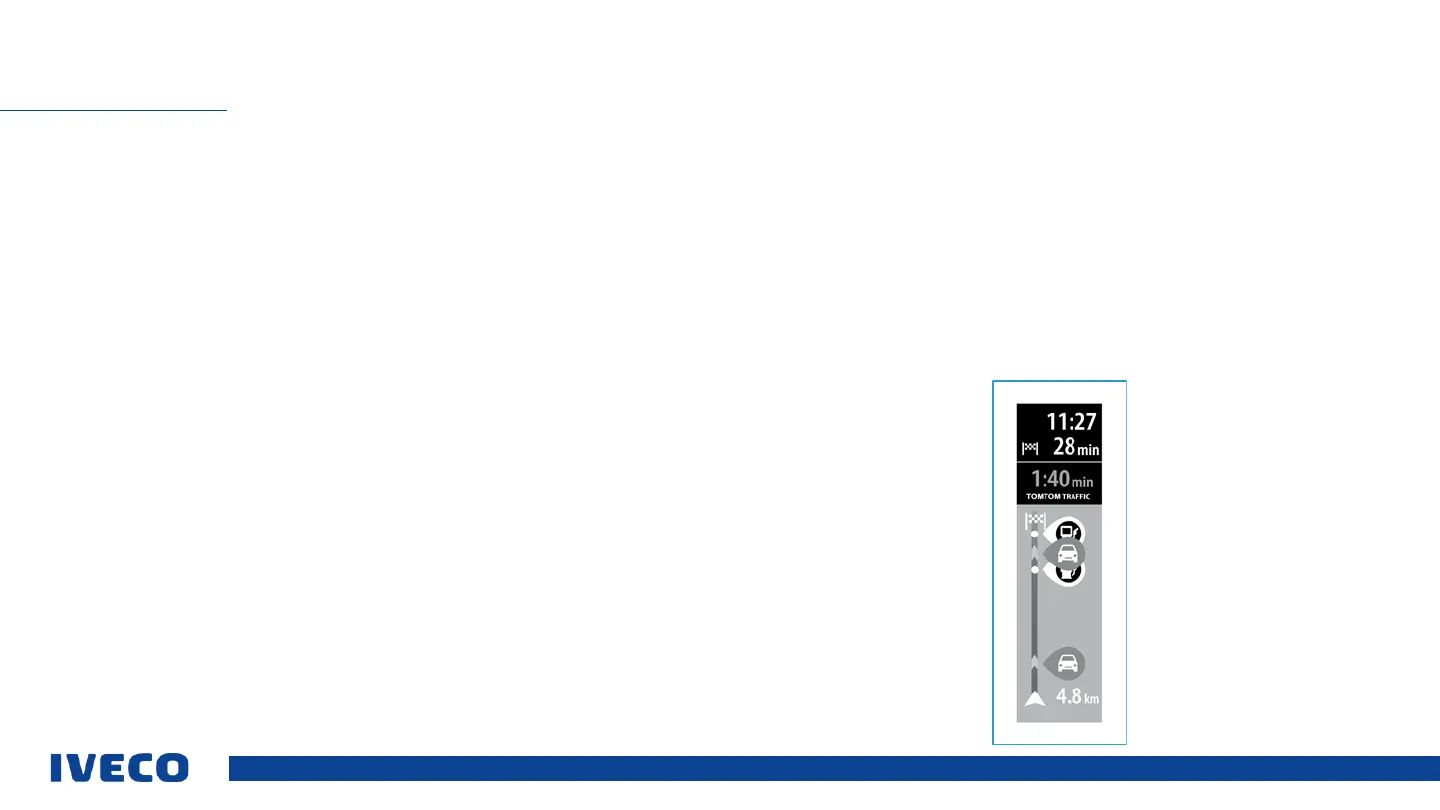
The route planner is displayed if a route has been planned. The bar at the top shows
arrival information. Under it is a bar with symbols.
The bar at the top displays the following information:
▪ Estimated arrival time
▪ Estimated drive time
The user can set which information is displayed. For further information, see the
“Settings” section.
Traffic status: A symbol under the arrival information indicates whether the “Traffic
information” option is used. If the option is deactivated, a cross symbol will appear
there.
The bar contains several symbols, displaying the following information:
▪ The next two stops along the planned route
▪ Petrol stations along the route
▪ Rest areas along the route
The symbols are shown in the sequence they occur along the route. If there are
traffic problems, the symbol will alternately show the type of disruption and how
late the vehicle will be in minutes.
INFOTAINMENT
For further information on available stops or traffic problems, select the relevant
symbol.
If a symbol is displayed above another symbol, zoom into the route bar to separate
the individual symbols.
The time by which the vehicle will be late is shown above the symbols in minutes. The
lower end of the route planner shows the current vehicle position and the distance to
the next waypoint on the route.


 To Next Page