52
IVECO Driver Pal
Iveco Driver Pal connects to the Amazon Alexa application, which must be installed on your smartphone (Android, iOS).
Ensure you have valid Amazon login details. We recommend approving that the Amazon Alexa app have access to the system’s
operating equipment needed for voice recognition, contacts, audio recording and access to geographic location, in order to
use all functions of the microphone.
Driver PAL microphone configuration
1. Switch on the ignition
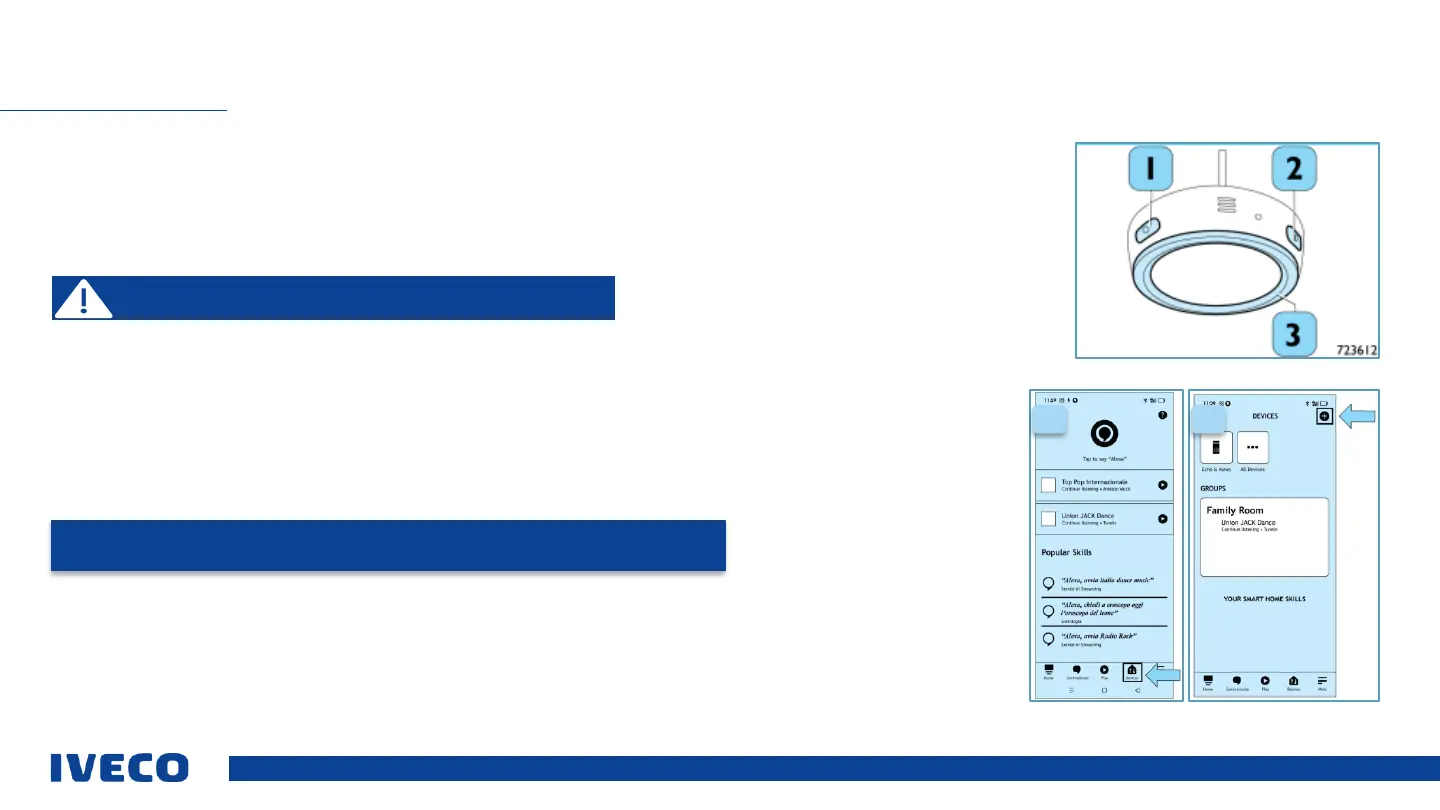
2. After turning on the Driver Pal microphone, press and hold the setup button for (2) 3 s to start the configuration. The
LED ring (3) will flash orange
3. Check whether Bluetooth is active on the smartphone to be connected to the microphone, and call up the Amazon Alexa
app.
4. Use the connection function for Bluetooth devices available in the Amazon Alexa app as shown.
A. Select “devices” as indicated by the arrow in the image.
B. Press “+”, as indicated by the arrow in the image
SET UP VOICE CONTROLS (DRIVER PAL)
Please note: Complete the process when the vehicle is stopped and
under safe conditions.
NOTE: The following images are provided only for informational purposes, and may vary
depending on the development of the Amazon Alexa app.
A B


 To Next Page