51
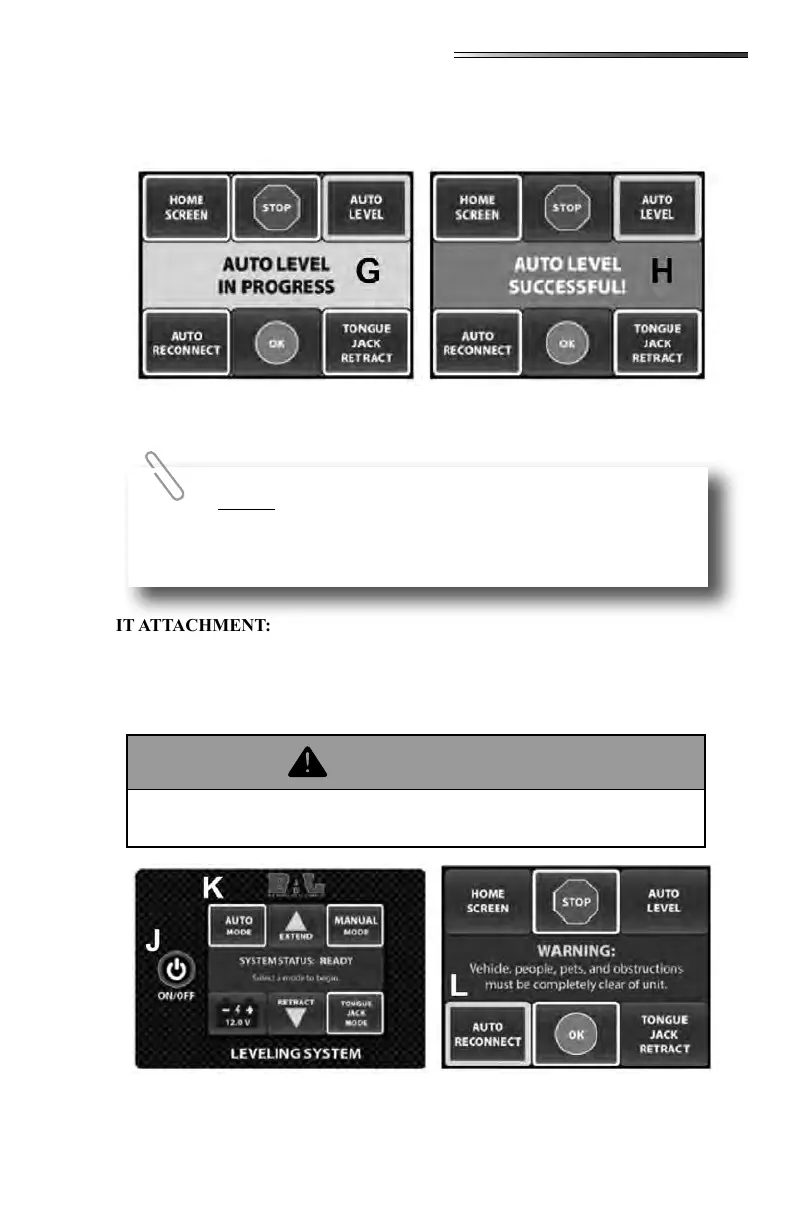
1. The system will go through a series of moving the jacks and checking the unit for level.
The display will read “”. (G below)
2. When the system successfully levels the unit the display will read “Auto Level Suc-
cessful” and a beep will sound. (H below)
1. Press ON/OFF to deactivate the display.
2. Close and latch the cover of the touch screen display.
1. Press ON/OFF to activate the display. (J below)
2. Press AUTO MODE. (K below)
3. Press AUTO RECONNECT (L below)
4. Press OK to begin Auto Reconnect or STOP to make a new selection.
If the system fails to Successfully Auto Level, check the
unevenness of the area underneath the unit. All lifting jacks must be
able to make full contact for the system to function properly.
Vehicle, people, pets and obstructions must be completely clear of the unit
before executing the “Auto Level” function.











 To Next Page