P/N 960-000167R_Rev. 1 {EDP #214645} © 2013, Japan CashMachine Co., Limited
DT-300™ Series Download Tool Operator Integration Guide
2 COMPONENT NAMES
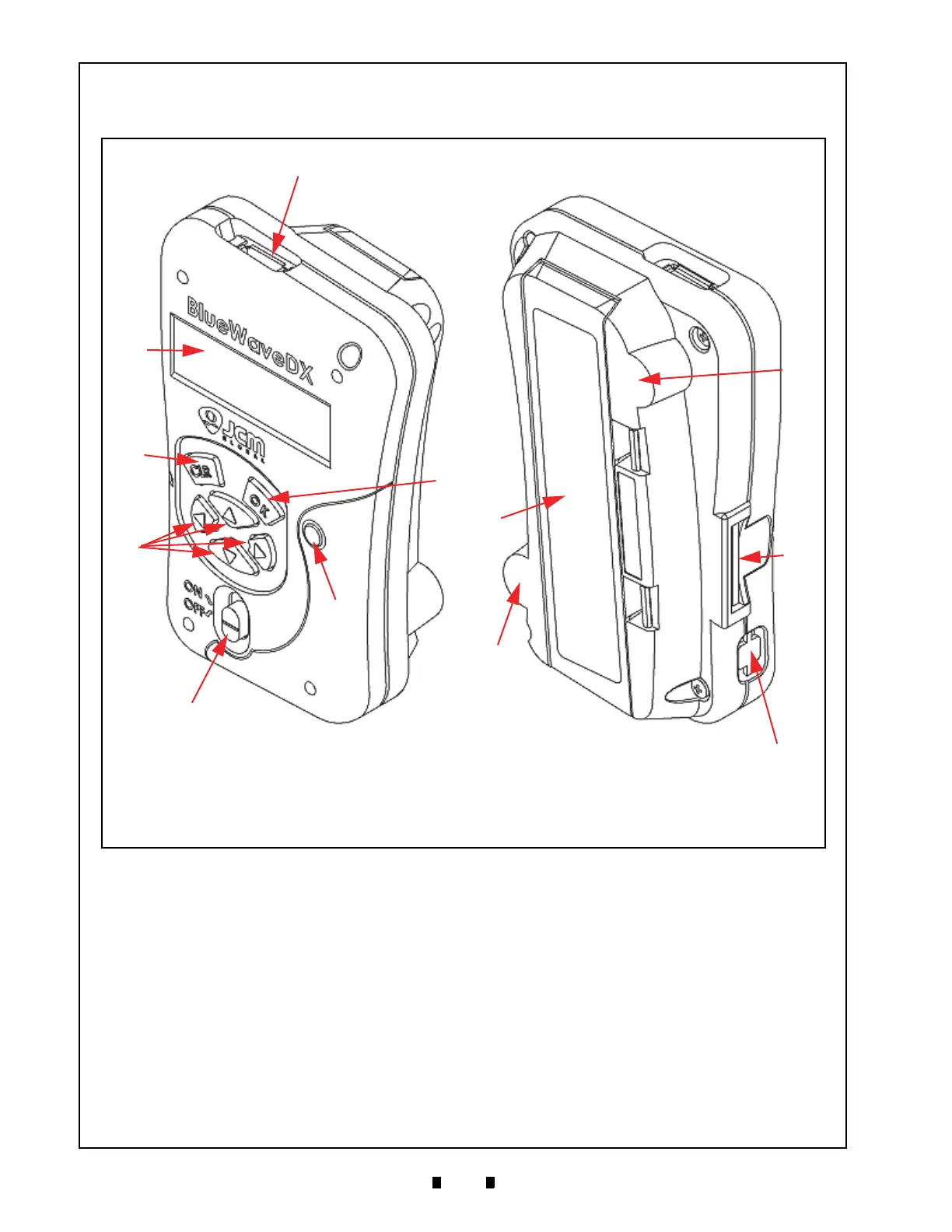
Figure 2 illustrates the DT-300™ Functional Component Part Names and Locations.
3 PRIMARY FEATURES
The DT-300™ “BlueWave” Series Download Tool contains the following primary features:
• The DT-300™ is a battery-driven device. The DT-300 transfers the softw
are data to the power-
supplied Validator.
• The DT-300™ features an LCD Display. The Bootloade
r update and the MainApplication function
selection are available by using the LCD Display. The Acceptance Log, Error Messages, Version/CRC/
Serial Number, Maintenance Condition, Enabled Denomination and Language Selection are also
confirmed by the LCD Display.
• Refer to “Operation Procedures (MainApplication)” on page 6 of this Guide for more details.
Figure 2 DT-300 Component Names
A. USB Connector Type A (Host)
B. LCD (Monochrome)
C. OK Button
D. CLR Button
E. Power LED (Red)
F. Direction Key Button
G. Power Switch
H. SD Card Slot
I. Battery Compartment Cover
J. Power Plug (Option)
K. Magnet
L. Magnet
A
B
C
D
E
F
G
H
I
K
J
L



 To Next Page