P/N 960-000167R_Rev. 1 {EDP #214645} © 2013, Japan CashMachine Co., Limited
DT-300™ Series Download Tool Operator Integration Guide
9 COMPATIBILITY
Table 18 lists the Validator Types compatible with the “BlueWaveDX” DT-300™ Device. Refer to the
“DT-300 Software Storage Destination Folder” Column to create the proper compatible Validator's
Destination Folder for each DT-3
00™ Device being Programmed.
Table 18 DT-300 Compatible Validators
Compatible
Validator
Validator Download Setting
DT-300 Software
Storage Destination
Folder
USB Connection
UBA Series
DIP Switch Settings are not required.
UBA Series downloading is available when the DT-300 Status
is either “
Download Mode” or not “Download Mode”. If it is
necessary to set the DT-300 into “Download Mode”, set DIP
Switches #6, #7 & #8 to ON, and keep DIP Switches #1
through #5 in their OFF position.
UBA System Type A - Type B
iVIZION Series
Set DIP Switches #6, #7 & #8 to ON, and keep DIP Switches
#1 thr
ough #5 OFF.
iVIZION System Type A - Mini B
VEGA Series
Set DIP Switches #1, #7 & #8 to ON, and keep DIP Switches
#2 thr
ough #6 OFF.
VEGA System Type A - Mini B
TBV-100 Series
Set DIP Switches #1, #6, #7 & #8 to ON, and keep DIP
Switches #2 th
rough #5 OFF.
TBV-100 System Type A - Mini B
iPRO Series
DIP Switch Settings are not required.
iPRO Series downloading is available when the DT
-300 Status
is either “Download Mode” or not “Download Mode”. If it is
necessary to set the DT-300 into “Download Mode”, set DIP
Switches #6, #7 & #8 to ON, and keep DIP Switches #1
through #5 in their OFF position.
iPRO System Type A - Mini B
8 UNIT DIMENSIONS
DT-300 E
NTIRE
U
NIT
O
UTSIDE
D
IMENSIONS
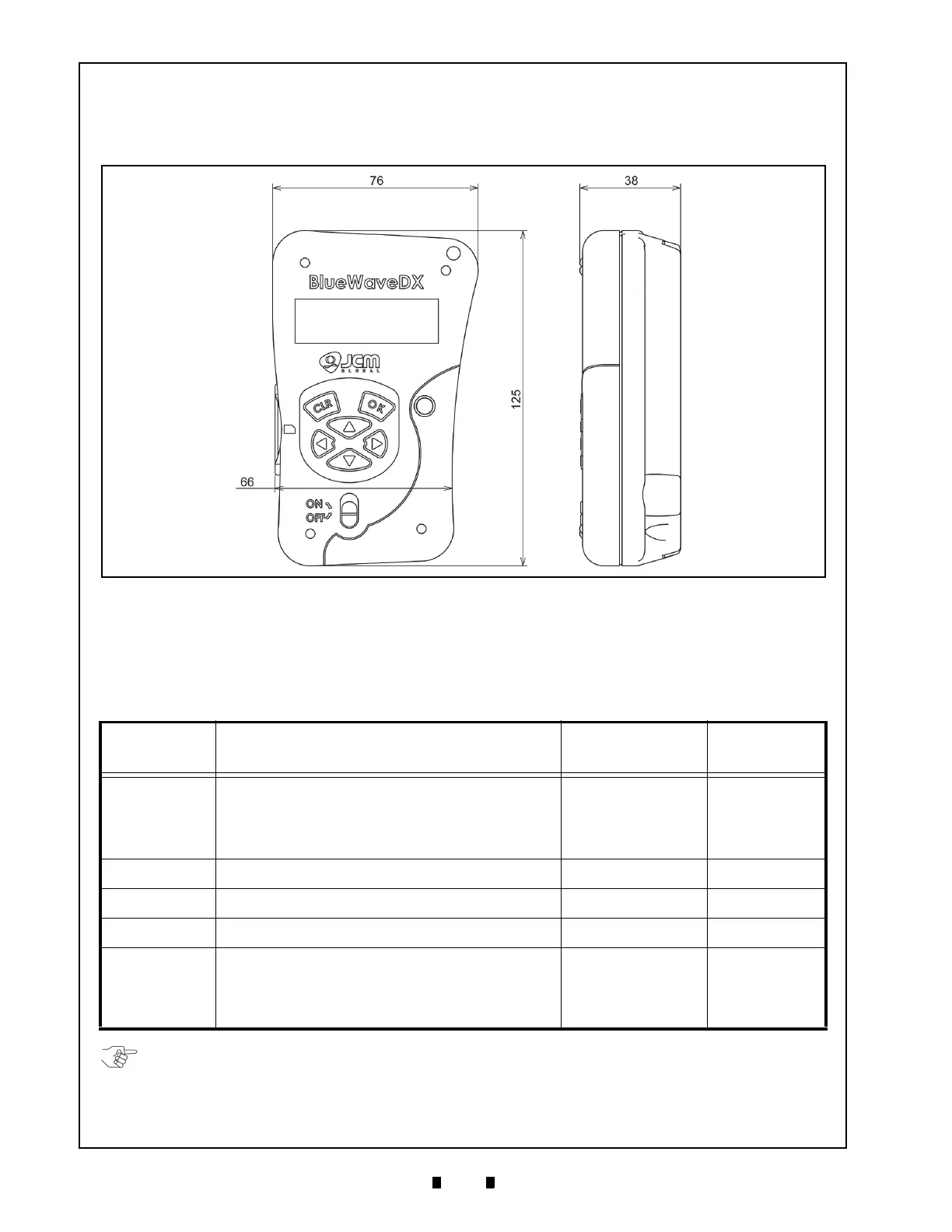
Figure 55 illustrates the DT-300™ entire Unit outside dimensions.
All Dimension are
in Millimeters
Figure 55 DT-300 Download Tool Outside Dimensions
NOTE: The Destination Folder intended for download to the specific DT-300 Device must be EXACTLY as
shown in the Table 18 Column, including the “Space” existing before the word “System”.
Twenty (20) Software Programs can be saved in the DT-300 Destination Folder. If saving over twenty (20)
Software Programs in the DT-300 Device, the functions may not work properly.



 To Next Page