17
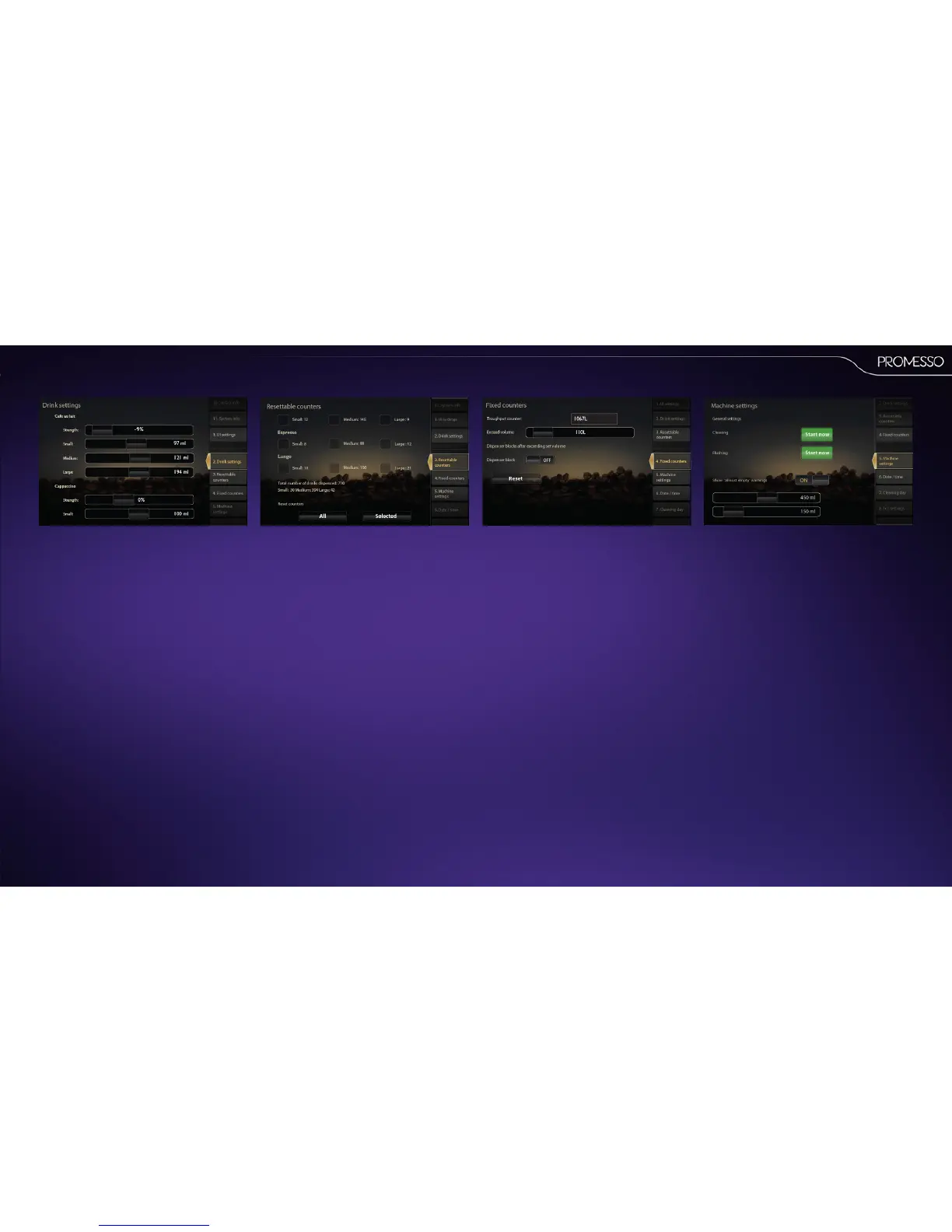
2.Drinksengs
This menu contains a list of standard drinks. For
each drink the coee strength and volume (small
medium and large pre-selecon) can be adjusted
by means of sliders.
• Coee strength range : -10% to +20%
• Volume (small) range : O, 50 to 150 ml
• Volume (medium) range : 62 to 187 ml
• Volume (large) range : O, 100 to 300 ml
3.Reseablecounters
This menu contains a list of counters per available
drinks. The counter of a specic drink is shown for
small, medium and large. The total numbers are
shown in the boom of the screen.
If you want to reset specic drinks :
• Press the ck box to select, scroll to the boom
of the screen.
• Press the [selected] buon to reset the counter
to ‘0’
• Press the [all] buon to rest all counters.
4.Fixedcounters
This menu shows the total throughput counter in
liters;
• It is possible to enter a number of liters aer
which the machine is blocked (Exceed vol-
ume).
• It also allows you to enable/disable the dis-
penser block and/or to reset the block
5.Machinesengs
In this menu you can manually start:
• The descaling procedure, the cleaning proce-
dure and ushing procedure
• You can in this menu enable (ON) the ‘almost
empty’ warnings (for coee).
With the slider you can set two remaining
volume sengs
Volume seng 1 (pack 2/3 empty message)
Volume seng 2 (pack is almost empty
message)



 To Next Page