MC
35
8.2. High and low temperature warning functions
Factory settings:
High temperature limit
t High 205 °C
Low temperature limit
t Low -55 °C
If for a sensitive temperature application task adherence to a
working temperature value (setpoint) is to be supervised,
then set high and low temperature warning values.
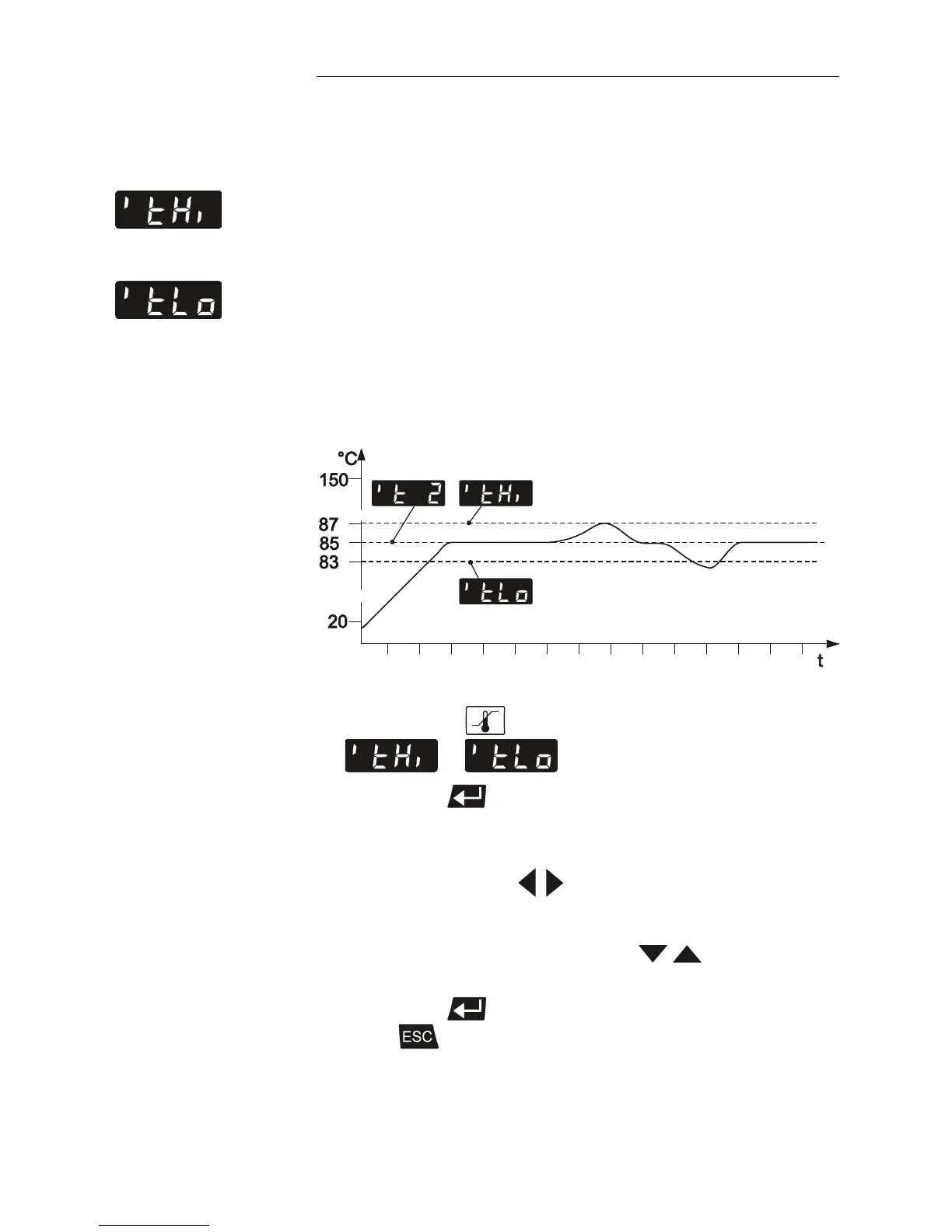
In the example below, the >Setpoint< of 85 °C is surrounded
by the values > t High < 87 °C and > t Low < 83 °C. The
electronics immediately registers when the actual
temperature attains a temperature out of the limits and it
follows a reaction according to what is set in the menu item >
Li < (Warning or Alarm).
(see chapter 8.4. Change-over of the warning function to
shutdown function).
1. Press the key until the menu item
or is displayed.
2. Press enter to indicate the adjusted value on the
MULTI-DISPLAY (LED) (digit blinks).
3. Set value:
Use the cursor keys
to move left or right on the
display until the numeral you wish to change blinks.
Use the increase/decrease arrows
to change the
selected numeral (-, 0, 1, 2, 3, ... 9).
4. Press enter to store the selected value.
Press
to update the display immediately



 To Next Page