47
ENGLISH
Using a VCR/DVD Recorder to
Dub Files from the Camcorder
!
Preparation:
Turn off all units.
1
Set the VCR/DVD recorder to its AUX
input mode.
2
Start playback on the camcorder.
•
To play back videos (Z pg. 28)
•
To play back playlists (“When dubbing
playlists using a VCR/DVD recorder”
Z pg. 38)
3
At the point you want to start
dubbing, start recording on the VCR/
DVD recorder.
Refer to the VCR/DVD recorder’s
instruction manual.
L To stop dubbing
Stop recording on the VCR/DVD recorder,
then press the START/STOP button again.
NOTE
To record only the date information among the
display indications, set [DISPLAY ON TV] to
[ON], and touch the OK button until date/time
indication appears. (Z pg. 64)
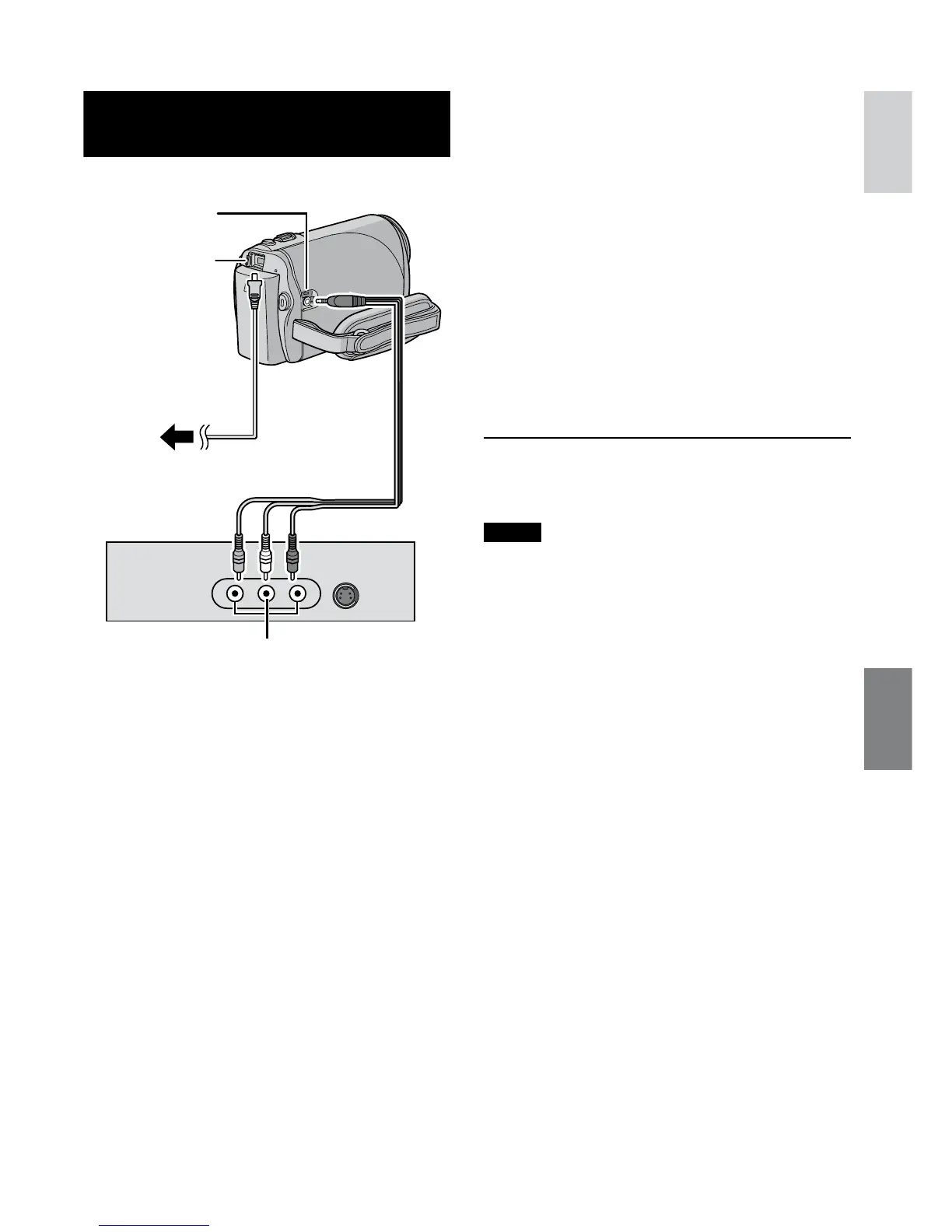
AC Adapter
To AC
Outlet
DC Jack
AV Jack
AV Cable
AV Input Jack
VCR/DVD Recorder



 To Next Page
 Loading...