EasyManua.ls Logo

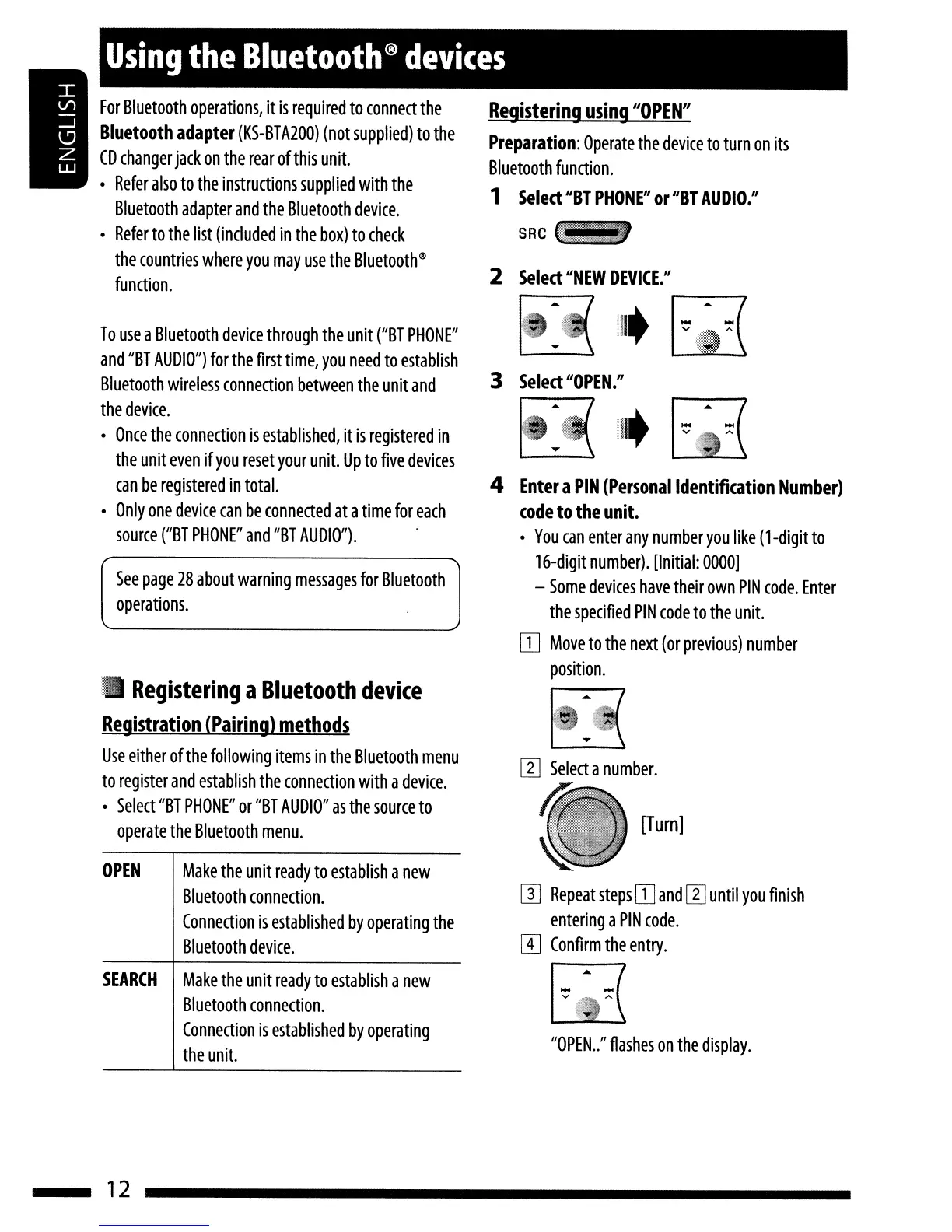
JVC KD-HDR20 - Bluetooth Device Pairing; Registering Bluetooth Devices

JVC KD-HDR20
51 pages
Print Icon
To Next Page IconTo Next Page
To Previous Page IconTo Previous Page
Loading...
[Turn]
lit
4
Enter
a
PIN
(Personal
Identification
Number)
(ode
to
the
unit.
•
You
can
enter
any
number
you
like
(l-digit
to
16-digit
number).
[Initial:
0000]
-
Some
devices
have
their
own
PIN
code.
Enter
the
specified
PIN
code
to
the
unit.
[I]
Move
to
the
next
(or
previous)
number
position.
[I]
Repeat
steps
[I]
and
[1]
until
you
finish
entering
a
PIN
code.
m
Confirm
the
entry.
3
Select
"OPEN."
Registering
using
1I0PEN
II
Preparation:
Operate
the
device
to
turn
on
its
Bluetooth
function.
1
Select
"BT
PHONE"
or
"BT
AUDIO./I
SRC"
2
Select
"NEW
DEVICE./I
,0.
I
~
.~(
See
page
28
about
warning
messages
for
Bluetooth
operations.
Registering
a
Bluetooth
device
Registration
(Pairing)
methods
Use
either
of
the
following
items
in
the
Bluetooth
menu
to
register
and
establish
the
connection
with
a
device.
•
Select
"BT
PHONE"
or
"BT
AUDIO"
as
the
source
to
operate
the
Bluetooth
menu.
OPEN
Make
the
unit
ready
to
establish
a
new
Bluetooth
connection.
Connection
is
established
by
operating
the
Bluetooth
device.
Using
the
Bluetooth®
devices
To
use
a
Bluetooth
device
through
the
unit
("BT
PHONE"
and
"BT
AUDIO")
for
the
first
time,
you
need
to
establish
Bluetooth
wireless
connection
between
the
unit
and
the
device.
•
Once
the
connection
is
established,
it
is
registered
in
the
unit
even
if
you
reset
your
unit.
Up
to
five
devices
can
be
registered
in
total.
•
Only
one
device
can
be
connected
at
a
time
for
each
source
("BT
PHONE"
and
"BT
AUDIO").
For
Bluetooth
operations,
it
is
required
to
connect
the
Bluetooth
adapter
(KS-BTA200)
(not
supplied)
to
the
CD
changer
jack
on
the
rear
of
this
unit.
•
Refer
also
to
the
instructions
supplied
with
the
Bluetooth
adapter
and
the
Bluetooth
device.
•
Refer
to
the
list
(included
in
the
box)
to
check
the
countries
where
you
may
use
the
Bluetooth@
function.
SEARCH
Make
the
unit
ready
to
establish
a
new
Bluetooth
connection.
Connection
is
established
by
operating
the
unit.
...
v
"OPEN
..
"
flashes
on
the
display.
12

Table of Contents