EasyManua.ls Logo

JVC KD-HDR20 - Display and Clock Configuration; Changing Display Information; Setting the Clock and Demo Mode

JVC KD-HDR20
51 pages
Print Icon
To Next Page IconTo Next Page
To Previous Page IconTo Previous Page
Loading...
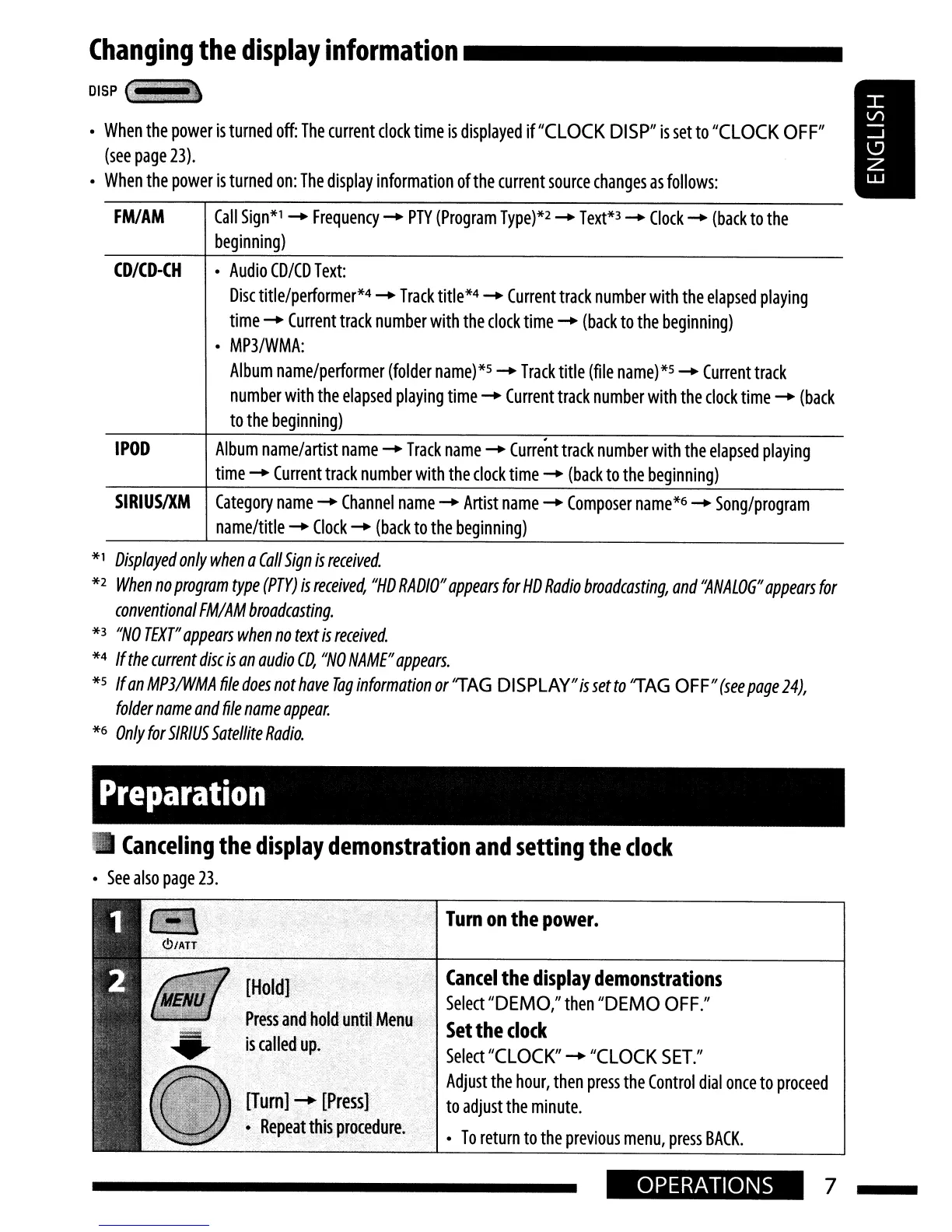
Changing
the
display
information
_
DISP
IlItti
..
When
the
power
is
turned
off:
The
current
clock
time
is
displayed
if"CLOCK
DISP"
is
set
to
"CLOCK
OFF"
(see
page
23).
When
the
power
is
turned
on:
The
display
information
of
the
current
source
changes
as
follows:
FM/AM
Call
Sign*l
-+
Frequency
-+
PTY
(Program
Type)*2
-+
Text*3
-+
Clock
-+
(back
to
the
beginning)
CD/CD-CH
Audio
CD/CD
Text:
Disc
title/performer*4
-+
Track
title*4
-+
Current
track
number
with
the
elapsed
playing
time
-+
Current
track
number
with
the
clock
time
-+
(back
to
the
beginning)
MP3/WMA:
Album
name/performer
(folder
name)*5
-+
Track
title
(file
name)*5
-+
Current
track
number
with
the
elapsed
playing
time
-+
Current
track
number
with
the
clock
time
-+
(back
to
the
beginning)
IPOD
Album
name/artist
name
-+
Track
name
-+
Curre'nt
track
number
with
the
elapsed
playing
time
-+
Current
track
number
with
the
clock
time
-+
(back
to
the
beginning)
SIRIUSIXM
Category
name
-+
Channel
name
-+
Artist
name
-+
Composer
name*6
-+
Song/program
name/title
-+
Clock
-+
(back
to
the
beginning)
*1
Displayed
only
when
a
Call
Sign
is
received.
*2
When
no
program
type
(PTY)
is
received,
"HD
RADIO"
appears
for
HD
Radio
broadcasting,
and
''ANALOG''
appears
for
conventional
FM/AM
broadcasting.
*3
"NO
TEXT"
appears
when
no
text
is
received.
*4
/f
the
current
disc
is
an
audio
CD,
"NO
NAME"
appears.
*5
/fan
MP3IWMA
file
does
not
have
Tag
information
or
'TAG
DISPLAY"issetto
'TAG
OFF"
(seepage
24),
folder
name
and
file
name
appear.
*6
Only
for
SIRIUS
Satellite
Radio.
Preparation
Canceling
the
display
demonstration
and
setting
the
clock
See
also
page
23.
Press
and
hold
until
Menu
iscaUed
up.
[Tum]
-+
[Press]
Rep~at
this
procedure.
Turn
on
the
power.
Cancel
the
display
demonstrations
Select
"DEMO,"
then
"DEMO
OFF."
.
Set
the
clock
Select
"CLOCK"
-+
"CLOCK
SET."
Adjust
the
hour,
then
press
the
Control
dial
once
to
proceed
to
adjust
the
minute.
To
return
to
the
previous
menu,
press
BACK.
OPERATIONS
7

Table of Contents

Other manuals for JVC KD-HDR20

Related product manuals