EasyManua.ls Logo

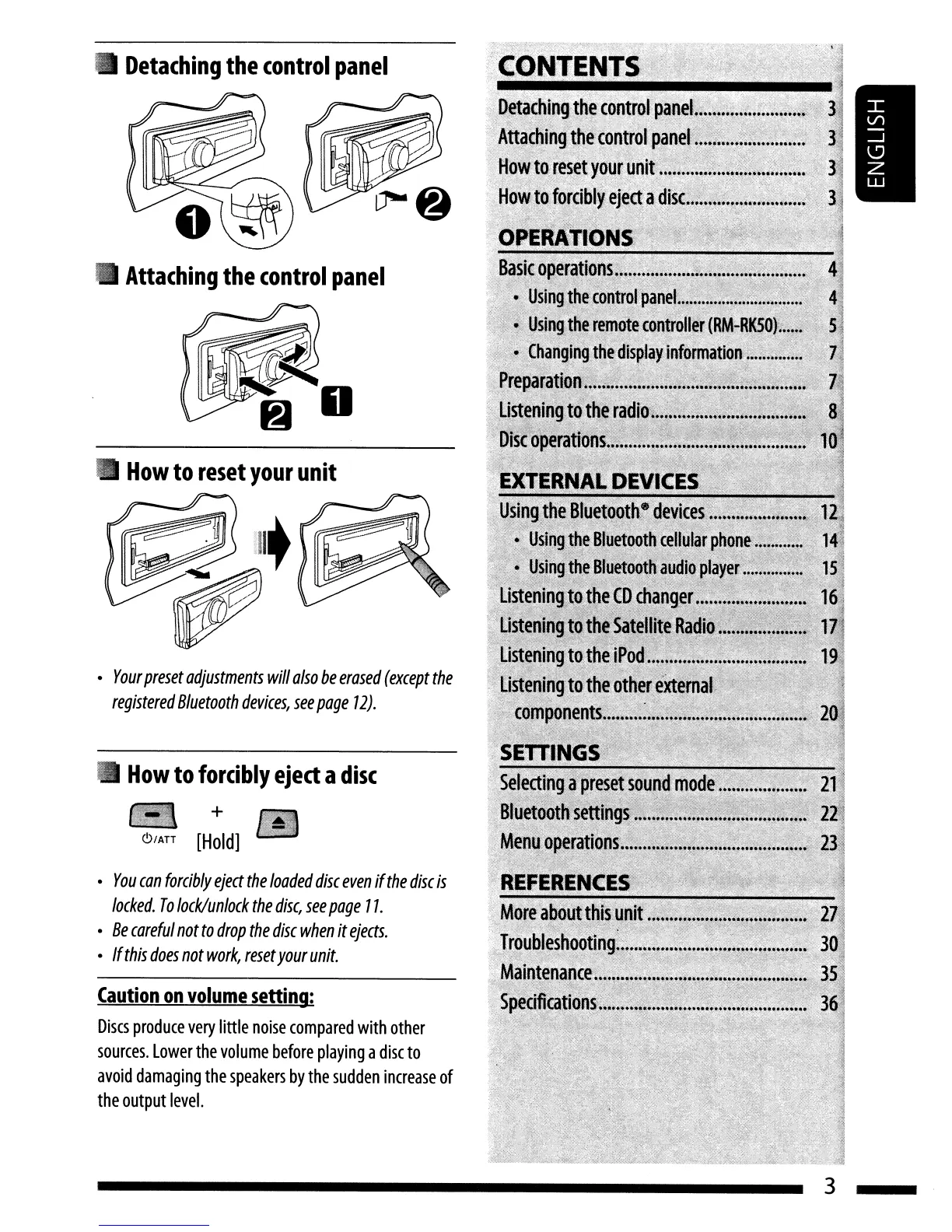
JVC KD-HDR20 - Operations; Detaching the Control Panel; Attaching the Control Panel; How to Reset Your Unit

JVC KD-HDR20
51 pages
Print Icon
To Next Page IconTo Next Page
To Previous Page IconTo Previous Page
Loading...
'CONTENTS
Caution
on
volume
setting:
Discs
produce
very
little
noise
compared
with
other
sources.
lower
the
volume
before
playing
a
disc
to
avoid
damaging
the
speakers
by
the
sudden
increase
of
the
output
level.
How
to
reset
your
unit
How
to
forcibly
eject
a
disc
- +
~/ATT
[Hold]
You
can
forcibly
eject
the
loaded
disc
even
if
the
disc
is
locked.
To
lock/unlock
the
disc,
see
page
11.
Be
careful
not
to
drop
the
disc
when
it
ejects.
If
this
does
not
work,
reset
your
unit.
Your
preset
adjustments
will
also
be
erased
(except
the
registered
Bluetooth
devices,
see
page
12).
Attaching
the
control
panel
Detaching
the
control
panel
3

Table of Contents

Other manuals for JVC KD-HDR20

Related product manuals