EasyManua.ls Logo

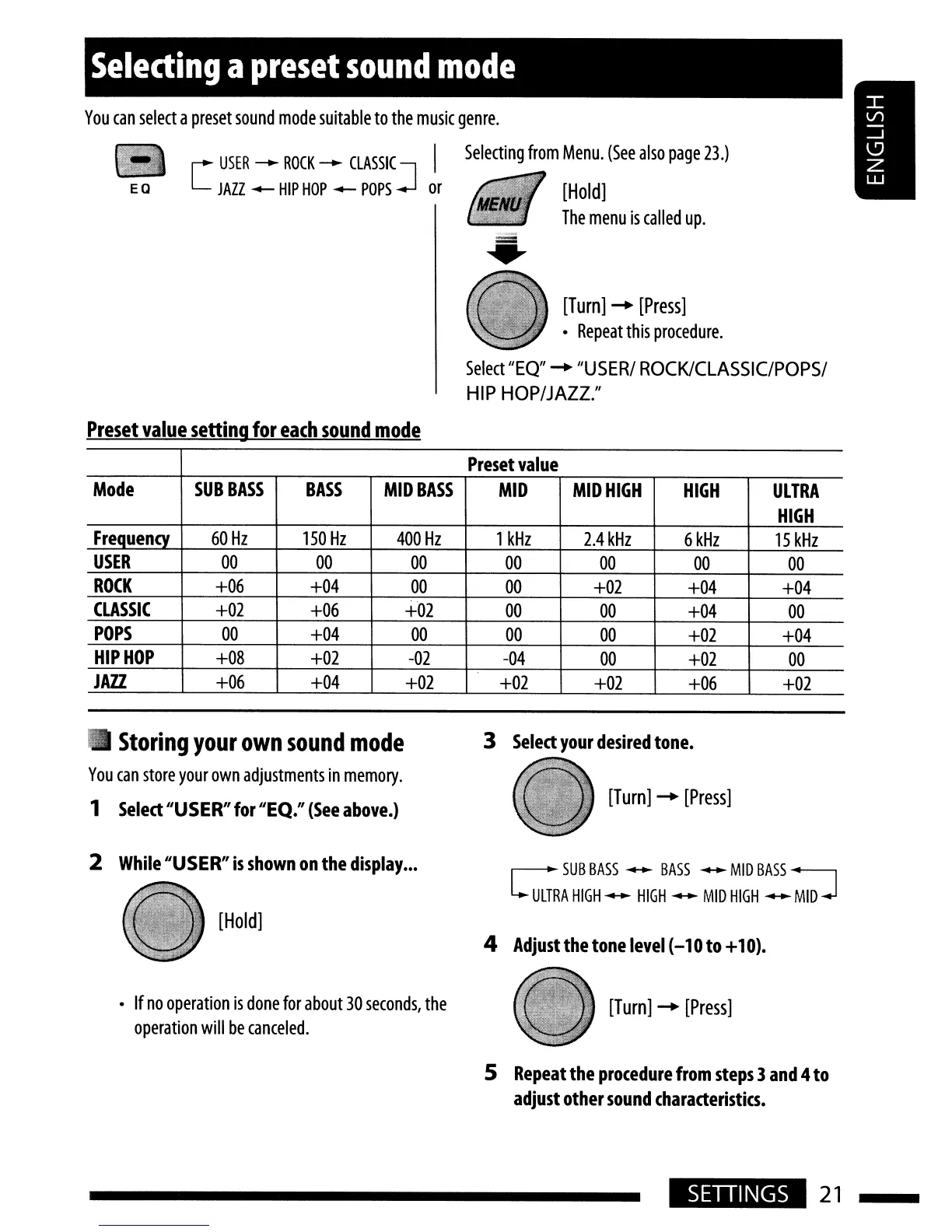
JVC KD-HDR20 - Sound Customization; Selecting Preset Sound Modes; Storing Custom Sound Modes

JVC KD-HDR20
51 pages
Print Icon
To Next Page IconTo Next Page
To Previous Page IconTo Previous Page
Loading...
Selecting
a
preset
sound
mode
[Turn]
.....
[Press]
Repeat
this
procedure.
EQ
You
can
select
a
preset
sound
mode
suitable
to
the
music
genre.
USER
_
ROCK
_
CLASSIC
I
Selecting
from
Menu.
(See
also
page
23.)
[
JAZZ
-
HIP
HOP
-
POPS
J
or
[Hold]
The
menu
is
called
up.
Select
"EO"
.....
"USER/
ROCK/CLASSIC/POPS/
HIP
HOP/JAZZ."
Preset
value
setting
for
each
sound
mode
Preset
value
Mode
SUB
BASS BASS
MID
BASS
MID MID
HIGH HIGH
ULTRA
HIGH
Frequency
60
Hz
150
Hz
400
Hz
1
kHz
2.4
kHz
6
kHz
15
kHz
USER
00 00
00 00
00
00
00
ROCK
+06
+04
00 00
+02
+04
+04
CLASSIC
+02 +06 +02
00
00
+04
00
POPS
00
+04
00 00 00
+02
+04
HIP
HOP
+08 +02
-02
-04
00
+02
00
JA11.
+06
+04
+02
+02
+02
+06
+02
..
Storing
your
own
sound
mode
3
Select
your
desired
tone.
You
can
store
your
own
adjustments
in
memory.
1
Select
"USER" for "EQ."
(See
above.)
[Turn]
.....
[Press]
2
While
"USER"
is
shown
on
the
display
•••
~
SUB
BASS
--
BASS
--
MID
BASS
::J
ULTRA
HIGH
--
HIGH
--
MID
HIGH
--
MID
[Hold]
4
Adjust
the
tone
level
(-10 to +
10).
If
no
operation
is
done
for
about
30
seconds,
the
[Turn]
.....
[Press]
operation
will
be
canceled.
5
Repeat
the
procedure
from
steps
3
and
4
to
adjust
other
sound
characteristics.
SETIINGS
21

Table of Contents

Other manuals for JVC KD-HDR20

Related product manuals