EasyManua.ls Logo

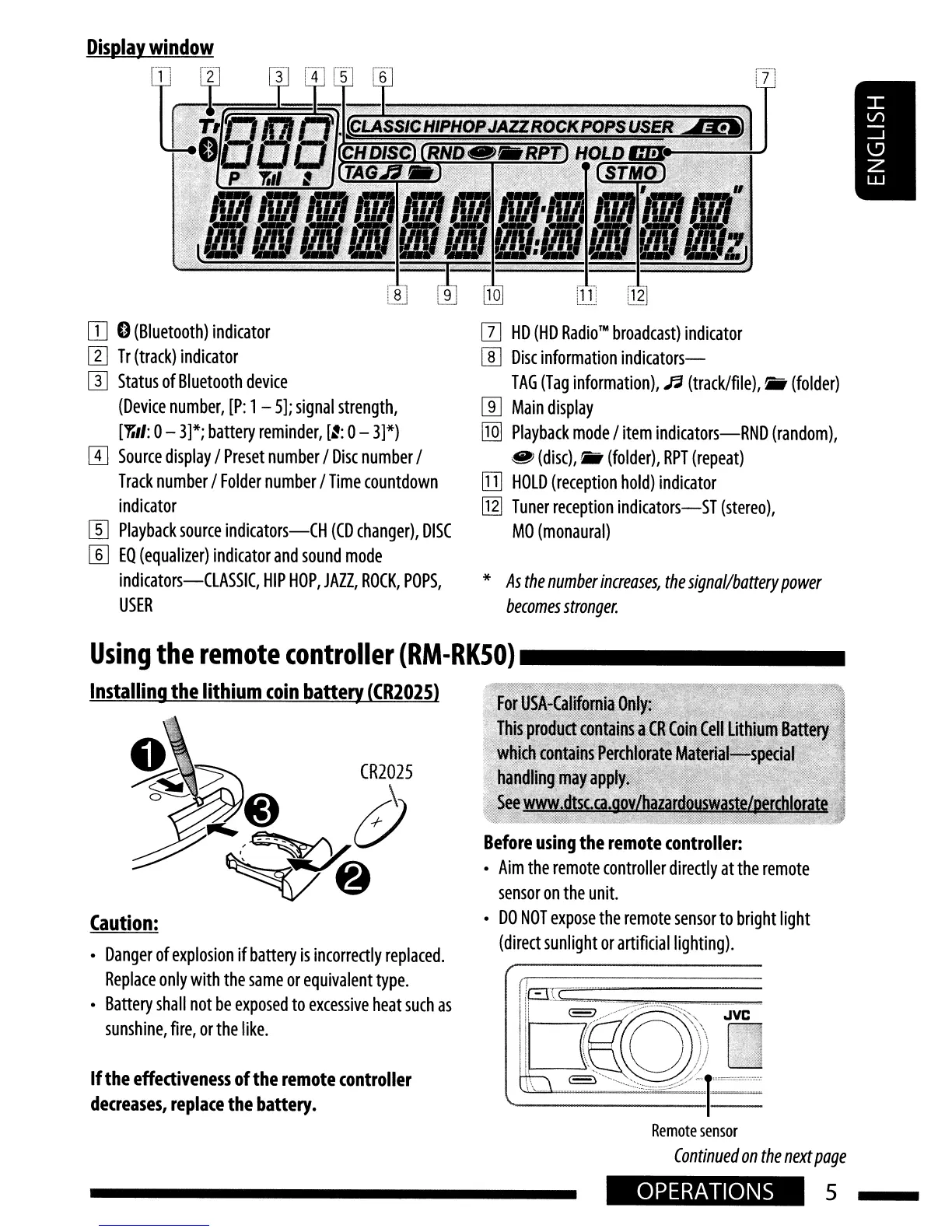
JVC KD-HDR20 - Remote Controller Usage; Display Window Overview; Installing the Lithium Coin Battery

JVC KD-HDR20
51 pages
Print Icon
To Next Page IconTo Next Page
To Previous Page IconTo Previous Page
Loading...
OJ
I)
(Bluetooth)
indicator
l1J
Tr
(track)
indicator
W
Status
of
Bluetooth
device
(Device
number,
[P:
1-
5];
signal
strength,
[''''',/:
0-
3]*;
battery
reminder,
[~:
0-
3]*)
[I]
Source
display
/
Preset
number
/
Disc
number
/
Track
number
/
Folder
number
/
Time
countdown
indicator
[]]
Playback
source
indicators-CH
(CD
changer),
DISC
W
EQ
(equalizer)
indicator
and
sound
mode
indicators-CLASSIC,
HIP
HOP,
JAZZ,
ROCK,
POPS,
USER
[I]
HD
(HD
Radio™
broadcast)
indicator
[[]
Disc
information
indicators-
TAG
(Tag
information),
'"
(track/file),.
(folder)
[ill
Main
display
[IQ]
Playback
mode
/
item
indicators-RND
(random),
@i
(disc),
(folder),
RPT
(repeat)
!III
HOLD
(reception
hold)
indicator
~
Tuner
reception
indicators-ST
(stereo),
MO
(monaural)
*
As
the
number
increases,
the
signal/battery
power
becomes
stronger.
Before
using
the
remote
controller:
Aim
the
remote
controller
directly
at
the
remote
sensor
on
the
unit.
DO
NOT
expose
the
remote
sensor
to
bright
light
(direct
sunlight
or
artificial
lighting).
If
the
effectiveness
of
the
remote
controller
decreases,
replace
the
battery.
Caution:
Danger
of
explosion
if
battery
is
incorrectly
replaced.
Replace
only
with
the
same
or
equivalent
type.
Battery
shall
not
be
exposed
to
excessive
heat
such
as
sunshine,
fire,
or
the
like.
Using
the
remote
controller
(RM-RKSO)
_
Installing
the
lithium
coin
battery
(CR202S}
Remote
sensor
Continued
on
the
next
page
OPERATIONS
5

Table of Contents

Other manuals for JVC KD-HDR20

Related product manuals